This post should how to implement a web application which needs secure access and secure identities. The application uses Angular as the UI tech, ASP.NET Core as the backend tech and a backend for frontend security architecture using OpenID Connect, OAuth and Auth0 as the identity provider.
Code: https://github.com/damienbod/Auth0BffDpopApi
Blogs in this series
- Implement BFF using Auth0, Angular and ASP.NET Core
- Use Aspire to implement and deploy the security architecture
- Implement secure downstream APIs using DPoP and Auth0
Target setup
In this setup, it is planned to implement the recommended authentication for applications and users which uses best practices and recommended authentication flows.
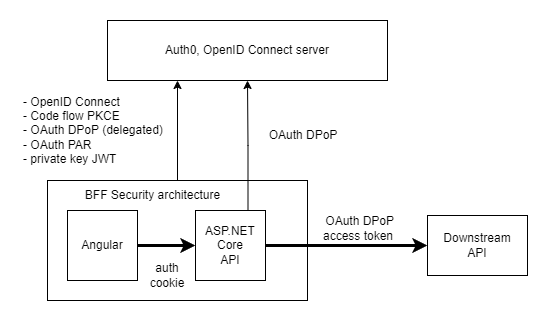
Used security standards:
- OpenID Connect code flow with PKCE
- Confidential client using client assertions (private key JWT )
- No JWT shared in the public (accessible from JS)
- HTTP only secure cookies used for the session
- Asynchronous encryption to sign the tokens
- DPoP used for the all access tokens
- OAuth PAR used with the OpenID Connect flow
- tokens stored correctly (encrypted) in a secure backend
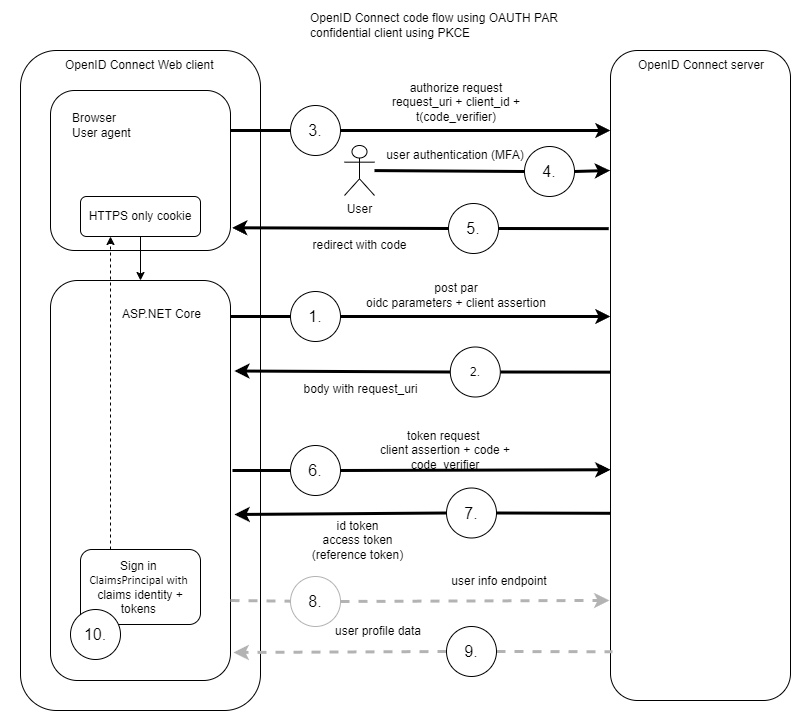
The OpenID Connect authentication flow can be displayed in the flowing figure:
UI backend
At present, web applications should authenticate applications with users using OpenID Connect code flow and a confidential client using client assertions (private Key JWT) to authenticate the client application. It is recommended to use OAuth PAR but this is only supported in the Auth0 Enterprise setup. No authentication security logic should be implemented in a client application running in the browser. A trusted backend is now required to implement web authentication in an industry security recommended way. PKCE is always used with OpenID Connect code flow.
Downstream APIs should use OAuth DPoP whenever possible or when you are not already using MTLS. DPoP is easy to implement in ASP.NET Core if it is supported by your identity provider and you have the correct license for the identity provider used in your solution. At present ASP.NET Core is still missing the DPoP APIs in the standard library.
The ASP.NET Core application in this demo implements the OpenID Connect and OAuth flows using the Microsoft client Nuget package called: Microsoft.AspNetCore.Authentication.OpenIdConnect. See this solution for an alternative implementation with less security features: https://github.com/damienbod/bff-auth0-aspnetcore-angular
Private Key JWT (client assertions) is used to authenticate the client application. This is done by using a public and private key to create a JWT client assertion. Auth0 uses the public key to validate the client assertion. This way, the secret, i.e. the private key is never shared. In the demo, the certificate is not loaded or used correctly. This would need to be read through a configuration and stored in a secure location which can support secret rotation then. I aim to rotate secrets like this on every deployment. Not sure how this would be achieved using Auth0.
Note: Auth0 DPoP only supports ES256
Here is an Auth0 client implementation example:
// Dev only!
var privatePem = File.ReadAllText(Path.Combine(builder.Environment.ContentRootPath, "rsa256-oidc-private.pem"));
var publicPem = File.ReadAllText(Path.Combine(builder.Environment.ContentRootPath, "rsa256-oidc-public.pem"));

// Deployments, Aspire setup
//var webDpopClientPrivatePem = builder.Configuration.GetValue<string>("WebDpopClientPrivatePem");
//var webDpopClientPublicPem = builder.Configuration.GetValue<string>("WebDpopClientPublicPem");

var rsaCertificate = X509Certificate2.CreateFromPem(publicPem, privatePem);
var rsaCertificateKey = new RsaSecurityKey(rsaCertificate.GetRSAPrivateKey());

builder.Services.AddAuthentication(options =>
{
    options.DefaultScheme = CookieAuthenticationDefaults.AuthenticationScheme;
    options.DefaultChallengeScheme = "Auth0"; // OpenIdConnectDefaults.AuthenticationScheme;
    options.DefaultSignOutScheme = "Auth0"; // OpenIdConnectDefaults.AuthenticationScheme;
})
.AddCookie(options =>
{
    options.Cookie.Name = "__Host-Http-Auth0-Web";
    options.Cookie.SameSite = SameSiteMode.Lax;
    // can be strict if same-site
    //options.Cookie.SameSite = SameSiteMode.Strict;
})
.AddOpenIdConnect("Auth0", options =>
{
    options.Events = OidcEventHandlers.OidcEvents(builder.Configuration);

    options.Authority = $"https://{configuration["Auth0:Domain"]}";
    options.ClientId = configuration["Auth0:ClientId"];
    //options.ClientSecret = "configuration["Auth0:ClientSecret"];
    options.ResponseType = OpenIdConnectResponseType.Code;
    options.Scope.Clear();
    options.Scope.Add("openid");
    options.Scope.Add("profile");
    options.Scope.Add("email");

    //options.CallbackPath = new PathString(configuration["Auth0:CallbackPath"]);

    options.ClaimsIssuer = "Auth0";
    options.SaveTokens = true;
    options.UsePkce = true;

    // broken with Auth0, DPoP, PAR and client assertions
    options.GetClaimsFromUserInfoEndpoint = false;
    options.TokenValidationParameters.NameClaimType = "name";

    options.PushedAuthorizationBehavior = PushedAuthorizationBehavior.Require;
});

// Dev only!
var webDpopClientPrivatePem = File.ReadAllText(Path.Combine(builder.Environment.ContentRootPath, "ecdsa256-dpop-private.pem"));
var webDpopClientPublicPem = File.ReadAllText(Path.Combine(builder.Environment.ContentRootPath, "ecdsa256-dpop-public.pem"));

var ecdsaCertificate = X509Certificate2.CreateFromPem(webDpopClientPublicPem, webDpopClientPrivatePem);
var ecdsaCertificateKey = new ECDsaSecurityKey(ecdsaCertificate.GetECDsaPrivateKey());

// add automatic token management
builder.Services.AddOpenIdConnectAccessTokenManagement(options =>
{
    // Only ES256 is supported by Auth0 DPoP
    var jwk = JsonWebKeyConverter.ConvertFromSecurityKey(ecdsaCertificateKey);
    jwk.Alg = "ES256";
    options.DPoPJsonWebKey = DPoPProofKey.ParseOrDefault(JsonSerializer.Serialize(jwk));
});

builder.Services.AddUserAccessTokenHttpClient("dpop-api-client", configureClient: client =>
{
    client.BaseAddress = new("https://localhost:7288");
});
OIDC Events
The OidcEventHandlers class implements the default events required for Auth0 and ASP.NET Core OpenID Connect APIs.
using Duende.AccessTokenManagement;
using Duende.AccessTokenManagement.DPoP;
using Duende.IdentityModel;
using Microsoft.AspNetCore.Authentication.OpenIdConnect;
using System.Net.Http.Headers;

namespace BffAuth0.Server;

public static class OidcEventHandlers
{
    public static OpenIdConnectEvents OidcEvents(IConfiguration configuration)
    {
        return new OpenIdConnectEvents
        {
            OnAuthorizationCodeReceived = async context => await OnAuthorizationCodeReceivedHandler(context, configuration),

            // use OAuth PAR
            OnPushAuthorization = async context => await OnPushAuthorizationHandler(context, configuration),

            OnRedirectToIdentityProviderForSignOut = async context => await OnRedirectToIdentityProviderForSignOutHandler(context, configuration),

            // standard OIDC flow handlers using JAR and client assertions - not using OAuth PAR
            //OnRedirectToIdentityProvider = async context => await OnRedirectToIdentityProviderHandler(context, configuration),
        };
    }

    private static async Task OnRedirectToIdentityProviderForSignOutHandler(RedirectContext context, IConfiguration configuration)
    {
        var logoutUri = $"https://{configuration["Auth0:Domain"]}/v2/logout?client_id={configuration["Auth0:ClientId"]}";

        var postLogoutUri = context.Properties.RedirectUri;
        if (!string.IsNullOrEmpty(postLogoutUri))
        {
            if (postLogoutUri.StartsWith("/"))
            {
                // transform to absolute
                var request = context.Request;
                postLogoutUri = request.Scheme + "://" + request.Host + request.PathBase + postLogoutUri;
            }
            logoutUri += $"&returnTo={Uri.EscapeDataString(postLogoutUri)}";
        }

        context.Response.Redirect(logoutUri);
        context.HandleResponse();
    }

    private static async Task OnAuthorizationCodeReceivedHandler(AuthorizationCodeReceivedContext context, IConfiguration configuration)
    {
        // https://openid.net/specs/openid-connect-eap-acr-values-1_0-final.html
        if (context.Properties != null && context.Properties.Items.ContainsKey("acr_values"))
        {
            context.ProtocolMessage.AcrValues = context.Properties.Items["acr_values"];
        }

        if (context.TokenEndpointRequest != null)
        {
            context.TokenEndpointRequest.ClientAssertionType = OidcConstants.ClientAssertionTypes.JwtBearer;
            context.TokenEndpointRequest.ClientAssertion = AssertionService.CreateClientToken(configuration);
        }
    }

    /// <summary>
    /// Not using OAuth PAR
    /// </summary>
    //private static async Task OnRedirectToIdentityProviderHandler(RedirectContext context, IConfiguration configuration)
    //{
    //    var request = AssertionService.SignAuthorizationRequest(context.ProtocolMessage, configuration);
    //    var clientId = context.ProtocolMessage.ClientId;
    //    var redirectUri = context.ProtocolMessage.RedirectUri;

    //    context.ProtocolMessage.Parameters.Clear();
    //    context.ProtocolMessage.ClientId = clientId;
    //    context.ProtocolMessage.RedirectUri = redirectUri;
    //    context.ProtocolMessage.SetParameter("request", request);
    //}

    private static async Task OnPushAuthorizationHandler(PushedAuthorizationContext context, IConfiguration configuration)
    {
        context.ProtocolMessage.Parameters.Add("client_assertion", AssertionService.CreateClientToken(configuration));
        context.ProtocolMessage.Parameters.Add("client_assertion_type", OidcConstants.ClientAssertionTypes.JwtBearer);

        context.ProtocolMessage.Parameters.Add("audience", configuration["Auth0:Audience"]);

        context.HandleClientAuthentication();

        // https://openid.net/specs/openid-connect-eap-acr-values-1_0-final.html
        if (context.Properties.Items.ContainsKey("acr_values"))
        {
            context.ProtocolMessage.AcrValues = context.Properties.Items["acr_values"];
        }
    }
}
private key JWT implementation
Note: Auth0 uses a special kid setup for the client key JWT, i.e. the ComputeJwkThumbprint is used instead of the thumbprint.
using Duende.IdentityModel;
using Microsoft.AspNetCore.DataProtection.KeyManagement;
using Microsoft.IdentityModel.Tokens;
using System.Globalization;
using System.IdentityModel.Tokens.Jwt;
using System.Security.Claims;
using System.Security.Cryptography;
using System.Security.Cryptography.X509Certificates;

namespace BffAuth0.Server;

public static class AssertionService
{
    public static string CreateClientToken(IConfiguration configuration)
    {
        var now = DateTime.UtcNow;
        var clientId = configuration.GetValue<string>("Auth0:ClientId");
        var authority = configuration.GetValue<string>("Auth0:Authority");

        //var privatePem = configuration.GetValue<string>("WebOidcClientPrivatePem");
        //var publicPem = configuration.GetValue<string>("WebOidcClientPublicPem");
        var privatePem = File.ReadAllText(Path.Combine("", "rsa256-oidc-private.pem"));
        var publicPem = File.ReadAllText(Path.Combine("", "rsa256-oidc-public.pem"));

        var rsaCertificate = X509Certificate2.CreateFromPem(publicPem, privatePem);
        var rsaCertificateKey = new RsaSecurityKey(rsaCertificate.GetRSAPrivateKey());

        string kid = Base64UrlEncoder.Encode(rsaCertificateKey.ComputeJwkThumbprint());
        var signingCredentials = new SigningCredentials(new X509SecurityKey(rsaCertificate, kid), "RS256");

        var token = new JwtSecurityToken(
            clientId,
            authority,
            new List<Claim>()
            {
                new Claim(JwtClaimTypes.JwtId, Guid.NewGuid().ToString()),
                new Claim(JwtClaimTypes.Subject, clientId!),
                new Claim(JwtClaimTypes.IssuedAt, DateTimeOffset.UtcNow.ToUnixTimeSeconds().ToString(), ClaimValueTypes.Integer64)
            },
            now,
            now.AddMinutes(5),
            signingCredentials
        );

        token.Header[JwtClaimTypes.TokenType] = "client-authentication+jwt";

        var tokenHandler = new JwtSecurityTokenHandler();
        tokenHandler.OutboundClaimTypeMap.Clear();

        return tokenHandler.WriteToken(token);
    }
}
UI frontend
Angular is used as the UI tech stack to implement the frontend. Angular supports CSP nonces and loads the Javascript using the nonce from the backend response.
Some characteristics of the UI:
- No security implementation
- Uses HTTP only secure cookies to access the BFF APIs
- Same origin, same site protection required
- Use CSP nonces to protection the session, supported by Angular
- Deployed to the BFF wwwroot in production setup
Setup development
Development is setup so that the developers can used there favorite tools and not to be dependent on the backend technology. YARP is used so that the applications can run locally and still use all the security features during development.

Setup production
When the application is deployed, the UI is built into the wwwroot of the backend application and the two tech stacks are deployed as a single container.

Notes
At present the user info endpoint does not work, I have no idea what causes this, but this should be easy to fix. Next steps are to migrate the solution to Aspire and add an API which supports both OAuth DPoP access tokens and standard JWT bearer tokens.
Links
https://auth0.com/docs/quickstart/webapp/aspnet-core
https://auth0.com/blog/backend-for-frontend-pattern-with-auth0-and-dotnet
https://github.com/damienbod/bff-auth0-aspnetcore-angular
https://github.com/damienbod/DPOP-aspnetcore-idp
https://auth0.com/docs/secure/sender-constraining/demonstrating-proof-of-possession-dpop
https://auth0.com/blog/implementing-dpop-with-auth0
https://auth0.com/docs/quickstart/backend/aspnet-core-webapi#using-dpop-for-enhanced-security


[…] Implement BFF using Auth0, Angular and ASP.NET Core […]