This article shows how to implement a SAML federation from an ASP.NET Core Identity application using Sustainsys.Saml2.AspNetCore2. Entra ID is used to implement the SAML authentication and the users can authenticate from the tenant.
Code: https://github.com/damienbod/DuendeEntraSaml
Setup
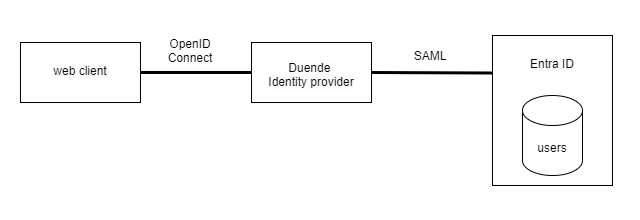
Three components are used to implement this demo, a web application that authenticates using OpenID Connect, an ASP.NET Core OpenID Connect server using Duende, and a SAML application that authenticates using Entra ID and an Enterprise Application. The web client understands only OpenID Connect and uses the claims returned from the authentication process. Duende IdentityServer acts as a gateway for Entra ID identities. The application uses SAML.
SAML client
The Sustainsys.Saml2.AspNetCore2 Nuget package is used to implement the SAML client. Duende IdentityServer uses this to implement the external authentication federation. The settings are read from a configuration and the properties must match the settings form the Entra ID tenant Enterprise application. After a successful authentication, the claims principal is stored in a secure HTTP only cookie.
        var samlTenantId = builder.Configuration["Saml:TenantId"];
        var samlMetadataLocation = builder.Configuration["Saml:MetadataLocation"]
            ?? $"https://login.microsoftonline.com/{samlTenantId}/federationmetadata/2007-06/federationmetadata.xml";
        var samlIdpEntityId = builder.Configuration["Saml:IdpEntityId"] ?? $"https://sts.windows.net/{samlTenantId}/";
        var samlSpEntityId = builder.Configuration["Saml:SpEntityId"] ?? "https://localhost:5021/Saml2";
        var samlReturnUrl = builder.Configuration["Saml:ReturnUrl"] ?? "https://localhost:5021/";

        // Load this depending on your environment, change the code as required. For example, you can load it from Azure Key Vault or from a secure location.
        var samlToolkitCertificatePath = Path.Combine(builder.Environment.ContentRootPath, "MicrosoftEntraSAMLToolkit.cer");
        var samlIdentityProviderCertificate = LoadIdentityProviderCertificate(samlToolkitCertificatePath);
Client authentication setup using SAML:
// https://docs.duendesoftware.com/identityserver/ui/login/saml-provider/
// https://learn.microsoft.com/en-us/entra/identity/saas-apps/saml-toolkit-tutorial
// https://github.com/Sustainsys/Saml2
builder.Services.AddAuthentication()
     .AddCookie("samlcookie")
     .AddSaml2(Saml2Defaults.Scheme, "entra-saml-idp", options =>
     {
         options.SignInScheme = "samlcookie";
         options.SPOptions.ValidateCertificates = false;
         options.SPOptions.EntityId = new EntityId(samlSpEntityId);
         options.SPOptions.ReturnUrl = new Uri(samlReturnUrl);

         var idp = new Sustainsys.Saml2.IdentityProvider(
             new EntityId(samlIdpEntityId), options.SPOptions)
         {
             MetadataLocation = samlMetadataLocation,
             LoadMetadata = true,
             //AllowUnsolicitedAuthnResponse = true
         };

         if (samlIdentityProviderCertificate is not null)
         {
             idp.SigningKeys.AddConfiguredKey(samlIdentityProviderCertificate);
             Log.Information(
                 "Loaded SAML signing certificate from {CertificatePath}. Thumbprint: {Thumbprint}",
                 samlToolkitCertificatePath,
                 samlIdentityProviderCertificate.Thumbprint);
         }
         else
         {
             Log.Warning("SAML signing certificate file not found or invalid: {CertificatePath}", samlToolkitCertificatePath);
         }

         LoadIdentityProviderMetadata(idp, samlMetadataLocation);

         options.IdentityProviders.Add(idp);
     });
The SAML metadata is loaded using a helper method called LoadIdentityProviderMetadata. This loads the metadata as defined by the Entra ID Enterprise Application. The certificate is downloaded from the Entra ID Enterprise Application and loaded from a file. This should be improved if implemented in a production environment.
private static void LoadIdentityProviderMetadata(Sustainsys.Saml2.IdentityProvider idp, string metadataLocation)
{
    try
    {
        var metadata = MetadataLoader.LoadIdp(metadataLocation);
        idp.ReadMetadata(metadata);

        Log.Information(
            "Loaded SAML metadata from {MetadataLocation}. Signing key count: {SigningKeyCount}",
            metadataLocation,
            idp.SigningKeys.Count());
    }
    catch (Exception ex)
    {
        Log.Warning(ex, "Failed to load SAML IdP metadata from {MetadataLocation}", metadataLocation);
    }
}

private static X509Certificate2? LoadIdentityProviderCertificate(string certificatePath)
{
    try
    {
        if (!File.Exists(certificatePath))
        {
            return null;
        }

        return X509CertificateLoader.LoadCertificateFromFile(certificatePath);
    }
    catch (Exception ex)
    {
        Log.Warning(ex, "Failed to load SAML certificate from {CertificatePath}", certificatePath);
        return null;
    }
}
SAML client setup Entra ID
Note: If you are setting this up in an Entra ID tenant, always use OpenID Connect rather than SAML. SAML should only be used where OpenID Connect is not available.
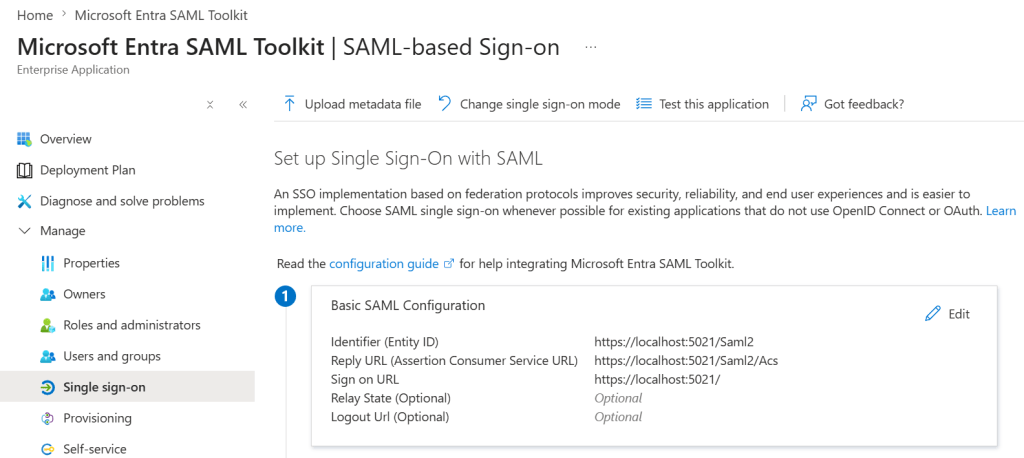
The Microsoft Entra SAML Toolkit is used to set up the Entra Enterprise Application. The properties must be configured to match the ASP.NET Core Identity application. The Entra Enterprise Application is used for single sign-on.
Start the SAML authentication
The SAML authentication is started using a Challenge request for the correct scheme. The scheme is passed in the items and used in the external callback.
app.MapGet("/login/entra-saml", async (HttpContext context) =>
{
    await context.ChallengeAsync(Saml2Defaults.Scheme, new AuthenticationProperties
    {
        RedirectUri = "/ExternalLogin/Callback", // where to go after successful login
        Items = { ["scheme"] = Saml2Defaults.Scheme }
    });
});
The authentication can be started from the UI.
<a class="btn btn-primary" href="/login/entra-saml">
    Sign in with Entra ID (SAML)
</a>
External Callback claims mapping using ASP.NET Core Identity
When the SAML authentication is completed, the Callback method handles the result. This sets up the user account and creates a claims principal for the user and the result is returned back to the web application.
public async Task<IActionResult> OnGet()
{
    // read external identity from the temporary cookie
    var result = await HttpContext.AuthenticateAsync("entraidcookie");

    if (result.Succeeded != true)
    {
        result = await HttpContext.AuthenticateAsync("adminentraidcookie");
    }

    if (result.Succeeded != true)
    {
        result = await HttpContext.AuthenticateAsync("samlcookie");
    }

    if (result.Succeeded != true)
    {
        throw new InvalidOperationException($"External authentication error: {result.Failure}");
    }

    var externalUser = result.Principal ??
        throw new InvalidOperationException("External authentication produced a null Principal");

    if (_logger.IsEnabled(LogLevel.Debug))
    {
        var externalClaims = externalUser.Claims.Select(c => $"{c.Type}: {c.Value}");
        _logger.ExternalClaims(externalClaims);
    }
Notes
SAML can be used to implement external federation in any ASP.NET Core application. This works like the OpenID Connect setup, just a bit more complicated and less supported. I used Entra ID as an example. Entra ID Enterprise applications implemented using OpenID Connect is a better choice for this.
Links
https://docs.duendesoftware.com/identityserver/saml
https://github.com/DuendeSoftware/samples/tree/main/IdentityServer/v8/SAML
https://learn.microsoft.com/en-us/entra/external-id/direct-federation
https://github.com/Sustainsys/Saml2
https://learn.microsoft.com/en-us/entra/architecture/auth-saml
https://learn.microsoft.com/en-us/entra/identity/saas-apps/saml-toolkit-tutorial
https://docs.duendesoftware.com/identityserver/usermanagement/getting-started
https://docs.duendesoftware.com/identityserver/usermanagement/identityserver-integration
https://zitadel.com/docs/guides/integrate/identity-providers/azure-ad-saml
https://learn.microsoft.com/en-us/entra/external-id/direct-federation
https://github.com/jitbit/AspNetSaml
https://github.com/Sustainsys/Saml2
https://learn.microsoft.com/en-us/entra/architecture/auth-saml


