This post looks at implement client assertions in an ASP.NET Core application OpenID Connect client using OAuth Demonstrating Proof of Possession (DPoP) and OAuth Pushed Authorization Requests (PAR).
Code: https://github.com/swiss-ssi-group/swiyu-passkeys-idp-loi-loa
Blogs in this series:
- Digital authentication and identity validation
- Set the amr claim when using passkeys authentication in ASP.NET Core
- Implementing Level of Authentication (LoA) with ASP.NET Core Identity and Duende
- Implementing Level of Identification (LoI) with ASP.NET Core Identity and Duende
- Force step up authentication in web applications
- Use client assertions in ASP.NET Core using OpenID Connect, OAuth DPoP and OAuth PAR
- Isolate the swiyu Public Beta management APIs using YARP
- Add Application security to the swiyu generic management verifier APIs using OAuth
Setup
An ASP.NET code application is setup to authentication using OpenID Connect and OAuth PAR. The web application is an OIDC confidential client and uses a client assertion to validate the application and not a shared secret.
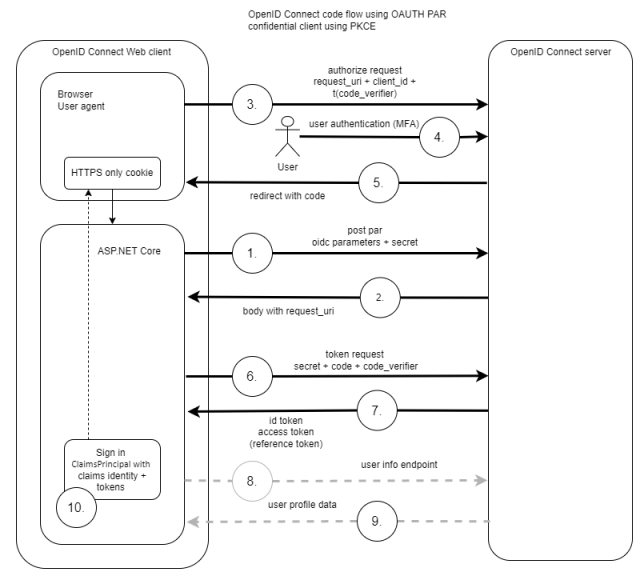
OpenID Connect ASP.NET Core client
The CreateClientToken method creates a JWT client assertion. The JWT is sent in the push authorization request as part of the OpenID Connect code flow. The assertion is signed using a private key and the key never leaves the client.
public static string CreateClientToken(IConfiguration configuration)
{
    var now = DateTime.UtcNow;
    var clientId = configuration.GetValue<string>("OpenIDConnectSettings:ClientId");
    var authority = configuration.GetValue<string>("OpenIDConnectSettings:Authority");

    var privatePem = File.ReadAllText(Path.Combine("", "rsa256-private.pem"));
    var publicPem = File.ReadAllText(Path.Combine("", "rsa256-public.pem"));
    var rsaCertificate = X509Certificate2.CreateFromPem(publicPem, privatePem);
    var rsaCertificateKey = new RsaSecurityKey(rsaCertificate.GetRSAPrivateKey());
    var signingCredentials = new SigningCredentials(new X509SecurityKey(rsaCertificate), "RS256");

    var token = new JwtSecurityToken(
        clientId,
        authority,
        new List<Claim>()
        {
            new Claim(JwtClaimTypes.JwtId, Guid.NewGuid().ToString()),
            new Claim(JwtClaimTypes.Subject, clientId!),
            new Claim(JwtClaimTypes.IssuedAt, DateTimeOffset.UtcNow.ToUnixTimeSeconds().ToString(), ClaimValueTypes.Integer64)
        },
        now,
        now.AddMinutes(1),
        signingCredentials
    );

    token.Header[JwtClaimTypes.TokenType] = "client-authentication+jwt";

    var tokenHandler = new JwtSecurityTokenHandler();
    tokenHandler.OutboundClaimTypeMap.Clear();

    return tokenHandler.WriteToken(token);
}
An OpenID Connect handlers class used for the OpenID Connect web client is added as a static class. This is required as the OAuth DPoP token management already overrides the OIDC handlers. The OnPushAuthorization and the OnAuthorizationCodeReceived events are used to add the client assertion to the OIDC flow.
public static class OidcEventHandlers
{
    public static OpenIdConnectEvents OidcEvents(IConfiguration configuration)
    {
        return new OpenIdConnectEvents
        {
            OnAuthorizationCodeReceived = async context => await OnAuthorizationCodeReceivedHandler(context, configuration),

            // use OAuth PAR
            OnPushAuthorization = async context => await OnPushAuthorizationHandler(context, configuration),

            // standard OIDC flow handlers using JAR and client assertions - not using OAuth PAR
            //OnRedirectToIdentityProvider = async context => await OnRedirectToIdentityProviderHandler(context, configuration),
        };
    }

    private static async Task OnAuthorizationCodeReceivedHandler(AuthorizationCodeReceivedContext context, IConfiguration configuration)
    {
        // https://openid.net/specs/openid-connect-eap-acr-values-1_0-final.html
        if (context.Properties != null && context.Properties.Items.ContainsKey("acr_values"))
        {
            context.ProtocolMessage.AcrValues = context.Properties.Items["acr_values"];
        }

        if (context.TokenEndpointRequest != null)
        {
            context.TokenEndpointRequest.ClientAssertionType = OidcConstants.ClientAssertionTypes.JwtBearer;
            context.TokenEndpointRequest.ClientAssertion = AssertionService.CreateClientToken(configuration);
        }
    }

    private static async Task OnPushAuthorizationHandler(PushedAuthorizationContext context, IConfiguration configuration)
    {
        context.ProtocolMessage.Parameters.Add("client_assertion", AssertionService.CreateClientToken(configuration));
        context.ProtocolMessage.Parameters.Add("client_assertion_type", OidcConstants.ClientAssertionTypes.JwtBearer);

        context.HandleClientAuthentication();

        // https://openid.net/specs/openid-connect-eap-acr-values-1_0-final.html
        if (context.Properties.Items.ContainsKey("acr_values"))
        {
            context.ProtocolMessage.AcrValues = context.Properties.Items["acr_values"];
        }
    }
}
The start up class of the ASP.NET Core application adds the OpenID Connect client and the OIDC events. OAuth DPoP is also added to the services.
var privatePem = File.ReadAllText(Path.Combine(builder.Environment.ContentRootPath, "ecdsa384-private.pem"));
var publicPem = File.ReadAllText(Path.Combine(builder.Environment.ContentRootPath, "ecdsa384-public.pem"));
var ecdsaCertificate = X509Certificate2.CreateFromPem(publicPem, privatePem);
var ecdsaCertificateKey = new ECDsaSecurityKey(ecdsaCertificate.GetECDsaPrivateKey());

builder.Services.AddAuthentication(options =>
{
    options.DefaultScheme = CookieAuthenticationDefaults.AuthenticationScheme;
    options.DefaultChallengeScheme = OpenIdConnectDefaults.AuthenticationScheme;
    options.DefaultSignOutScheme = OpenIdConnectDefaults.AuthenticationScheme;
})
.AddCookie(options =>
{
    options.Cookie.Name = "__Host-idp-swiyu-passkeys-web";
    options.Cookie.SameSite = SameSiteMode.Lax;
    // can be strict if same-site
    //options.Cookie.SameSite = SameSiteMode.Strict;
})
.AddOpenIdConnect(options =>
{
    builder.Configuration.GetSection("OpenIDConnectSettings").Bind(options);

    options.Events = OidcEventHandlers.OidcEvents(builder.Configuration);

    options.SignInScheme = CookieAuthenticationDefaults.AuthenticationScheme;
    options.ResponseType = OpenIdConnectResponseType.Code;

    // client_assertion used, set in oidc events
    //options.ClientSecret = "test";

    options.SaveTokens = true;
    options.GetClaimsFromUserInfoEndpoint = true;
    options.MapInboundClaims = false;

    options.ClaimActions.MapUniqueJsonKey("loa", "loa");
    options.ClaimActions.MapUniqueJsonKey("loi", "loi");
    options.ClaimActions.MapUniqueJsonKey(JwtClaimTypes.Email, JwtClaimTypes.Email);

    options.PushedAuthorizationBehavior = PushedAuthorizationBehavior.Require;

    options.Scope.Add("scope2");
    options.TokenValidationParameters = new TokenValidationParameters
    {
        NameClaimType = "name"
    };
});

// add automatic token management
builder.Services.AddOpenIdConnectAccessTokenManagement(options =>
{
    var jwk = JsonWebKeyConverter.ConvertFromSecurityKey(ecdsaCertificateKey);
    jwk.Alg = "ES384";
    options.DPoPJsonWebKey = DPoPProofKey.ParseOrDefault(JsonSerializer.Serialize(jwk));
});

builder.Services.AddUserAccessTokenHttpClient("dpop-api-client", configureClient: client =>
{
    client.BaseAddress = new("https+http://apiservice");
});
OpenID Connect server using Duende
Duende IdentityServer is used to implement the OpenID Connect server. The Clients method is used to add the code flow client which requires DPoP, PAR and a client assertion to authenticate the application.
   public static IEnumerable<Client> Clients(IWebHostEnvironment environment)
   {
       var publicPem = File.ReadAllText(Path.Combine(environment.ContentRootPath, "rsa256-public.pem"));
       var rsaCertificate = X509Certificate2.CreateFromPem(publicPem);

       // interactive client using code flow + pkce + par + DPoP
       return [
           new Client
           {
               ClientId = "webclient",
               ClientSecrets =
               {
                       //new Secret("test".Sha256()),
                       new Secret
                       {
                           // X509 cert base64-encoded
                           Type = IdentityServerConstants.SecretTypes.X509CertificateBase64,
                           Value = Convert.ToBase64String(rsaCertificate.GetRawCertData())
                       }
               },
               RequireDPoP = true,
               RequirePushedAuthorization = true,

               AllowedGrantTypes = GrantTypes.Code,
               AlwaysIncludeUserClaimsInIdToken = true,

               RedirectUris = { "https://localhost:7019/signin-oidc" },
               FrontChannelLogoutUri = "https://localhost:7019/signout-oidc",
               PostLogoutRedirectUris = { "https://localhost:7019/signout-callback-oidc" },

               AllowOfflineAccess = true,
               AllowedScopes = { "openid", "profile", "scope2" }
           },
       ];
   }
Notes
When the applications are started, the web client can authentication using OAuth PAR together with client assertions and OAuth DPoP to access downstream APIs.
Links
https://www.rfc-editor.org/rfc/rfc7521.html
https://www.rfc-editor.org/rfc/rfc7523.html
https://openid.bitbucket.io/fapi/fapi-2_0-security.html
https://docs.duendesoftware.com/identityserver/tokens/fapi-2-0-specification/
https://datatracker.ietf.org/doc/html/draft-ietf-oauth-browser-based-apps


[…] Use client assertions in ASP.NET Core using OpenID Connect, OAuth DPoP and OAuth PAR […]
[…] Use client assertions in ASP.NET Core using OpenID Connect, OAuth DPoP and OAuth PAR […]
[…] Use client assertions in ASP.NET Core using OpenID Connect, OAuth DPoP and OAuth PAR […]
[…] Use client assertions in ASP.NET Core using OpenID Connect, OAuth DPoP and OAuth PAR […]
[…] Use client assertions in ASP.NET Core using OpenID Connect, OAuth DPoP and OAuth PAR […]
[…] Use client assertions in ASP.NET Core using OpenID Connect, OAuth DPoP and OAuth PAR (Damien Bowden) […]
[…] Use client assertions in ASP.NET Core using OpenID Connect, OAuth DPoP and OAuth PAR […]
[…] Use client assertions in ASP.NET Core using OpenID Connect, OAuth DPoP and OAuth PAR […]