This post shows how to authenticate users using Duende IdentityServer and ASP.NET Core Identity which verifies identities (verifiable digital credentials) using the Swiss Digital identity and trust infrastructure (swiyu). The swiyu infrastructure is implemented using the provided generic containers which implement the OpenID for Verifiable Presentations standards as well as many other standards for implementing verifiable credentials. This infrastructure can be used to implement identity use cases or basic authentication flows.
Using verifiable credentials is a great way to implement identification use cases, it is not a great way to implement authentication flows. When high security is required, the identification of users should be used together with a strong authentication flow, for example, passkeys authentication and verifiable credentials identification.
Code: https://github.com/swiss-ssi-group/swiyu-idp-aspire-aspnetcore
Blogs in this series
- Issue and verify credentials using the Swiss Digital identity public beta, ASP.NET Core and .NET Aspire
- Use swiyu, the Swiss E-ID to authenticate users with Duende and .NET Aspire
- Implement MFA using swiyu, the Swiss E-ID with Duende IdentityServer, ASP.NET Core Identity and .NET Aspire
- Implement forgot your password using swiyu, ASP.NET Core Identity and Aspire
Setup
A Duende identity server is used as an OpenID Connect server for web applications. When the user authenticates, the Swiss E-ID can be used to complete the authentication inside the identity provider. The applications are implemented using .NET Aspire, ASP.NET Core Identity and the Swiss public beta generic containers. The containers implement the OpenID verifiable credential standards and provide a simple API to integrate the different applications. Using swiyu is simple, but not a good way of doing authentication as it is not phishing resistant. It is a good way of doing identity checks.

Registration flow
To register using the swiyu, the following four claims are used to identify the person:
- birth_date
- birth_place
- family_name
- given_name
The register endpoint requires an authenticated user. The account has already registered an email and created a password authentication. The E-ID can then be added and the claims are attached to this account.
To register and identify the user using a Swiss E-ID, a verification presentation request is created using the swiss generic APIs. The OnPostAsync method starts this process.
public async Task OnPostAsync()
{
    var presentation = await _verificationService
        .CreateBetaIdVerificationPresentationAsync();

    var verificationResponse = JsonSerializer.Deserialize<CreateVerificationPresentationModel>(presentation);
    // verification_url
    QrCodeUrl = verificationResponse!.verification_url;

    var qrCode = QrCode.EncodeText(verificationResponse!.verification_url, QrCode.Ecc.Quartile);
    QrCodePng = qrCode.ToPng(20, 4, MagickColors.Black, MagickColors.White);

    VerificationId = verificationResponse.id;
}
The body sends the required presentation as defined in the generic APIs.
private static string GetBetaIdVerificationPresentationBody(string inputDescriptorsId, string presentationDefinitionId, string acceptedIssuerDid, string vcType)
{
    var json = $$"""
         {
             "accepted_issuer_dids": [ "{{acceptedIssuerDid}}" ],
             "jwt_secured_authorization_request": true,
             "presentation_definition": {
                 "id": "{{presentationDefinitionId}}",
                 "name": "Verification",
                 "purpose": "Verify using Beta ID",
                 "input_descriptors": [
                     {
                         "id": "{{inputDescriptorsId}}",
                         "format": {
                             "vc+sd-jwt": {
                                 "sd-jwt_alg_values": [
                                     "ES256"
                                 ],
                                 "kb-jwt_alg_values": [
                                     "ES256"
                                 ]
                             }
                         },
                         "constraints": {
            	                "fields": [
            		                {
            			                "path": [
            				                "$.vct"
            			                ],
            			                "filter": {
            				                "type": "string",
            				                "const": "{{vcType}}"
            			                }
            		                },
            		                { "path": [ "$.birth_date" ] },
            		                { "path": [ "$.given_name" ] },
                                    { "path": [ "$.family_name" ] },
                                    { "path": [ "$.birth_place" ] }
            	                ]
                         }
                     }
                 ]
             }
         }
         """;

    return json;
}
The UI starts to poll the backend, to check if the verification is complete. The process completes out of band and has no connection to the session. This is a problem as phishing cannot be prevented. The data sent is correct, but it is disconnected to the session which uses the identity. Once the user completes the identity check using the swiyu wallet, the user gets updated and attached to the account.
[HttpGet("verification-response")]
public async Task<ActionResult> VerificationResponseAsync([FromQuery] string? id)
{
    try
    {
        if (id == null)
        {
            return BadRequest(new { error = "400", error_description = "Missing argument 'id'" });
        }

        var verificationModel = await _verificationService.GetVerificationStatus(id);

        if (verificationModel != null && verificationModel.state == "SUCCESS")
        {
            // In a business app we can use the data from the verificationModel
            // Verification data:
            // Use: wallet_response/credential_subject_data
            var verificationClaims = _verificationService.GetVerifiedClaims(verificationModel);

            var user = await _userManager.FindByEmailAsync(GetEmail(User.Claims)!);

            var exists = _applicationDbContext.SwiyuIdentity.FirstOrDefault(c =>
                c.BirthDate == verificationClaims.BirthDate &&
                c.BirthPlace == verificationClaims.BirthPlace &&
                c.GivenName == verificationClaims.GivenName &&
                c.FamilyName == verificationClaims.FamilyName);

            if(exists != null)
            {
                throw new Exception("Swiyu already in use and connected to an account...");
            }

            if (user != null && user.SwiyuIdentityId <= 0)
            {
                var swiyuIdentity = new SwiyuIdentity
                {
                    UserId = user.Id,
                    BirthDate = verificationClaims.BirthDate,
                    FamilyName = verificationClaims.FamilyName,
                    BirthPlace = verificationClaims.BirthPlace,
                    GivenName = verificationClaims.GivenName,
                    Email = user.Email!
                };

                _applicationDbContext.SwiyuIdentity.Add(swiyuIdentity);

                // Save to DB
                user.SwiyuIdentityId = swiyuIdentity.Id;

                await _applicationDbContext.SaveChangesAsync();
            }
        }

        return Ok(verificationModel);
    }
    catch (Exception ex)
    {
        return BadRequest(new { error = "400", error_description = ex.Message });
    }
}
Authentication flow
The user has an account and can authenticate using the Swiss E-ID. The user and the application uses OpenID Connect to authenticate from a web application and authenticates on the identity provider using the Swiss wallet with the credentials stored on the phone. Anyone with access to the phone can use the credentials. This is also a gap in the security. Once the identity provider opens, the login endpoint is used. The swiyu identity check can be started and it sends a verification presentation request like in the registration flow.
 public async Task<IActionResult> OnGet(string? returnUrl)
 {
     if (returnUrl != null)
     {
         // check if we are in the context of an authorization request
         var context = await _interaction.GetAuthorizationContextAsync(returnUrl);

         ReturnUrl = returnUrl;
     }

     var presentation = await _verificationService
         .CreateBetaIdVerificationPresentationAsync();

     var verificationResponse = JsonSerializer.Deserialize<CreateVerificationPresentationModel>(presentation);
     // verification_url
     QrCodeUrl = verificationResponse!.verification_url;

     var qrCode = QrCode.EncodeText(verificationResponse!.verification_url, QrCode.Ecc.Quartile);
     QrCodePng = qrCode.ToPng(20, 4, MagickColors.Black, MagickColors.White);

     VerificationId = verificationResponse.id;

     return Page();
 }
The basic login screen using the Duende default templates is adapted.
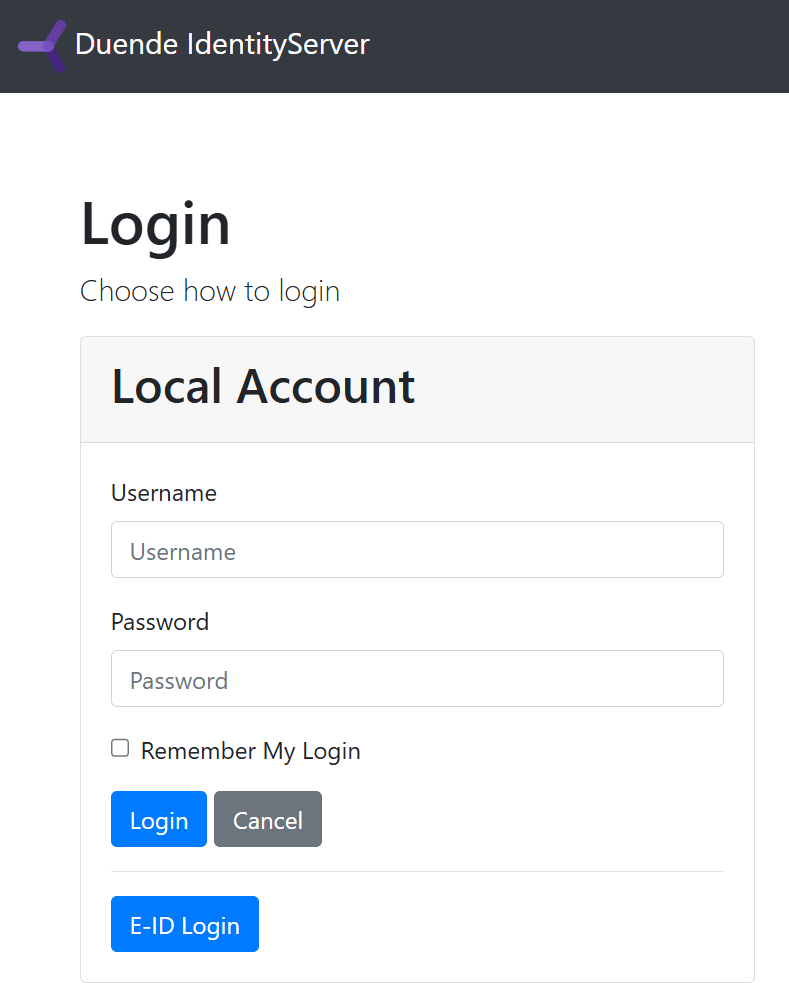
The Login UI polls and the checks the status of the presentation. If the VerificationId has a successful response, the claims are used and the identity is authenticated. Some extra verification should be added here. It would be good to verify the email as well. If the user has the same email as the account attached to the date from the verification, the security is slightly stronger.
   public async Task<IActionResult> OnPost()
   {
       VerificationClaims verificationClaims = null;
       try
       {
           if (VerificationId == null)
           {
               return BadRequest(new { error = "400", error_description = "Missing argument 'VerificationId'" });
           }

           var verificationModel = await RequestSwiyuClaimsAsync(1, VerificationId);

           verificationClaims = _verificationService.GetVerifiedClaims(verificationModel);

           // check if we are in the context of an authorization request
           var context = await _interaction.GetAuthorizationContextAsync(ReturnUrl);

           if (ModelState.IsValid)
           {
               var claims = new List<Claim>
               {
                   new Claim("name", verificationClaims.GivenName),
                   new Claim("family_name", verificationClaims.FamilyName),
                   new Claim("birth_place", verificationClaims.BirthPlace),
                   new Claim("birth_date", verificationClaims.BirthDate)
               };

               var exists = _applicationDbContext.SwiyuIdentity.FirstOrDefault(c =>
                   c.BirthDate == verificationClaims.BirthDate &&
                   c.BirthPlace == verificationClaims.BirthPlace &&
                   c.GivenName == verificationClaims.GivenName &&
                   c.FamilyName == verificationClaims.FamilyName);

               if (exists != null)
               {
                   var user = await _userManager.FindByIdAsync(exists.UserId);

                   // issue authentication cookie for user
                   await _signInManager.SignInWithClaimsAsync(user, null, claims);

                   if (context != null)
                   {
                       if (context.IsNativeClient())
                       {
                           // The client is native, so this change in how to
                           // return the response is for better UX for the end user.
                           return this.LoadingPage(ReturnUrl);
                       }
                   }

                   return Redirect(ReturnUrl);
               }
           }
       }
       catch (Exception ex)
       {
           return BadRequest(new { error = "400", error_description = ex.Message });
       }

       return Page();
   }
The identity provider displays a QR code to verify the credentials.
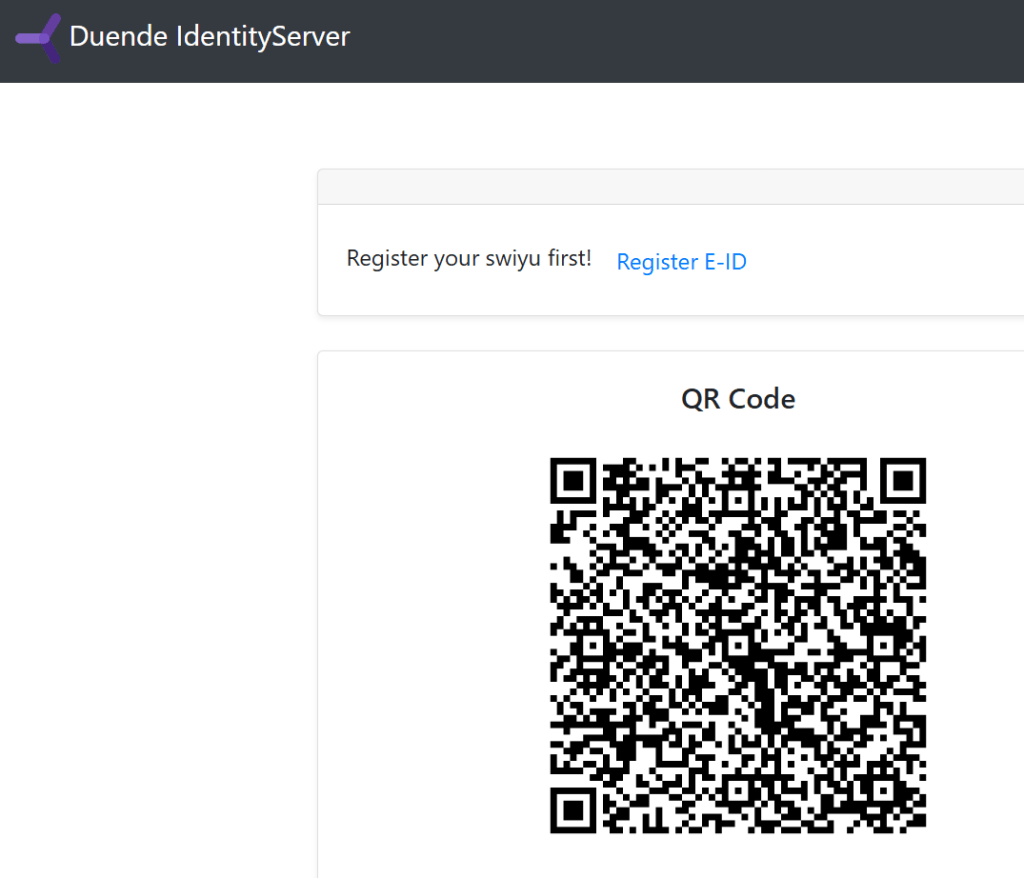
Once the account is verified, the OpenID Connect flow can complete.
Notes
Using the the Swiss E-ID (Swiyu) for identity is an excellent solution but it is not a good solution for authentication. This is weak authentication and can be phished. For business flows which require low levels of authentication, this is fine with this as an acceptable risk. It should be always possible to use a stronger way to authenticate, for example using passkeys.
Where to use swiyu?
- Sign-up
- Onboarding
- Recovery
- Step-up
- Identity check
Links
https://swiyu-admin-ch.github.io/
https://www.eid.admin.ch/en/public-beta-e
https://learn.microsoft.com/en-us/dotnet/aspire/get-started/aspire-overview
https://www.npmjs.com/package/ngrok
https://swiyu-admin-ch.github.io/specifications/interoperability-profile/
https://andrewlock.net/converting-a-docker-compose-file-to-aspire/
https://swiyu-admin-ch.github.io/cookbooks/onboarding-generic-verifier/
https://github.com/orgs/swiyu-admin-ch/projects/2/views/2
Standards
https://identity.foundation/trustdidweb/
https://openid.net/specs/openid-4-verifiable-credential-issuance-1_0.html
https://openid.net/specs/openid-4-verifiable-presentations-1_0.html
https://datatracker.ietf.org/doc/draft-ietf-oauth-selective-disclosure-jwt/
https://datatracker.ietf.org/doc/draft-ietf-oauth-sd-jwt-vc/
https://datatracker.ietf.org/doc/draft-ietf-oauth-status-list/

 Software Engineering
[…] Use swiyu, the Swiss E-ID to authenticate users with Duende and .NET Aspire […]
[…] Use swiyu, the Swiss E-ID to authenticate users with Duende and .NET Aspire […]
[…] Use swiyu, the Swiss E-ID to authenticate users with Duende and .NET Aspire […]