This article looks at using multiple authentication schemes in an ASP.NET Core web application. I required something like this when migrating a large application to a new identity provider and reducing the used OIDC servers down to one. Instead of migrating the multiple authentication schemes to a single cookie default scheme, it was quicker to support multiple schemes and set the default after an OpenID Connect authentication. A BFF application using Angular as the UI and ASP.NET Core as the backend is used for the Web UI.
Code: https://github.com/damienbod/MultipleSchemeWithOidc
Setup
All controllers in the web application are configured to use one of the available authentication schemes or to allow access through both. These schemes provide the basis for subsequent authorization decisions, which are implemented using claims obtained from identity tokens, the UserInfo endpoint, or data stored in the database.
Example of a controller:
[ValidateAntiForgeryToken]
[Authorize(AuthenticationSchemes = "SchemeOne")]
[ApiController]
[Route("api/[controller]")]
public class SchemOneController : ControllerBase
{
    [HttpGet]
    public IEnumerable<string> Get()
    {
        return new List<string> { "some data scheme 1",
          "more data", "loads of data" };
    }
}
Cookies policy
To support multiple OpenID Connect authentication schemes, the application uses four dedicated cookie schemes. The default scheme is not explicitly assigned but instead the AddPolicyScheme method dynamically resolves the correct authentication scheme based on the incoming cookie. Once a valid cookie has been identified and validated, the associated user principal is loaded into the request context. Despite supporting multiple authentication schemes, only one cookie scheme participates in the authentication process for a given HTTP request, ensuring a simple authentication flow.
builder.Services.AddAuthentication(options =>
{
    options.DefaultScheme = "Unknown";
    options.DefaultChallengeScheme = OpenIdConnectDefaults.AuthenticationScheme;
    options.DefaultSignOutScheme = OpenIdConnectDefaults.AuthenticationScheme;
})
.AddPolicyScheme("Unknown", "Select SchemeOne/SchemeTwo", options =>
{
    options.ForwardDefaultSelector = context =>
    {
        if (context.Request.Cookies.ContainsKey("__Host-Http-one"))
            return "SchemeOne";

        if (context.Request.Cookies.ContainsKey("__Host-Http-two"))
            return "SchemeTwo";

        return "SchemeOne"; // fallback
    };
})
.AddCookie("SchemeOne", options =>
{
    options.Cookie.Name = "__Host-Http-one";
    options.Cookie.SameSite = SameSiteMode.Lax;
    options.EventsType = typeof(CookieEventHandler);
})
.AddCookie("SchemeTwo", options =>
{
    options.Cookie.Name = "__Host-Http-two";
    options.Cookie.SameSite = SameSiteMode.Lax;
    options.EventsType = typeof(CookieEventHandler);
})
.AddCookie("SchemeOidcAuth")
OpenID Connect
OpenID Connect using Duende IdentityServer is used to authenticate the identity. OpenID Connect code flow with PKCE, and OAuth PAR are used as well. A client assertion is used to authenticate the application.
.AddOpenIdConnect(options =>
{
    options.SignInScheme = "SchemeOidcAuth";

    options.Events = OidcEventHandlers.OidcEvents(builder.Configuration);

    options.ClientId = builder.Configuration["WebOidcClientId"];
    options.Authority = builder.Configuration["WebOidcAuthority"];
    options.ResponseType = OpenIdConnectResponseType.Code;

    // client_assertion used, set in oidc events
    //options.ClientSecret = "test";

    options.SaveTokens = true;
    options.GetClaimsFromUserInfoEndpoint = true;
    options.MapInboundClaims = false;

    options.ClaimActions.MapUniqueJsonKey("loa", "loa");
    options.ClaimActions.MapUniqueJsonKey("loi", "loi");
    options.ClaimActions.MapUniqueJsonKey(JwtClaimTypes.Email, JwtClaimTypes.Email);

    options.PushedAuthorizationBehavior = PushedAuthorizationBehavior.Require;

    options.Scope.Add("scope2");
    options.TokenValidationParameters = new TokenValidationParameters
    {
        NameClaimType = "name"
    };
});
The OnTokenValidated OpenID Connect event handler is used to sign users in to the appropriate authentication scheme. The selection is based on one or more claims contained in the validated token. While this implementation is intended as a demonstration, a common real-world scenario is identity provider federation, where authentication is delegated to downstream identity providers. In such cases, a claim such as idp (Identity Provider) may contain a specific value that can be used to determine the correct authentication scheme. In production environments, additional claims transformation or claims mapping is often required to normalize claims across identity providers, this has been omitted from this example to keep the implementation focused on the scheme-selection logic.
 private static async Task OnTokenValidatedHandler(TokenValidatedContext context,
     IConfiguration configuration)
 {
     var applicationServices = context.HttpContext.RequestServices;
     if (context.Principal != null)
     {
         var loa = context.Principal?.FindFirst("loa")?.Value;
         var targetScheme = loa == "loa.400" ? "SchemeOne" : "SchemeTwo";

         await context.HttpContext.SignInAsync(targetScheme,
                   context.Principal!, context.Properties);

         await context.HttpContext.SignOutAsync("SchemeOidcAuth");
     }
 }
Logout
A logout method is required to remove the schemes as required. This is required to remove the sessions. This could be implemented better maybe.
    [IgnoreAntiforgeryToken] // need to apply this to the form post request
    [Authorize(AuthenticationSchemes = "SchemeOne,SchemeTwo")]
    [HttpPost("Logout")]
    public IActionResult Logout()
    {
        return SignOut(
            new AuthenticationProperties { RedirectUri = "/" },
            // TODO which cookie scheme should be logged out
            "SchemeOne",
            "SchemeTwo",
            OpenIdConnectDefaults.AuthenticationScheme);
    }
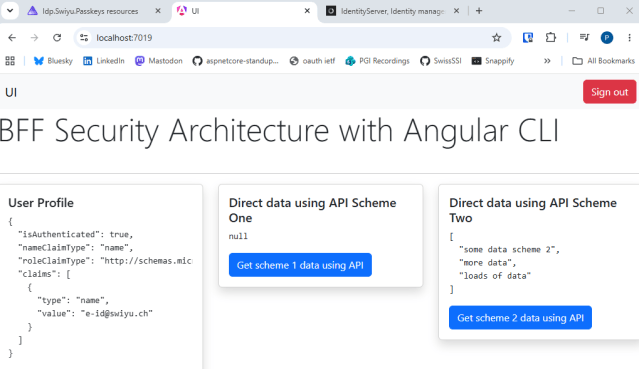
When you start the application, the BFF UI application can logout and use the allowed APIs.
Notes
Normally a setup like this is not required and a single default scheme would be the better approach if starting a new project.
Links
https://github.com/DuendeSoftware/Samples/tree/main/IdentityServer/v8/SessionManagement/Client


Thanks for sharing this. We included it in DotNetNews here: https://dotnetnews.beehiiv.com/p/new-post-000c