Configurable token lifetimes in the Microsoft identity platform went GA and I thought I would look at implementing this using a .NET console application using Microsoft Graph . This article looks at implementing this with an delegated user credential as well as an application client credential.
Code: https://github.com/damienbod/EntraIdTokenLifeTimePolicies
The code example was initially created using copilot and the Microsoft documentation. The created code had an number of issues which were fixed and cleaned up but it is good enough for a demo. The security still needs to be improved, if using in a productive environment.
The aim of the code is to set the token lifespan using the new Entra ID feature. By reducing the lifespan of a token in some use cases, it can help to reduce the security risk. This would be useful when using application access tokens for Entra ID setup tasks or other administration flows.
The default service is an implementation in .NET created from the Powershell examples and Github copilot.
using System.Text.Json;
using Microsoft.Extensions.Logging;
using Microsoft.Extensions.Options;
using Microsoft.Graph;
using Microsoft.Graph.Models;

namespace EntraIdTokenLifeTimePolicies.Core;

public sealed class TokenLifetimePolicyService(GraphServiceClient graphServiceClient,
    IOptions<TokenLifetimePolicyOptions> options, ILogger<TokenLifetimePolicyService> logger)
{
    private readonly GraphServiceClient _graphServiceClient = graphServiceClient;
    private readonly TokenLifetimePolicyOptions _options = options.Value;
    private readonly ILogger<TokenLifetimePolicyService> _logger = logger;

    public async Task ApplyPolicyAsync(CancellationToken cancellationToken = default)
    {
        ValidateOptions();

        var servicePrincipal = await FindServicePrincipalAsync(_options.TargetApplicationClientId, cancellationToken);
        if (servicePrincipal?.Id is null)
        {
            throw new InvalidOperationException(
                $"No service principal was found for application client ID '{_options.TargetApplicationClientId}'.");
        }

        var policyDefinition = BuildPolicyDefinition(_options.AccessTokenLifetimeMinutes);
        var policy = await UpsertPolicyAsync(policyDefinition, cancellationToken);

        if (policy.Id is null)
        {
            throw new InvalidOperationException("The created or updated token lifetime policy does not contain an ID.");
        }

        await AssignPolicyToServicePrincipalAsync(servicePrincipal.Id, policy.Id, cancellationToken);
    }

    private async Task<ServicePrincipal?> FindServicePrincipalAsync(string appId, CancellationToken cancellationToken)
    {
        var response = await _graphServiceClient.ServicePrincipals.GetAsync(requestConfiguration =>
        {
            requestConfiguration.QueryParameters.Filter = $"appId eq '{EscapeFilterValue(appId)}'";
            requestConfiguration.QueryParameters.Top = 1;
            requestConfiguration.QueryParameters.Select = ["id", "appId", "displayName"];
        }, cancellationToken);

        var servicePrincipal = response?.Value?.FirstOrDefault();
        _logger.LogInformation("Resolved target service principal: {DisplayName} ({ServicePrincipalId})", servicePrincipal?.DisplayName, servicePrincipal?.Id);
        return servicePrincipal;
    }

    private async Task<TokenLifetimePolicy> UpsertPolicyAsync(string definition, CancellationToken cancellationToken)
    {
        var existingPolicies = await _graphServiceClient.Policies.TokenLifetimePolicies.GetAsync(requestConfiguration =>
        {
            requestConfiguration.QueryParameters.Filter = $"displayName eq '{EscapeFilterValue(_options.PolicyDisplayName)}'";
            requestConfiguration.QueryParameters.Top = 1;
            requestConfiguration.QueryParameters.Select = ["id", "displayName", "definition"];
        }, cancellationToken);

        var existingPolicy = existingPolicies?.Value?.FirstOrDefault();
        var updateBody = new TokenLifetimePolicy
        {
            Definition = [definition],
            IsOrganizationDefault = false,
            DisplayName = _options.PolicyDisplayName,
        };

        if (existingPolicy?.Id is not null)
        {
            _logger.LogInformation("Updating existing token lifetime policy: {PolicyId}", existingPolicy.Id);
            await _graphServiceClient.Policies.TokenLifetimePolicies[existingPolicy.Id].PatchAsync(updateBody, cancellationToken: cancellationToken);
            existingPolicy.Definition = updateBody.Definition;
            return existingPolicy;
        }

        _logger.LogInformation("Creating token lifetime policy: {PolicyDisplayName}", _options.PolicyDisplayName);
        var createdPolicy = await _graphServiceClient.Policies.TokenLifetimePolicies.PostAsync(updateBody, cancellationToken: cancellationToken);
        return createdPolicy ?? throw new InvalidOperationException("Microsoft Graph returned null while creating a token lifetime policy.");
    }

    private async Task AssignPolicyToServicePrincipalAsync(string servicePrincipalId, string policyId, CancellationToken cancellationToken)
    {
        var existingAssignments = await _graphServiceClient.ServicePrincipals[servicePrincipalId].TokenLifetimePolicies.GetAsync(
            requestConfiguration =>
            {
                requestConfiguration.QueryParameters.Select = ["id"];
            },
            cancellationToken);

        if (existingAssignments?.Value?.Any(policy => string.Equals(policy.Id, policyId, StringComparison.OrdinalIgnoreCase)) == true)
        {
            _logger.LogInformation("Policy {PolicyId} is already assigned to service principal {ServicePrincipalId}.", policyId, servicePrincipalId);
            return;
        }

        var reference = new ReferenceCreate
        {
            OdataId = $"{_graphServiceClient.RequestAdapter.BaseUrl}/policies/tokenLifetimePolicies/{policyId}",
        };

        _logger.LogInformation("Assigning policy {PolicyId} to service principal {ServicePrincipalId}.", policyId, servicePrincipalId);
        await _graphServiceClient.ServicePrincipals[servicePrincipalId].TokenLifetimePolicies.Ref.PostAsync(reference, cancellationToken: cancellationToken);
    }

    private static string BuildPolicyDefinition(int accessTokenLifetimeMinutes)
    {
        var policy = new
        {
            TokenLifetimePolicy = new
            {
                Version = 1,
                AccessTokenLifetime = $"00:{accessTokenLifetimeMinutes}:00",
            },
        };

        return JsonSerializer.Serialize(policy);
    }

    private void ValidateOptions()
    {
        if (string.IsNullOrWhiteSpace(_options.TargetApplicationClientId))
        {
            throw new InvalidOperationException("TokenLifetimePolicy:TargetApplicationClientId is required.");
        }

        if (string.IsNullOrWhiteSpace(_options.PolicyDisplayName))
        {
            throw new InvalidOperationException("TokenLifetimePolicy:PolicyDisplayName is required.");
        }

        if (_options.AccessTokenLifetimeMinutes is < 10 or > 1440)
        {
            throw new InvalidOperationException("TokenLifetimePolicy:AccessTokenLifetimeMinutes must be between 10 and 1440.");
        }
    }

    private static string EscapeFilterValue(string value) => value.Replace("'", "''", StringComparison.Ordinal);
}
This code can then be used in two ways, from an application client or from a delegated client. Each one requires different Graph permissions and authorize using different security flows.
Application permissions
No user is involved in this flow.
An Azure App Registration is used to setup the permissions to access the Graph API. We used an client credentials flow with a client secret to acquire the access token. This is fine for a demo, but using a managed identity would be a better way to use the permissions inside Azure, or a client assertion for non Azure applications. This is not a recommended flow when a user is involved.
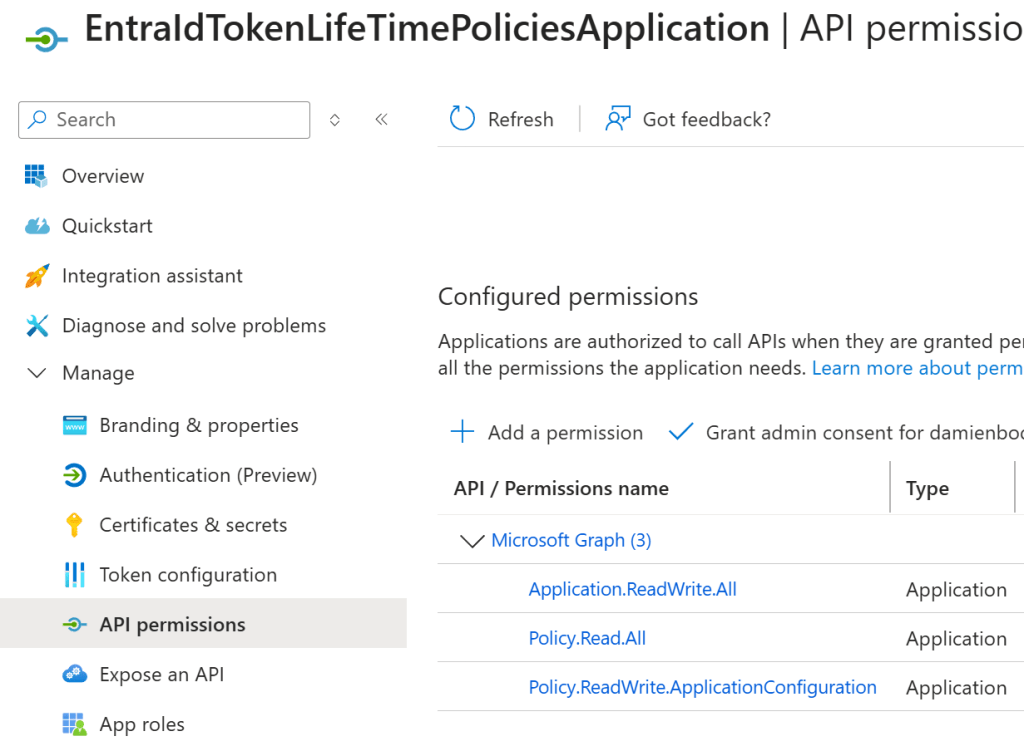
The ClientSecretCredential is used to acquire the application access token.
builder.Services.AddSingleton(sp =>
{
    var authOptions = sp
     .GetRequiredService<IOptions<ApplicationAuthenticationOptions>>().Value;

    var credential = new ClientSecretCredential(
        authOptions.TenantId,
        authOptions.ClientId,
        authOptions.ClientSecret);

    return new GraphServiceClient(credential,
      ["https://graph.microsoft.com/.default"]);
});
Then the Microsoft Graph APIs can be used.
  var authenticationOptions = host.Services
           .GetRequiredService<IOptions<ApplicationAuthenticationOptions>>();
  var tokenLifetimePolicyService = host.Services
           .GetRequiredService<TokenLifetimePolicyService>();

  ApplicationAuthenticationOptions.Validate(authenticationOptions.Value);

  logger.LogInformation("Starting app-only flow for tenant {TenantId}.",
         authenticationOptions.Value.TenantId);

  logger.LogInformation("Required application permissions: {Permissions}",
        string.Join(", ",
           authenticationOptions.Value.RequiredApplicationPermissions));

  await tokenLifetimePolicyService.ApplyPolicyAsync(CancellationToken.None);
Testing the application access token
The policy is applied to Azure App registration tokens, not to Graph API tokens. An application ID was added to an App Registration and the access token was requested using the default permission as this is an application and requires no consent like a user does. The token expires in the time defined in the policy.
static async Task TestApplicationTokenPolicy(IHost host, ILogger logger)
{
    // Test token
    var authOptions = host.Services.GetRequiredService<IOptions<ApplicationAuthenticationOptions>>().Value;
    var credential = new ClientSecretCredential(authOptions.TenantId, authOptions.ClientId, authOptions.ClientSecret);

    // Request token for the API (Policy only applies to App registrion, not graph)
    var context = new TokenRequestContext(["api://1ff3f063-8b62-43d7-b323-956291bec8e5/.default"]);
    var response = await credential.GetTokenAsync(context);

    logger.LogInformation("Token acquired UTC: {ExpiresIn}, {Token}", response.ExpiresOn, response.Token);
}
Delegated permissions
This is used when a user is involved. Delegated access tokens should always be used if possible. An OpenID Connect flow is used to acquire the access token. Only delegated permission are used.
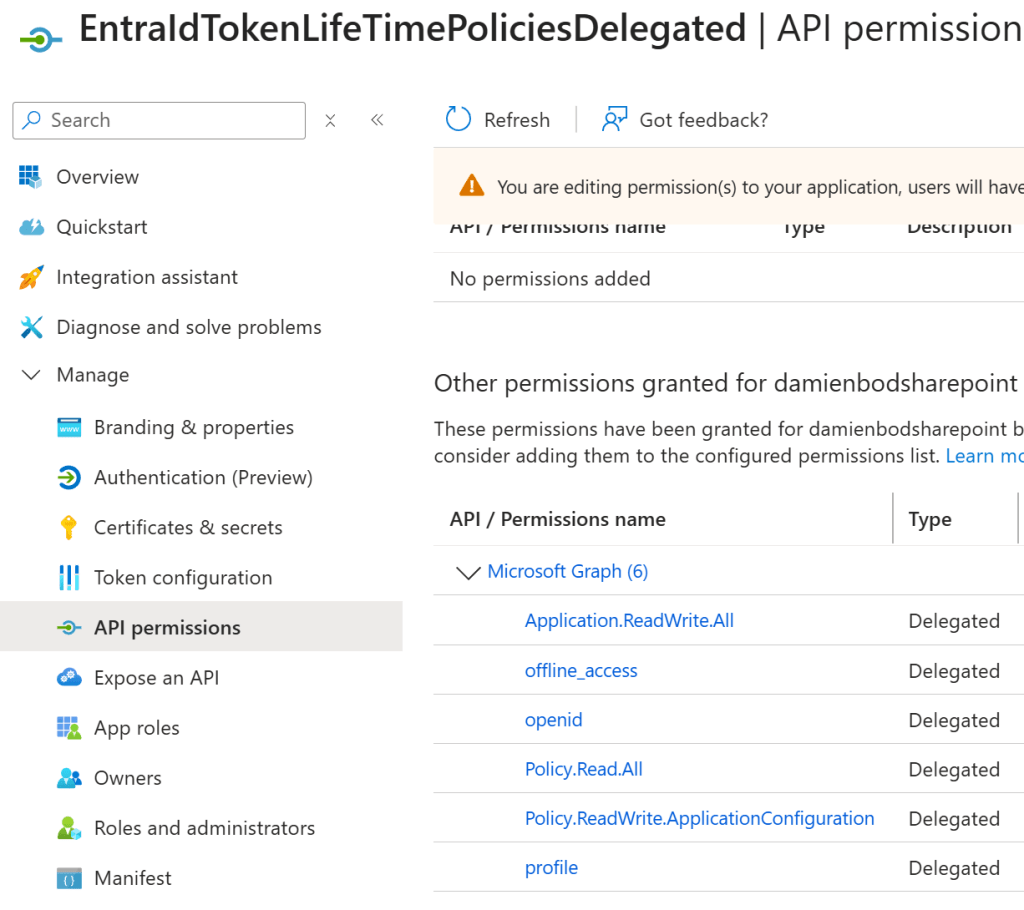
This example uses a native client with the InteractiveBrowserCredentialOptions browser. This is a public OpenID Connect client.
builder.Services.AddSingleton(sp =>
{
    var authOptions = sp.GetRequiredService<IOptions<DelegatedAuthenticationOptions>>().Value;

    var credentialOptions = new InteractiveBrowserCredentialOptions
    {
        ClientId = authOptions.ClientId,
        TenantId = authOptions.TenantId,
        RedirectUri = new Uri("http://localhost"),
    };

    var credential = new InteractiveBrowserCredential(credentialOptions);
    return new GraphServiceClient(credential, authOptions.RequiredDelegatedScopes);
});
The policy is used with the delegated access token using the required permissions.
 var tokenLifetimePolicyService = host.Services.GetRequiredService<TokenLifetimePolicyService>();
 var authenticationOptions = host.Services.GetRequiredService<IOptions<DelegatedAuthenticationOptions>>();

 DelegatedAuthenticationOptions.Validate(authenticationOptions.Value);

 logger.LogInformation("Starting delegated flow for tenant {TenantId}.", authenticationOptions.Value.TenantId);
 logger.LogInformation("Delegated scopes requested: {Scopes}", string.Join(", ", authenticationOptions.Value.RequiredDelegatedScopes));
 await tokenLifetimePolicyService.ApplyPolicyAsync(CancellationToken.None);
Testing the delegated access token
An App registration is setup to use a scope (access_as_user) and this can be requested using the OpenID Connect flow. This flow requires consent. The Azure SDKs provide helper methods for this.
static async Task TestDelegatedTokenPolicy(IHost host, ILogger logger)
{
    // Test token
    var authOptions = host.Services
           .GetRequiredService<IOptions<DelegatedAuthenticationOptions>>().Value;

    var credentialOptions = new InteractiveBrowserCredentialOptions
    {
        ClientId = authOptions.ClientId,
        TenantId = authOptions.TenantId,
        RedirectUri = new Uri("http://localhost"),
    };
    var credential = new InteractiveBrowserCredential(credentialOptions);

    // Request token for the API (Policy only applies to App registrion, not graph)
    var context = new TokenRequestContext(
            ["api://9949e3d8-ffb2-4e86-908a-fd92b6140972/access_as_user"]);

    var response = await credential.GetTokenAsync(context);

    logger.LogInformation("Token acquired UTC: {ExpiresIn}, {Token}",
                response.ExpiresOn, response.Token);
}
Notes
This was really easy to implement using the documentation. The docs implement the examples using Powershell, but this can be easily switched to .NET using any AI coding tool. What is missing is the right permissions and the way to acquire the access token correctly.
Links
https://learn.microsoft.com/en-us/entra/identity-platform/configurable-token-lifetimes
https://learn.microsoft.com/en-us/entra/identity-platform/configure-token-lifetimes


