This article shows how to remove the sign-up flow from Entra External ID user flows. This is required because SMS and Phone validation can be abused by bots to run up costs on the tenant. The bots create accounts and start a phone validation or a SMS validation which is charged to the tenant. The intent of this attack is just to cause costs.
SMS or Phone verification should not be used in an unauthenticated flow.
Any IAM or user management system which does not support passkeys or Authenticator apps at the least should not be used. 2FA, MFA should be possible without inducing a usage cost.
Graph authentication using OAuth
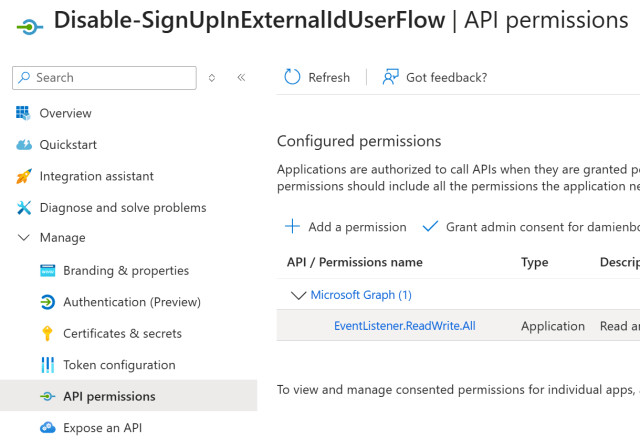
An Azure App registration is required with the Graph application permission EventListener.ReadWrite.All granted. A user secret and can be added and the application client ID, tenant ID are required. The following script uses the Azure App registration.
Powershell script
The following script is used to disable the sign-up process on a Entra External ID tenant. Thanks to Marc Rufer who supported me in creating the Powershell script.
#Requires -Version 7.0
#Requires -Modules @{ ModuleName="Microsoft.Graph.Authentication"; ModuleVersion="2.35.1" }
#Requires -Modules @{ ModuleName="Microsoft.Graph.Identity.SignIns"; ModuleVersion="2.35.1" }

# Create a App registration for the client credentials flow
# EventListener.ReadWrite.All
PARAM
(
    [Parameter(Mandatory = $true, Position = 0, HelpMessage = "Id of the Entra External ID tenant")]
 	[string] $tenantId
    ,
    [Parameter(Mandatory = $true, Position = 1, HelpMessage = "Application (Client) Id of the app registration with IdentityUserFlow.ReadWrite.All permissions")]
    [string] $applicationId
	,
	[Parameter(Mandatory = $true, Position = 2, HelpMessage = "Client secret for the app registration with the graph permissions")]
    [string] $clientSecret
	,
	[Parameter(Mandatory = $true, Position = 3, HelpMessage = "Client Id for the app registration with the graph permissions")]
    [string] $clientId
)

$cred = New-Object -TypeName System.Management.Automation.PSCredential -ArgumentList $clientId, (ConvertTo-SecureString -String $clientSecret -AsPlainText -Force)
Connect-MgGraph -TenantId $tenantId -Credential $cred

$response = Get-MgIdentityAuthenticationEventFlow -Filter "microsoft.graph.externalUsersSelfServiceSignUpEventsFlow/conditions/applications/includeApplications/any(appId:appId/appId eq '$applicationId')"

$userFlowId = $response.Id

$body = @{
    "@odata.type" = "#microsoft.graph.externalUsersSelfServiceSignUpEventsFlow"
    "onInteractiveAuthFlowStart" = @{
        "@odata.type"   = "#microsoft.graph.onInteractiveAuthFlowStartExternalUsersSelfServiceSignUp"
        "isSignUpAllowed" = $false
    }
}

Update-MgIdentityAuthenticationEventFlow -AuthenticationEventsFlowId $userFlowId -BodyParameter $body
Using the script
The Powershell scrip can be used by setting the correct parameters.
$tenantId = "Entra-External-ID-tenant-id"
$appId = "Application-(Client)-ID-from-user-flow"
$clientSecret = "Azure-App-Registration-Client-Secret"
$clientId = "Azure-App-Registration-Application-(Client)-ID"

.\Disable-SignUpInExternalIdUserFlow.ps1  -tenantId $tenantId -applicationId $appId -clientSecret $clientSecret -clientId $clientid
Note
Once the script has been run and executed, delete the Azure App registration on the tenant.
Links
https://learn.microsoft.com/en-us/entra/external-id/customers/how-to-disable-sign-up-user-flow


