The post shows how to implement a step up authorization using the OAuth 2.0 Step Up Authentication Challenge Protocol RFC 9470. The application uses ASP.NET Core to implement the API, the web application and the identity provider. Duende IdentityServer is used to implement the OpenID Connect server standard and also OAuth DPoP token binding as well as other OAuth standards.
Code: https://github.com/swiss-ssi-group/swiyu-passkeys-idp-loi-loa
Blogs in this series:
- Digital authentication and identity validation
- Set the amr claim when using passkeys authentication in ASP.NET Core
- Implementing Level of Authentication (LoA) with ASP.NET Core Identity and Duende
- Implementing Level of Identification (LoI) with ASP.NET Core Identity and Duende
- Force step up authentication in web applications
- Use client assertions in ASP.NET Core using OpenID Connect, OAuth DPoP and OAuth PAR
- Isolate the swiyu Public Beta management APIs using YARP
- Add Application security to the swiyu generic management verifier APIs using OAuth
Setup
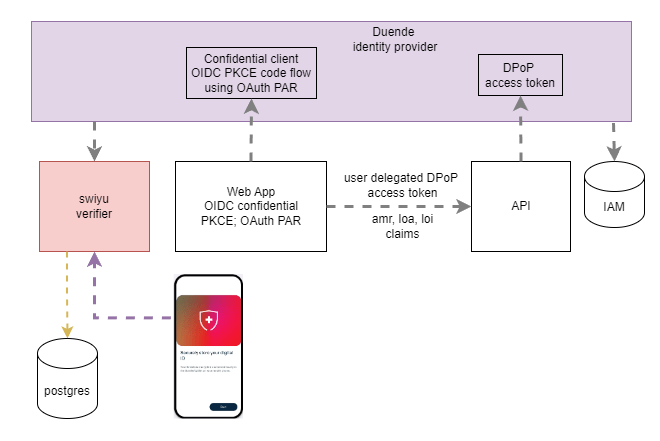
The solutions uses multiple containers in a container hosting environment. I use Azure Container Apps as my preferred solution for cloud hosting deployments.
The API requires access tokens and forces OAuth DPoP token binding. The API uses Open API to describe the endpoint. If the DPoP access token is missing or has an incorrect value or not the required claims, a 401 is returned with the WWW-Authenticate set using the OAuth specification.
The web application uses OpenID Connect to authenticate as well as requiring DPoP access tokens. The access token is used to request data from the downstream API. If a 401 is returned, the web application provides a way to authenticate again using the required authentication and identification.
The identity provider muss handle the step up authentication request. This is implemented by Duende IdentityServer using the AuthorizeInteractionResponseGenerator base class. This handles all login requests, not just the step requests. Multiple login flows needs to be supported and tested when implementing this.
The identity provider container uses ASP.NET Core Identity with an SQL Server database. The database is migrated using a .NET Worker service using Entity Framework Core migrations. The database uses passkeys and swiyu tables to store the identity data.
Swiyu is supported using the generic containers which implement the swiyu Public Beta infrastructure. The swiyu verifier container supports both management APIs and OpenIDVP implementations. The Swiss Wallet uses the public API to complete an identification check.
The applications are run and setup locally using Microsoft Aspire. This reduces the complexity of creating and hosting local containers and also makes is easy to deploy the professional environments like Azure Container Apps. You could also use AKS, but this makes no sense implementing a low level container hosting system.
Implement the API
An AuthorizationHandler is used to validate the level of authentication and the level of identification authorization requirements. The handler validates if the required claims has the required value.
using Idp.Swiyu.Passkeys.ApiService;
using Microsoft.AspNetCore.Authorization;

public class LoaHandler : AuthorizationHandler<LoaRequirement>
{
    protected override Task HandleRequirementAsync(AuthorizationHandlerContext context, LoaRequirement requirement)
    {
        // DPoP is required to use the API
        var loa = context.User.FindFirst(c => c.Type == Consts.LOA);

        if (loa is null)
        {
            return Task.CompletedTask;
        }

        // Lets require passkeys to use this API
        if (loa.Value != Consts.LOA_400)
        {
            return Task.CompletedTask;
        }

        context.Succeed(requirement);

        return Task.CompletedTask;
    }
}
The implementation of the IAuthorizationMiddlewareResultHandler is used to fulfil the OAuth 2.0 Step Up Authentication Challenge Protocol RFC 9470 specification. If the loi or the loa requirement fails, the WWW-Authenticate header is set with the correct value.
using Microsoft.AspNetCore.Authorization;
using Microsoft.AspNetCore.Authorization.Policy;
using System.Text;

namespace Idp.Swiyu.Passkeys.ApiService;

/// <summary>
/// https://datatracker.ietf.org/doc/rfc9470/
/// implementation for step-up authorization requirements
/// </summary>
public class ForbiddenAuthorizationMiddleware : IAuthorizationMiddlewareResultHandler
{
    private readonly AuthorizationMiddlewareResultHandler defaultHandler = new();

    public async Task HandleAsync(
        RequestDelegate next,
        HttpContext context,
        AuthorizationPolicy policy,
        PolicyAuthorizationResult authResult)
    {
        // If the authorization was forbidden due to a step-up requirement, set
        // the status code and WWW-Authenticate header to indicate that step-up
        // is required
        if (authResult.Forbidden)
        {
            var loaFailed = authResult.AuthorizationFailure!.FailedRequirements
                .OfType<LoaRequirement>().FirstOrDefault();
            var loiFailed = authResult.AuthorizationFailure!.FailedRequirements
                .OfType<LoiRequirement>().FirstOrDefault();

            if (loaFailed != null || loiFailed != null)
            {
                var errorMessage = new CreateErrorMessage();
                if (loaFailed != null)
                {
                    errorMessage.Loa = Consts.LOA_400;
                }
                if (loiFailed != null)
                {
                    errorMessage.Loi = Consts.LOI_400;
                }

                context.Response.Headers.WWWAuthenticate = errorMessage.GetErrorMessage();
                context.Response.StatusCode = StatusCodes.Status401Unauthorized;

                return;
            }
        }

        // Fall back to the default implementation.
        await defaultHandler.HandleAsync(next, context, policy, authResult);
    }
}

public class CreateErrorMessage
{
    private readonly string Error = "insufficient_user_authentication";
    private string ErrorDescription
    {
        get
        {
            var errorDescription = new StringBuilder();

            if (Loi != null && Loa != null)
            {
                errorDescription.Append("insufficient level of identification and authentication");
            }

            if (Loi != null && Loa == null)
            {
                errorDescription.Append("insufficient level of identification");
            }

            if (Loa != null && Loi == null)
            {
                errorDescription.Append("insufficient level of authentication");
            }


            return errorDescription.ToString();
        }
    }

    public string? Loi { get; set; }
    public string? Loa { get; set; }

    public string GetErrorMessage()
    {
        var props = new StringBuilder();
        props.Append($"Bearer error=\"{Error}\",");
        props.Append($"error_description=\"{ErrorDescription}\", ");

        if (Loi != null && Loa != null)
        {
            props.Append($"{Consts.LOI}=\"{Loi}\", ");
            props.Append($"{Consts.LOA}=\"{Loa}\"");
        }

        if (Loi != null && Loa == null)
        {
            props.Append($"{Consts.LOI}=\"{Loi}\"");
        }

        if (Loa != null && Loi == null)
        {
            props.Append($"{Consts.LOA}=\"{Loa}\"");
        }

        return props.ToString();
    }
}
The API is setup to use DPoP access tokens to protected the data. If the DPoP access token is validated successfully, the authorization rules and the policies are validated. If the authorization fails, the WWW-Authenticate is set correctly and returned to the calling application. The audience and the issuer are validated as well like recommended in the different specifications used in implementation.
builder.Services.AddOpenApi();

builder.Services.AddAuthentication("Bearer")
    .AddJwtBearer(options =>
    {
        options.Authority = "https://localhost:5001";
        options.Audience = "dpop-api";

        options.TokenValidationParameters.ValidateAudience = true;
        options.TokenValidationParameters.ValidateIssuer = true;
        options.TokenValidationParameters.ValidAudience = "dpop-api";

        options.MapInboundClaims = false;
        options.TokenValidationParameters.ValidTypes = ["at+jwt"];
    });

// layers DPoP onto the "token" scheme above
builder.Services.ConfigureDPoPTokensForScheme("Bearer", opt =>
{
    opt.ValidationMode = ExpirationValidationMode.IssuedAt; // IssuedAt is the default.
});

builder.Services.AddAuthorization();

builder.Services.AddSingleton<IAuthorizationHandler, LoiHandler>();
builder.Services.AddSingleton<IAuthorizationHandler, LoaHandler>();
builder.Services.AddSingleton<IAuthorizationMiddlewareResultHandler, ForbiddenAuthorizationMiddleware>();

builder.Services.AddAuthorizationBuilder()
    .AddPolicy("authz_checks", policy => policy
        .RequireAuthenticatedUser()
        .AddRequirements([new LoaRequirement(), new LoiRequirement()]));
Implement the web application step up handling
Once the 401 is returned with the WWW-Authenticate set correctly, the web application needs to handle this correctly.
using System.Net;

namespace Idp.Swiyu.Passkeys.Web.WeatherServices;

public class WeatherApiClient
{
    private readonly IHttpClientFactory _httpClientFactory;
    public WeatherApiClient(IHttpClientFactory httpClientFactory)
    {
        _httpClientFactory = httpClientFactory;
    }

    public async Task<WeatherForecast[]> GetWeatherAsync(int maxItems = 10, CancellationToken cancellationToken = default)
    {
        var httpClient = _httpClientFactory.CreateClient("dpop-api-client");

        HttpResponseMessage? response = null;
        try
        {
            // Make a direct request to check for 401 first
            response = await httpClient.GetAsync("/weatherforecast", cancellationToken);

            // Check if we got a 401 response
            if (response.StatusCode == HttpStatusCode.Unauthorized)
            {
                // Parse the WWW-Authenticate header to extract error_description
                var errorMessage = ApiErrorHandling.ParseErrorDescriptionFromResponse(response);
                throw new ApiErrorHandlingException(errorMessage);
            }

            // Ensure success status code
            response.EnsureSuccessStatusCode();

            // Read the response as an array
            var forecasts = await response.Content.ReadFromJsonAsync<WeatherForecast[]>(cancellationToken);

            // Take only maxItems
            if (forecasts != null && forecasts.Length > maxItems)
            {
                return forecasts.Take(maxItems).ToArray();
            }

            return forecasts ?? [];
        }
        finally
        {
            response?.Dispose();
        }
    }
}

public record WeatherForecast(DateOnly Date, int TemperatureC, string? Summary)
{
    public int TemperatureF => 32 + (int)(TemperatureC / 0.5556);
}
The ApiErrorHandling parses the error description depending on the error and returns this in the WWW-Authenticate header.
public static class ApiErrorHandling
{
    public static string ParseErrorDescriptionFromResponse(HttpResponseMessage response)
    {
        var errorMessage = new StringBuilder();
        errorMessage.Append($"Reason: {response.ReasonPhrase}, ");

        // Get the WWW-Authenticate header
        if (response.Headers.WwwAuthenticate.Any())
        {
            foreach (var authHeader in response.Headers.WwwAuthenticate)
            {
                var headerValue = authHeader.ToString();

                errorMessage.Append(headerValue);
            }
        }
        else
        {
            errorMessage.Append("Unauthorized access to API, WWW-Authenticate header not set");
        }


        return errorMessage.ToString();
    }
}
The web application displays the error in the UI and allows the user of the application to step up authentication.
@if (errorMessage != null)
{
    var returnUrl = NavigationManager.Uri;
    <div class="alert alert-danger" role="alert">
        <strong>Error:</strong> @errorMessage
        @if (errorMessage.Contains("loi", StringComparison.OrdinalIgnoreCase))
        {
            <div class="mt-2">
                <a class="btn btn-primary" href="@GetRegisterSwiyuUrl()" target="_blank">
                    <span class="bi bi-key-fill-nav-menu" aria-hidden="true"></span> Step up identification
                </a>
            </div>
        }
        @if (errorMessage.Contains("loa", StringComparison.OrdinalIgnoreCase))
        {
            var loaValue = ExtractParameterValue(errorMessage, "loa");
            if (!string.IsNullOrEmpty(loaValue))
            {
                var stepUpUrl = $"/stepuploa?loa={Uri.EscapeDataString(loaValue)}&returnUrl={Uri.EscapeDataString(returnUrl)}";
                <div class="mt-2">
                    <a href="@stepUpUrl" class="btn btn-primary">Step up authentication</a>
                </div>
            }
        }
    </div>
}
When a user selects the step up type and starts the flow, the backend application begins the OpenID Connect challenge. If the user needs to authenticate, the challenge sends the required acr_values prompt, if the user needs an identity verification, the user is redirected to start the OpenIDVP flow.
        app.MapGet("/stepuploa", async context =>
        {
            var returnUrl = context.Request.Query["returnUrl"];
            var loa = context.Request.Query["loa"];

            if (!string.IsNullOrEmpty(loa) && loa == "loa.400")
            {
                await context.ChallengeAsync(OpenIdConnectDefaults.AuthenticationScheme, new AuthenticationProperties
                {
                    RedirectUri = returnUrl == StringValues.Empty ? "/" : returnUrl.ToString(),
                    Items = { ["acr_values"] = "phr" }
                });
            }
            else
            {
                await context.ChallengeAsync(OpenIdConnectDefaults.AuthenticationScheme, new AuthenticationProperties
                {
                    RedirectUri = returnUrl == StringValues.Empty ? "/" : returnUrl.ToString(),
                    Items = { ["acr_values"] = "mfa" }
                });
            }

        }).AllowAnonymous();
Implement the OpenID Connect Server
The StepUpInteractionResponseGenerator implements the AuthorizeInteractionResponseGenerator class. This method is called every time a user tries to logout. If special logic is required to step up, the user gets redirected to the required UI.
namespace Idp.Swiyu.Passkeys.Sts;

public class StepUpInteractionResponseGenerator : AuthorizeInteractionResponseGenerator
{
    public StepUpInteractionResponseGenerator(
        IdentityServerOptions options,
        IClock clock,
        ILogger<AuthorizeInteractionResponseGenerator> logger,
        IConsentService consent,
        IProfileService profile) : base(options, clock, logger, consent, profile)
    {
    }

    protected override async Task<InteractionResponse> ProcessLoginAsync(ValidatedAuthorizeRequest request)
    {
        var result = await base.ProcessLoginAsync(request);

        if (!result.IsLogin && !result.IsError)
        {
            if (PasskeysRequired(request) && !AuthenticatedWithPasskeys(request.Subject!))
            {
                if (UserDeclinedMfa(request.Subject!))
                {
                    result.Error = OidcConstants.AuthorizeErrors.UnmetAuthenticationRequirements;
                }
                else
                {
                    // passkeys can be completed here
                    result.RedirectUrl = "/Account/Login";
                }
            }
            else if (MfaRequired(request) && !AuthenticatedWithMfa(request.Subject!))
            {
                if (UserDeclinedMfa(request.Subject!))
                {
                    result.Error = OidcConstants.AuthorizeErrors.UnmetAuthenticationRequirements;
                }
                else
                {
                    // Swiyu authentication possible
                    result.RedirectUrl = "/Account/Login";

                    // if you support the default Identity setup with MFA,
                    //result.RedirectUrl = "/Account/LoginWith2fa";
                }
            }
        }

        return result;
    }

    private bool PasskeysRequired(ValidatedAuthorizeRequest request) =>
       PasskeysRequestedByClient(request);

    private bool PasskeysRequestedByClient(ValidatedAuthorizeRequest request)
    {
        return request.AuthenticationContextReferenceClasses!.Contains("phr");
    }

    private bool MfaRequired(ValidatedAuthorizeRequest request) =>
       MfaRequestedByClient(request);

    private bool MfaRequestedByClient(ValidatedAuthorizeRequest request)
    {
        return request.AuthenticationContextReferenceClasses!.Contains("mfa");
    }

    private bool AuthenticatedWithMfa(ClaimsPrincipal user) =>
        user.Claims.Any(c => c.Type == "amr" && (c.Value == Amr.Pop || c.Value == Amr.Mfa));

    private bool AuthenticatedWithPasskeys(ClaimsPrincipal user) =>
        user.Claims.Any(c => c.Type == "amr" && c.Value == Amr.Pop);

    private bool UserDeclinedMfa(ClaimsPrincipal user) =>
        user.Claims.Any(c => c.Type == "declined_mfa" && c.Value == "true");
}
The service needs to be added to the STS services.
builder.Services.AddTransient<IAuthorizeInteractionResponseGenerator,
   StepUpInteractionResponseGenerator>();
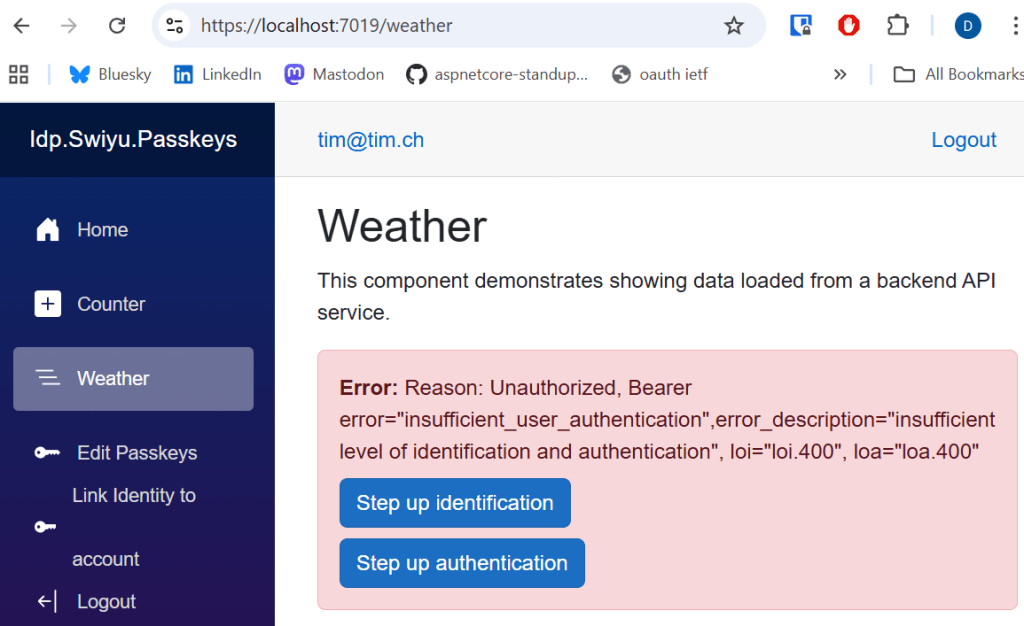
When run, if the user is missing both the authentication requirement and the identification requirement, the web application displays the following error when trying to access the API.
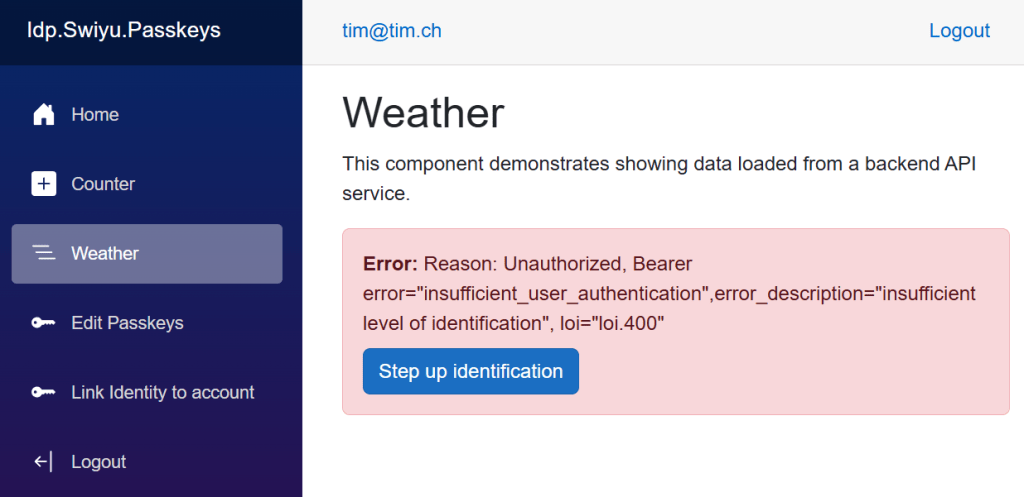
If the used has authenticated using passkeys, but not completed an identity check:
Notes
This works good and communicates the level of authentication and the level of the identification to all clients of the OpenID Connect server. The solution still needs some further security hardening and the applications parts which are not required should be removed.
Links
https://github.com/dotnet/aspnetcore/issues/64881
https://openid.net/specs/openid-connect-eap-acr-values-1_0-final.html
https://datatracker.ietf.org/doc/html/rfc8176
https://learn.microsoft.com/en-us/aspnet/core/security/authentication/claims
SSI
https://www.eid.admin.ch/en/public-beta-e
https://learn.microsoft.com/en-us/dotnet/aspire/get-started/aspire-overview
https://www.npmjs.com/package/ngrok
https://swiyu-admin-ch.github.io/specifications/interoperability-profile/
https://andrewlock.net/converting-a-docker-compose-file-to-aspire/
https://swiyu-admin-ch.github.io/cookbooks/onboarding-generic-verifier/
https://github.com/orgs/swiyu-admin-ch/projects/2/views/2
SSI Standards
https://identity.foundation/trustdidweb/
https://openid.net/specs/openid-4-verifiable-credential-issuance-1_0.html
https://openid.net/specs/openid-4-verifiable-presentations-1_0.html
https://datatracker.ietf.org/doc/draft-ietf-oauth-selective-disclosure-jwt/
https://datatracker.ietf.org/doc/draft-ietf-oauth-sd-jwt-vc/
https://datatracker.ietf.org/doc/draft-ietf-oauth-status-list/

 Software Engineering
[…] Force step up authentication in web applications […]
[…] Force step up authentication in web applications […]
[…] Force step up authentication in web applications […]
[…] Force step up authentication in web applications […]
[…] Force step up authentication in web applications (Damien Bowden) […]
[…] 详情参考 […]
[…] Force step up authentication in web applications […]
[…] Force step up authentication in web applications […]
[…] Force step up authentication in web applications […]