This post shows how to implement an application which requires a user to authenticate using passkeys. The identity provider returns three claims to prove the authentication level (loa), the identity level, (loi) and the amr claim showing the used authentication method.
Code: https://github.com/swiss-ssi-group/swiyu-passkeys-idp-loi-loa
Blogs in this series:
- Digital authentication and identity validation
- Set the amr claim when using passkeys authentication in ASP.NET Core
- Implementing Level of Authentication (LoA) with ASP.NET Core Identity and Duende
- Implementing Level of Identification (LoI) with ASP.NET Core Identity and Duende
- Force step up authentication in web applications
- Use client assertions in ASP.NET Core using OpenID Connect, OAuth DPoP and OAuth PAR
- Isolate the swiyu Public Beta management APIs using YARP
- Add Application security to the swiyu generic management verifier APIs using OAuth
The amr claim and the loa claim returns similar values. The amr claim contains the identity provider implementation and the ASP.NET Core Identity implementation of the amr specification. This could be used for validating the authentication method but each IDP uses different values and the level is unclear. Due to this, the loa claim can be used. This claim returns the level of authentication from least secure to most secure. The most secure authentication is passkeys or public/private key certificate authentication. Less then 300 should NOT be used for most use cases.
loa (Level of Authentication)
loa.400 : passkeys, (public/private key certificate authentication)
loa.300 : authenticator apps, OpenID verifiable credentials (E-ID, swiyu)
loa.200 : SMS, email, TOTP, 2-step
loa.100 : single factor, SAS key, API Keys, passwords, OTP

Setup
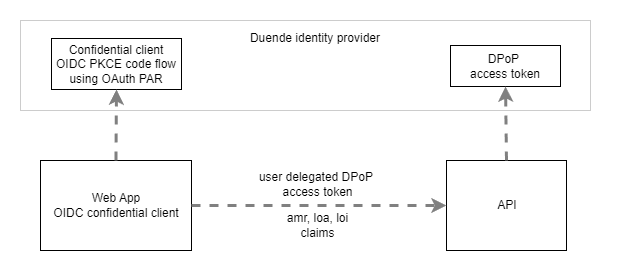
The solution is implemented using Aspire from Microsoft. It uses three applications, the STS which is an OpenID Connect server implemented using Duende and an Identity provider using ASP.NET Core Identity, the web application using Blazor and an API which requires DPoP access tokens and a level of authentication which is phishing resistant. The web application authenticates using a confidential OpenID Connect client using PKCE and OAuth PAR.
OpenID Connect web client
The Blazor application uses two Nuget packages to implement the OIDC authentication client.
- Duende.AccessTokenManagement.OpenIdConnect
- Microsoft.AspNetCore.Authentication.OpenIdConnect
The application uses OpenID Connect to authenticate and secure HTTP only cookies to store the session. A client secret is used as this is only a demo, client assertions should be used in productive applications. The client requests and uses DPoP access tokens.
var oidcConfig = builder.Configuration.GetSection("OpenIDConnectSettings");

builder.Services.AddAuthentication(options =>
{
    options.DefaultScheme = CookieAuthenticationDefaults.AuthenticationScheme;
    options.DefaultChallengeScheme = OpenIdConnectDefaults.AuthenticationScheme;
    options.DefaultSignOutScheme = OpenIdConnectDefaults.AuthenticationScheme;
})
.AddCookie(options =>
{
    options.Cookie.Name = "__Host-idp-swiyu-passkeys-web";
    options.Cookie.SameSite = SameSiteMode.Lax;
})
.AddOpenIdConnect(options =>
{
    builder.Configuration.GetSection("OpenIDConnectSettings").Bind(options);

    options.SignInScheme = CookieAuthenticationDefaults.AuthenticationScheme;
    options.ResponseType = OpenIdConnectResponseType.Code;

    options.SaveTokens = true;
    options.GetClaimsFromUserInfoEndpoint = true;
    options.MapInboundClaims = false;

    options.ClaimActions.MapUniqueJsonKey("loa", "loa");
    options.ClaimActions.MapUniqueJsonKey("loi", "loi");
    options.ClaimActions.MapUniqueJsonKey(JwtClaimTypes.Email, JwtClaimTypes.Email);

    options.Scope.Add("scope2");
    options.TokenValidationParameters = new TokenValidationParameters
    {
        NameClaimType = "name"
    };
});

var privatePem = File.ReadAllText(Path.Combine(
	builder.Environment.ContentRootPath, "ecdsa384-private.pem"));
var publicPem = File.ReadAllText(Path.Combine(
	builder.Environment.ContentRootPath, "ecdsa384-public.pem"));

var ecdsaCertificate = X509Certificate2
	.CreateFromPem(publicPem, privatePem);

var ecdsaCertificateKey = new ECDsaSecurityKey(
	$ecdsaCertificate.GetECDsaPrivateKey());

// add automatic token management
builder.Services.AddOpenIdConnectAccessTokenManagement(options =>
{
    var jwk = JsonWebKeyConverter.ConvertFromSecurityKey(ecdsaCertificateKey);
    jwk.Alg = "ES384";
    options.DPoPJsonWebKey = DPoPProofKey
		.ParseOrDefault(JsonSerializer.Serialize(jwk));
});

builder.Services.AddUserAccessTokenHttpClient("dpop-api-client",
	configureClient: client =>
	{
		client.BaseAddress = new("https+http://apiservice");
	});
OpenID Connect Server using Identity & Duende
The OpenID Connect client is implemented using Duende IdentityServer. The client requires DPoP and uses OAuth PAR, (Pushed Authorization Requests). I added the profile claims into the ID token, this can be removed, but the Blazor client application would be required to support this. The client should use a client assertion in a production application and the scope2 together with the ApiResource definition is added as a demo. This is validated in the API.
// interactive client using code flow + pkce + par + DPoP
new Client
{
    ClientId = "web-client",
    ClientSecrets = { new Secret("super-secret-$123".Sha256()) },

    RequireDPoP = true,
    RequirePushedAuthorization = true,

    AllowedGrantTypes = GrantTypes.Code,
    AlwaysIncludeUserClaimsInIdToken = true,

    RedirectUris = { "https://localhost:7019/signin-oidc" },
    FrontChannelLogoutUri = "https://localhost:7019/signout-oidc",
    PostLogoutRedirectUris = { "https://localhost:7019/signout-callback-oidc" },

    AllowOfflineAccess = true,
    AllowedScopes = { "openid", "profile", "scope2" }
},
The index.html.cs file contains the additional claims implementation. The “loa” and the “loi” claims are added here, depending on the level of authentication and the level of identification. As the User.Claims are immutable, the claims need to be removed and recreated. The amr claim is also recreated because the ASP.NET Core Identity sets an incorrect value for passkeys.
if (!string.IsNullOrEmpty(Input.Passkey?.CredentialJson))
{
    // When performing passkey sign-in, don't perform form validation.
    ModelState.Clear();

    result = await _signInManager.PasskeySignInAsync(Input.Passkey.CredentialJson);
    if (result.Succeeded)
    {
        user = await _userManager.GetUserAsync(User);

        // Sign out first to clear the existing cookie
        await _signInManager.SignOutAsync();

        // Create additional claims
        var additionalClaims = new List<Claim>
        {
            new Claim(Consts.LOA, Consts.LOA_400),
            new Claim(Consts.LOI, Consts.LOI_100),
            // ASP.NET Core bug workaround:
            // https://github.com/dotnet/aspnetcore/issues/64881
            new Claim(JwtClaimTypes.AuthenticationMethod, Amr.Pop)
        };

        // Sign in again with the additional claims
        await _signInManager.SignInWithClaimsAsync(user!, isPersistent: false, additionalClaims);
    }
}
The Profile.cs class implements the IProfileService service from Duende. This is added in the services. The class added the different claims to the different caller profiles.
public class ProfileService : IProfileService
{
    public Task GetProfileDataAsync(ProfileDataRequestContext context)
    {
        // context.Subject is the user for whom the result is being made
        // context.Subject.Claims is the claims collection from the user's session cookie at login time
        // context.IssuedClaims is the collection of claims that your logic has decided to return in the response

        if (context.Caller == IdentityServerConstants.ProfileDataCallers.ClaimsProviderAccessToken)
        {
            // Access token - add custom claims
            AddCustomClaims(context);
        }

        if (context.Caller == IdentityServerConstants.ProfileDataCallers.ClaimsProviderIdentityToken)
        {
            // Identity token - add custom claims and standard profile claims
            AddCustomClaims(context);
            AddProfileClaims(context);
        }

        if (context.Caller == IdentityServerConstants.ProfileDataCallers.UserInfoEndpoint)
        {
            // UserInfo endpoint - add custom claims and standard profile claims
            AddCustomClaims(context);
            AddProfileClaims(context);
        }

        return Task.CompletedTask;
    }

    public Task IsActiveAsync(IsActiveContext context)
    {
        context.IsActive = true;
        return Task.CompletedTask;
    }

    private void AddCustomClaims(ProfileDataRequestContext context)
    {
        // Add OID claim
        var oid = context.Subject.Claims.FirstOrDefault(t => t.Type == "oid");
        if (oid != null)
        {
            context.IssuedClaims.Add(new Claim("oid", oid.Value));
        }

        // Add LOA (Level of Authentication) claim
        var loa = context.Subject.Claims.FirstOrDefault(t => t.Type == Consts.LOA);
        if (loa != null)
        {
            context.IssuedClaims.Add(new Claim(Consts.LOA, loa.Value));
        }

        // Add LOI (Level of Identification) claim
        var loi = context.Subject.Claims.FirstOrDefault(t => t.Type == Consts.LOI);
        if (loi != null)
        {
            context.IssuedClaims.Add(new Claim(Consts.LOI, loi.Value));
        }

        // Add AMR (Authentication Method Reference) claim
        var amr = context.Subject.Claims.FirstOrDefault(t => t.Type == JwtClaimTypes.AuthenticationMethod);
        if (amr != null)
        {
            context.IssuedClaims.Add(new Claim(JwtClaimTypes.AuthenticationMethod, amr.Value));
        }
    }

    private void AddProfileClaims(ProfileDataRequestContext context)
    {
        // Add Name claim (required for User.Identity.Name to work)
        var name = context.Subject.Claims.FirstOrDefault(t => t.Type == JwtClaimTypes.Name);
        if (name != null)
        {
            context.IssuedClaims.Add(new Claim(JwtClaimTypes.Name, name.Value));
        }

        var email = context.Subject.Claims.FirstOrDefault(t => t.Type == JwtClaimTypes.Email);
        if (email != null)
        {
            context.IssuedClaims.Add(new Claim(JwtClaimTypes.Email, email.Value));
        }
    }
}
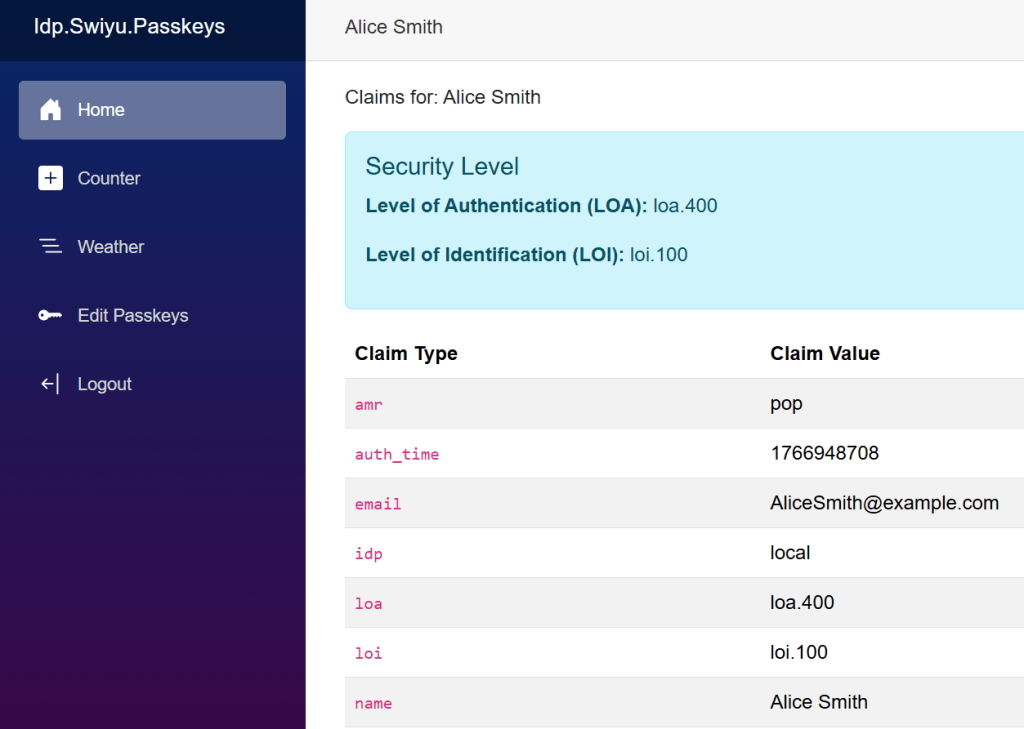
The result can be displayed in the Blazor application. The default windows mapping is disabled. The level of authentication and the level of identification values are displayed in the UI. When clicking the Weather tab, a HTTP request is sent to the API using the DPoP access token.
DPoP API requires passkeys user authentication
The API uses the following Nuget packages to implement the JWT and DPoP security requirements.
- Microsoft.AspNetCore.Authentication.JwtBearer
- Duende.AspNetCore.Authentication.JwtBearer
The AddJwtBearer method is used to validate the DPoP token together with the Duende client library extensions. The ApiResource is validated as well as the standard DPoP requirements.
builder.Services.AddAuthentication("Bearer")
    .AddJwtBearer(options =>
    {
        options.Authority = "https://localhost:5001";
        options.Audience = "dpop-api";

        options.TokenValidationParameters.ValidateAudience = true;
        options.TokenValidationParameters.ValidateIssuer = true;
        options.TokenValidationParameters.ValidAudience = "dpop-api";

        options.MapInboundClaims = false;
        options.TokenValidationParameters.ValidTypes = ["at+jwt"];
    });

// layers DPoP onto the "token" scheme above
builder.Services.ConfigureDPoPTokensForScheme("Bearer", opt =>
{
    opt.ValidationMode = ExpirationValidationMode.IssuedAt; // IssuedAt is the default.
});

builder.Services.AddAuthorization();

builder.Services.AddSingleton<IAuthorizationHandler, AuthzLoaLoiHandler>();

builder.Services.AddAuthorizationBuilder()
    .AddPolicy("authz_checks", policy => policy
        .RequireAuthenticatedUser()
        .AddRequirements(new AuthzLoaLoiRequirement()));
The AuthzLoaLoiHandler is used to validate the loa and later the loi claims. The API returns a 403 if the user that acquired the access token did not use a phishing resistant authentication method.
using Microsoft.AspNetCore.Authorization;

public class AuthzLoaLoiHandler : AuthorizationHandler<AuthzLoaLoiRequirement>
{
    protected override Task HandleRequirementAsync(AuthorizationHandlerContext context,
         AuthzLoaLoiRequirement requirement)
    {
        var loa = context.User.FindFirst(c => c.Type == "loa");
        var loi = context.User.FindFirst(c => c.Type == "loi");

        if (loa is null || loi is null)
        {
            return Task.CompletedTask;
        }

        // Lets require passkeys to use this API
        // DPoP is required to use the API
        if (loa.Value != "loa.400")
        {
            return Task.CompletedTask;
        }

        context.Succeed(requirement);

        return Task.CompletedTask;
    }
}
Links
https://github.com/dotnet/aspnetcore/issues/64881
https://openid.net/specs/openid-connect-eap-acr-values-1_0-final.html
https://datatracker.ietf.org/doc/html/rfc8176
https://learn.microsoft.com/en-us/aspnet/core/security/authentication/claims

 Software Engineering
[…] Implementing Level of Authentication (LoA) with ASP.NET Core Identity and Duende […]
[…] Implementing Level of Authentication (LoA) with ASP.NET Core Identity and Duende […]
[…] Implementing Level of Authentication (LoA) with ASP.NET Core Identity and Duende (Damien Bowden) […]
[…] Implementing Level of Authentication (LoA) with ASP.NET Core Identity and Duende […]
[…] Implementing Level of Authentication (LoA) with ASP.NET Core Identity and Duende […]
[…] Implementing Level of Authentication (LoA) with ASP.NET Core Identity and Duende […]
[…] Implementing Level of Authentication (LoA) with ASP.NET Core Identity and Duende […]
[…] Implementing Level of Authentication (LoA) with ASP.NET Core Identity and Duende […]