This post looks at implementing an OpenID Connect client in ASP.NET Core and require a level of authentication (LoA) implemented using Keycloak. The applications are hosted using Aspire. The LoA is requested in Keycloak using the acr_values claim.
Code: https://github.com/damienbod/IdentityExternalErrorHandling
Setup
The applications are implemented using Aspire. An ASP.NET Core application uses an OpenID Connect client to authenticate against a Keycloak server. The client application should be required to use passkeys to authenticate. This is forced using the acr_values claim with the LoA3 value. The LoA3 value is only specific to my implementation, this can be implemented using any definitions on the Keycloak server. If using a different identity provider, some require pre-defined values. If implementing this in Microsoft Entra, authentication contexts with continuous access policies can be used.

OpenID Connect setup
The OpenID Connect client is implemented using the standard ASP.NET Core interfaces. The client does not use OAuth PAR for this demo but OAuth PAR should be used, if the identity provider supports this. When using OAuth PAR, the PAR event must be used.
.AddOpenIdConnect("keycloak", "keycloak", options =>
{
  options.SignInScheme = IdentityConstants.ExternalScheme;
  options.SignOutScheme = IdentityConstants.ApplicationScheme;
  options.RemoteSignOutPath = new PathString("/signout-callback-oidc-keycloak");
  options.SignedOutCallbackPath = new PathString("/signout-oidc-keycloak");
  options.CallbackPath = new PathString("/signin-oidc-keycloak");

  options.Authority = builder.Configuration["AuthConfiguration:IdentityProviderUrl"];
  options.ClientSecret = builder.Configuration["AuthConfiguration:ClientSecret"];
  options.ClientId = builder.Configuration["AuthConfiguration:Audience"];
  options.ResponseType = OpenIdConnectResponseType.Code;

  options.Scope.Clear();
  options.Scope.Add("openid");
  options.Scope.Add("profile");
  options.Scope.Add("email");
  options.Scope.Add("offline_access");

  options.ClaimActions.Remove("amr");
  options.ClaimActions.MapJsonKey("website", "website");

  options.GetClaimsFromUserInfoEndpoint = true;
  options.SaveTokens = true;

  options.PushedAuthorizationBehavior = PushedAuthorizationBehavior.Disable;

  options.TokenValidationParameters = new TokenValidationParameters
  {
	  NameClaimType = "name",
	  RoleClaimType = "role",
  };

  options.Events = new OpenIdConnectEvents
  {
	  // Add event handlers
  };
});
Using the acr_values
The OnRedirectToIdentityProvider is used to set and send the level of authentication requirement to the identity provider. The acr_values claim is used for this. If using OAuth PAR, the par event should be used.
OnRedirectToIdentityProvider = async context =>
{
    // Require passkeys
    context.ProtocolMessage.AcrValues = "LoA3";

    var logger = context.HttpContext.RequestServices.GetRequiredService<ILogger<Program>>();
    logger.LogInformation("OnRedirectToIdentityProvider to identity provider. Scheme: {Scheme: }", context.Scheme.Name);

    await Task.CompletedTask;
},
Keycloak setup
Keycloak is used to implement the OpenID Connect server and implement the level of authentication requirement. Keycloak have really good docs for this:
https://www.keycloak.org/docs/latest/server_admin/index.html#features
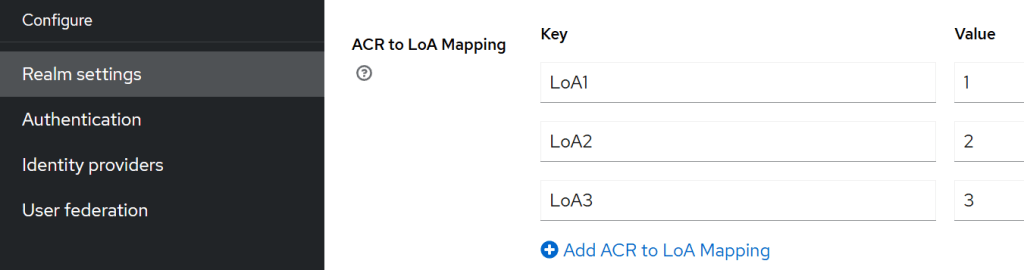
The application requirements are setup as follows:
- LoA1, Level 1, password
- LoA2, Level 2, authenticator app
- LoA3, Level 3, passkeys
The alias can be set on the Realm settings:
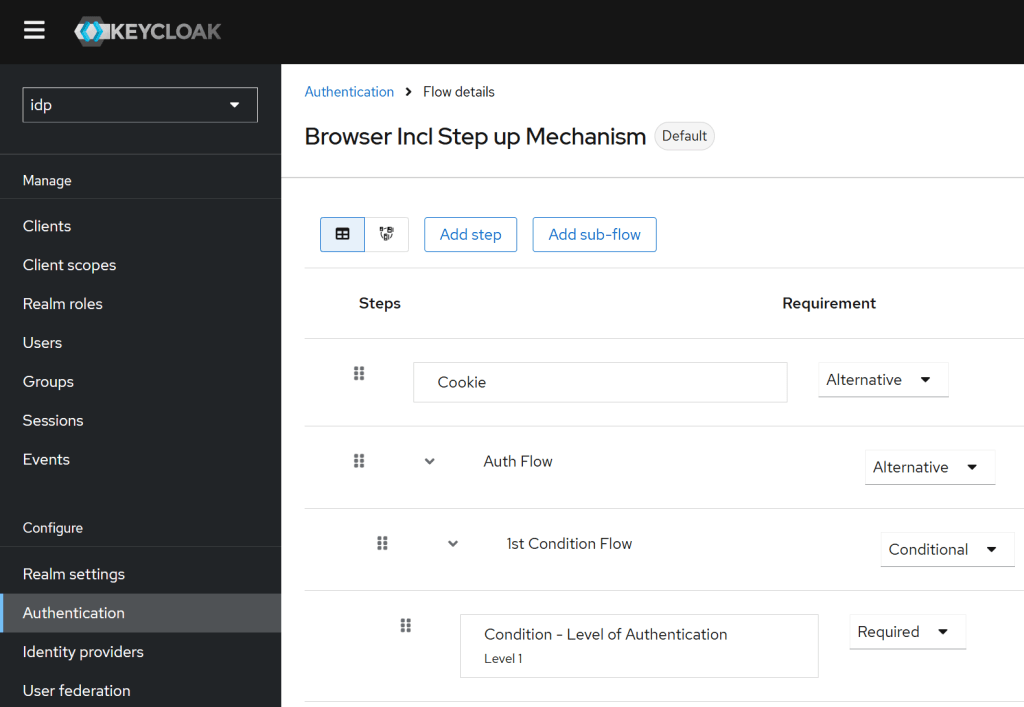
The client browser flow must be changed to support the LoA flow. In the flow the value of the level is setup as required. This was implemented following the Keycloak documentation.
Notes
The Level of authentication can be implemented and forced using Keycloak and the acr_values. If using different identity providers, it will need a different client implementation. All servers force this different.
It is important to validate the the correct level of authentication is returned to the client application. You should also validate the amr claim as well.
Some identity provider return errors if this is incorrect, some identity providers return a weaker value for this claim. The client must be implemented depending on the used identity provider.
Links
https://www.keycloak.org/docs/latest/server_admin/index.html#features
https://docs.duendesoftware.com/identityserver/fundamentals/openid-connect-events/

 Software Engineering
[…] Implement ASP.NET Core OpenID Connect with Keycloak to implement Level of Authentication (LoA) requi… (Damien Bowden) […]
[…] Implement ASP.NET Core OpenID Connect with Keycloak to implement Level of Authentication (LoA) requi… by Damien Bowden […]
[…] The authentication pyramid Implement ASP.NET Core OpenID Connect with Keycloak to implement Level of Authentication (LoA) … […]
[…] https://damienbod.com/2025/07/02/implement-asp-net-core-openid-connect-with-keykloak-to-implement-le… […]
[…] https://damienbod.com/2025/07/02/implement-asp-net-core-openid-connect-with-keykloak-to-implement-le… […]
[…] Digital Authentication and Identity validation Implement ASP.NET Core OpenID Connect with Keycloak to implement Level of Authentication (LoA) … […]
[…] Digital Authentication and Identity validation Implement ASP.NET Core OpenID Connect with Keycloak to implement Level of Authentication (LoA) … […]
[…] Digital Authentication and Identity validation Implement ASP.NET Core OpenID Connect with Keycloak to implement Level of Authentication (LoA) … […]
[…] Digital Authentication and Identity validation Implement ASP.NET Core OpenID Connect with Keycloak to implement Level of Authentication (LoA) … […]