This post looks at hardening the security for the swiyu public beta infrastructure. The generic containers provide both management APIs and wallet APIs which support the OpenID for Verifiable Presentations 1.0 specification. The management APIs require both network protection and application security. This post looks at implementing the network isolation.
Code: https://github.com/swiss-ssi-group/swiyu-passkeys-idp-loi-loa
Blogs in this series:
- Digital authentication and identity validation
- Set the amr claim when using passkeys authentication in ASP.NET Core
- Implementing Level of Authentication (LoA) with ASP.NET Core Identity and Duende
- Implementing Level of Identification (LoI) with ASP.NET Core Identity and Duende
- Force step up authentication in web applications
- Use client assertions in ASP.NET Core using OpenID Connect, OAuth DPoP and OAuth PAR
- Isolate the swiyu Public Beta management APIs using YARP
- Add Application security to the swiyu generic management verifier APIs using OAuth
Setup
The solution is setup to use an identity provider implemented using ASP.NET Core and Duende, a web application which authenticates using OpenID Connect from the IDP and an API which requires DPoP tokens for access. The swiyu generic container is only accessible in the internal network and the management APIs are not public. The YARP proxy is used for the external endpoints of the public beta generic container. Inside the internal network, the management APIs are fully open without protection. In a follow up post, the APIs can be secured using application security. Network security is not enough for this type of application. a zero trust strategy is required.
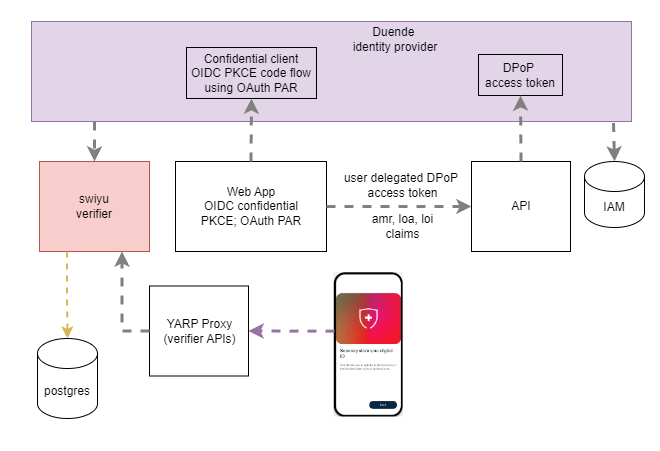
The proxy is implemented using the Yarp.ReverseProxy Nuget package. YARP is a high permormance reverse proxy. See the documentation.
Proxy configurations
When deploying and using YARP together with Aspire and containers, it is best to use code configuration together with the Aspire parameters. I created a YarpConfigurations class for this. Only the deployment dependent settings need to be passed into the setup. The class supports but the verifier and the generic container setups.
public static class YarpConfigurations
{
    public static RouteConfig[] GetVerifierRoutes()
    {
        return
        [
            new RouteConfig()
            {
                RouteId = "routeverifier",
                ClusterId = "clusterverifier",
                AuthorizationPolicy = "Anonymous",
                Match = new RouteMatch
                {
                    Path = "/oid4vp/{**catch-all}"
                }
            }
        ];
    }

    public static ClusterConfig[] GetVerifierClusters(string verifier)
    {
        return
        [
            new ClusterConfig()
            {
                ClusterId = "clusterverifier",
                Destinations = new Dictionary<string, DestinationConfig>
                {
                    { "destination1", new DestinationConfig() { Address = $"{verifier}/" } }
                },
                HttpClient = new HttpClientConfig {
MaxConnectionsPerServer = 10, SslProtocols =  SslProtocols.Tls12 }
            }
        ];
    }
}
The proxy is added to the server using the AddReverseProxy and the correct configurations. The Aspire parameters are passed in the method.
builder.Services.AddReverseProxy()
    .LoadFromMemory(YarpConfigurations.GetVerifierRoutes(),
        YarpConfigurations.GetVerifierClusters(
            builder.Configuration["SwiyuVerifierMgmtUrl"]!));
Using the proxy
The proxy is then used in the Aspire host project. The External endpoints are removed from the swiyu public beta generic container and the YARP proxy forwards only the verifier endpoints.
swiyuVerifier = builder.AddContainer("swiyu-verifier", "ghcr.io/swiyu-admin-ch/swiyu-verifier", "latest")
    // ...
    .WithHttpEndpoint(port: VERIFIER_PORT, targetPort: 8080, name: HTTP);

swiyuProxy = builder.AddProject<Projects.Swiyu_Endpoints_Proxy>("swiyu-endpoints-proxy")
    .WaitFor(swiyuVerifier)
    .WithEnvironment("SwiyuVerifierMgmtUrl", swiyuVerifier.GetEndpoint(HTTP))
    .WithExternalHttpEndpoints();

identityProvider = builder.AddProject<Projects.Idp_Swiyu_Passkeys_Sts>(IDENTITY_PROVIDER)
    .WithExternalHttpEndpoints()
    // ...
    .WaitFor(swiyuVerifier)
    .WaitFor(swiyuProxy);
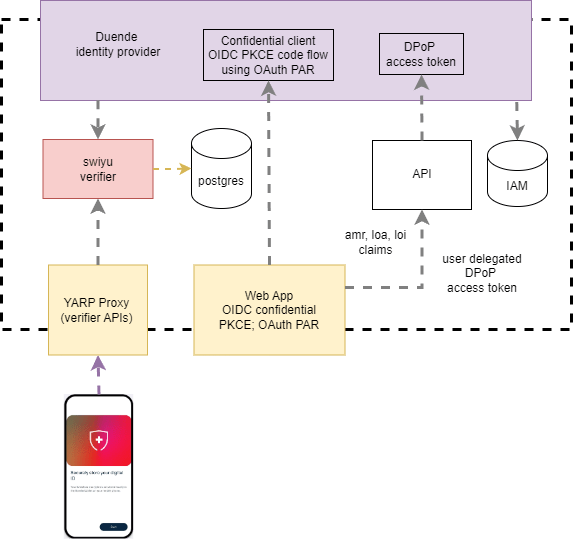
The solution now looks like the following diagram. The swiyu and the API have no public or external endpoints, the IDP, the web application and the proxy are public. See https://learn.microsoft.com/en-us/azure/container-apps/ingress-overview
Notes
This setup works good but the swiyu generic container still has no application security applied. The APIs must be protected as well as isolated.
Links
https://learn.microsoft.com/en-us/aspnet/core/fundamentals/servers/yarp/getting-started
https://github.com/dotnet/aspnetcore/issues/64881
https://openid.net/specs/openid-connect-eap-acr-values-1_0-final.html
https://datatracker.ietf.org/doc/html/rfc8176
https://learn.microsoft.com/en-us/aspnet/core/security/authentication/claims
SSI
https://www.eid.admin.ch/en/public-beta-e
https://learn.microsoft.com/en-us/dotnet/aspire/get-started/aspire-overview
https://www.npmjs.com/package/ngrok
https://swiyu-admin-ch.github.io/specifications/interoperability-profile/
https://andrewlock.net/converting-a-docker-compose-file-to-aspire/
https://swiyu-admin-ch.github.io/cookbooks/onboarding-generic-verifier/
https://github.com/orgs/swiyu-admin-ch/projects/2/views/2
SSI Standards
https://identity.foundation/trustdidweb/
https://openid.net/specs/openid-4-verifiable-credential-issuance-1_0.html
https://openid.net/specs/openid-4-verifiable-presentations-1_0.html
https://datatracker.ietf.org/doc/draft-ietf-oauth-selective-disclosure-jwt/
https://datatracker.ietf.org/doc/draft-ietf-oauth-sd-jwt-vc/
https://datatracker.ietf.org/doc/draft-ietf-oauth-status-list/

 Software Engineering
[…] Isolate the swiyu Public Beta management APIs using YARP […]
[…] Isolate the swiyu Public Beta management APIs using YARP […]
[…] Isolate the swiyu Public Beta management APIs using YARP […]
[…] Isolate the swiyu Public Beta management APIs using YARP […]
[…] Isolate the swiyu Public Beta management APIs using YARP […]
[…] Isolate the swiyu Public Beta management APIs using YARP […]
[…] Isolate the swiyu Public Beta management APIs using YARP (Damien Bowden) […]
[…] Isolate the swiyu Public Beta management APIs using YARP […]