The post shows how to set the correct amr value when authenticating using ASP.NET Core Identity and passkeys in .NET 10. When authenticating using OpenID Connect and passkeys authentication, the OpenID Connect Extended Authentication Profile (EAP) ACR Values 1.0 specification should be used for the implementation. The amr claim should return the pop value.
Blogs in this series:
- Digital authentication and identity validation
- Set the amr claim when using passkeys authentication in ASP.NET Core
- Implementing Level of Authentication (LoA) with ASP.NET Core Identity and Duende
- Implementing Level of Identification (LoI) with ASP.NET Core Identity and Duende
- Force step up authentication in web applications
- Use client assertions in ASP.NET Core using OpenID Connect, OAuth DPoP and OAuth PAR
- Isolate the swiyu Public Beta management APIs using YARP
- Add Application security to the swiyu generic management verifier APIs using OAuth
Setup
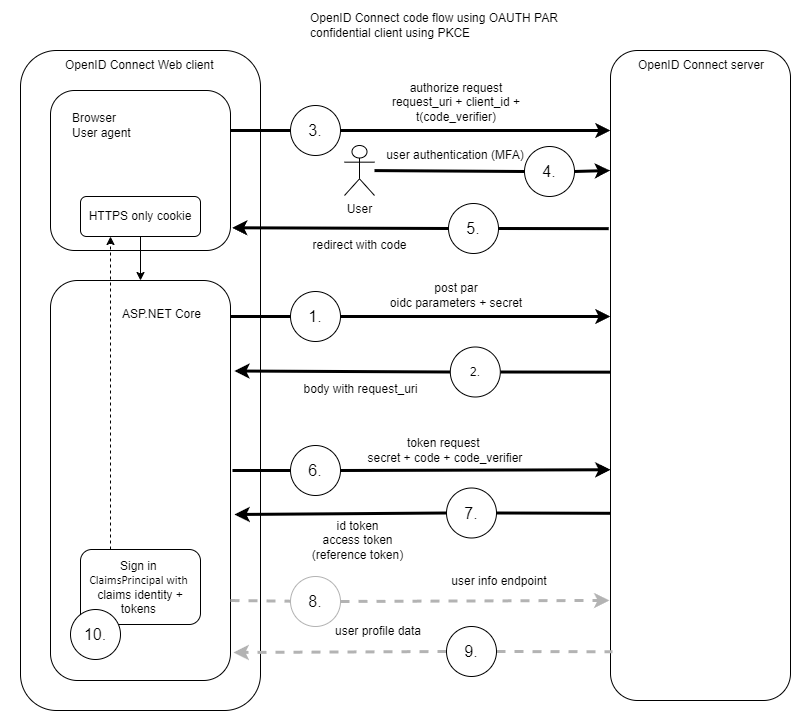
A typical web application would authenticate using OpenID Connect with client assertions and OAuth PAR. When the user authenticates, passkeys are used for the user authentication. The server returns claims to the client application and the amr claim is returned with the “pop” value.
Specifications
The following two specifications are used as the basis for the implementation.
- OpenID Connect Extended Authentication Profile (EAP) ACR Values 1.0
- RFC 8176 Authentication Method Reference Values
Set the amr value
The amr claim is set after a successful passkey authentication. At present, this is not implemented correctly in ASP.NET Core (.NET 10) and the amr claim needs to be set. The User.Claims array is immutable and so needs to be re-created.
result = await _signInManager.PasskeySignInAsync(
       Input.Passkey.CredentialJson);

if (result.Succeeded)
{
    user = await _userManager.GetUserAsync(User);

    // Sign out first to clear the existing cookie
    await _signInManager.SignOutAsync();

    // Create additional claims
    var additionalClaims = new List<Claim>
    {
        new Claim(Consts.LOA, Consts.LOA_400),
        new Claim(Consts.LOI, Consts.LOI_100),
        // ASP.NET Core bug workaround:
        // https://github.com/dotnet/aspnetcore/issues/64881
        new Claim(JwtClaimTypes.AuthenticationMethod, Amr.Pop)
    };

    // Sign in again with the additional claims
    await _signInManager.SignInWithClaimsAsync(
          user!, isPersistent: false, additionalClaims);
}
See the github issue about ASP.NET Core and the amr:
https://github.com/dotnet/aspnetcore/issues/64881
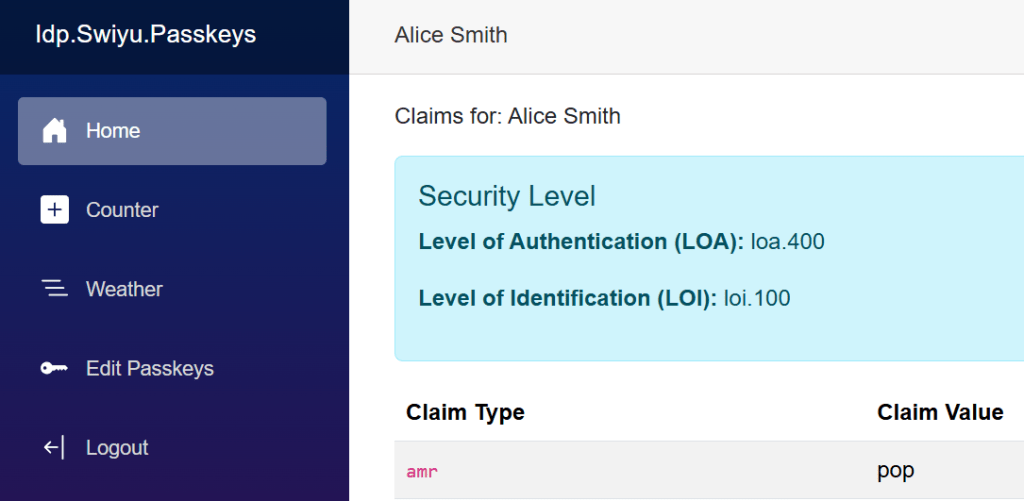
The web application displays the correct claims after a passkey authentication.
Force phishing resistant authentication
Using the specification “OpenID Connect Extended Authentication Profile (EAP) ACR Values 1.0”, the OpenID Connect client can force a phishing resistant authentication by setting the acr_values to “phr” or “phrh“. This would need to be supported on the OpenID Connect server.
The client would send the request using the OnRedirectToIdentityProvider method
OnRedirectToIdentityProvider = async context =>
{
    // Require passkeys
    context.ProtocolMessage.AcrValues = "phr";

    await Task.CompletedTask;
}
Or when using OAuth PAR, using the OnPushAuthorization method :
OnPushAuthorization = context =>
{
    // https://openid.net/specs/openid-connect-eap-acr-values-1_0-final.html
    context.ProtocolMessage.AcrValues = "phr";

    return Task.FromResult(0);
},
Examples of OpenID Connect server implementations:
- https://duendesoftware.com/blog/20250708-step-up-challenges-with-duende-identityserver-and-aspnet-core-apis
- https://damienbod.com/2025/07/02/implement-asp-net-core-openid-connect-with-keykloak-to-implement-level-of-authentication-loa-requirements/
Links
https://github.com/dotnet/aspnetcore/issues/64881
https://openid.net/specs/openid-connect-eap-acr-values-1_0-final.html
https://datatracker.ietf.org/doc/html/rfc8176
https://learn.microsoft.com/en-us/aspnet/core/security/authentication/claims

 Software Engineering
[…] Set the amr claim when using passkeys authentication in ASP.NET Core (Damien Bowden) […]
[…] Set the amr claim when using passkeys authentication in ASP.NET Core […]
[…] Set the amr claim when using passkeys authentication in ASP.NET Core […]
[…] Set the amr claim when using passkeys authentication in ASP.NET Core […]
[…] Set the amr claim when using passkeys authentication in ASP.NET Core […]
[…] Set the amr claim when using passkeys authentication in ASP.NET Core […]
[…] Set the amr claim when using passkeys authentication in ASP.NET Core […]
[…] Set the amr claim when using passkeys authentication in ASP.NET Core […]