This post looks at monitoring Azure Durable Functions, highlighting practical techniques and tools that can help ensure reliability and performance. It also demonstrates how diagnostic APIs can be integrated to provide deeper insights into function execution, state management, and error handling, enabling developers to build more resilient and observable workflows.
Code: https://github.com/damienbod/AzureDurableFunctions
History
- 2025-11-23 Updated to .NET 10, Azure functions V4, Azurite
Posts in this series
- Using External Inputs in Azure Durable functions
- Azure Functions Configuration and Secrets Management
- Using Key Vault and Managed Identities with Azure Functions
- Waiting for Azure Durable Functions to complete
- Azure Durable Functions Monitoring and Diagnostics
- Retry Error Handling for Activities and Orchestrations in Azure Durable Functions
Diagnostic APIs
Azure Functions could be used to add APIs which can request the status of the different orchestration instances or even complete lists of flows using the Azure Durable Function APIs.
The DurableTaskClient provides different APIs for displaying the state of the different orchestrations. The GetInstanceAsync method can be used to return the actual status of a single orchestration instance. The status can be returned with the history if required.
    private readonly ILogger<DiagnosticsApi> _logger;

    public DiagnosticsApi(ILogger<DiagnosticsApi> logger)
    {
        _logger = logger;
    }

    [Function(Constants.Diagnostics)]
    public async Task<IActionResult> Diagnostics(
     [HttpTrigger(AuthorizationLevel.Anonymous, "get", Route = null)] HttpRequest req,
     [DurableClient] DurableTaskClient starter)
    {
        string instanceId = req.Query["instanceId"];
        _logger.LogInformation("Started DiagnosticsApi with ID = '{instanceId}'.", instanceId);

        var data = await starter.GetInstanceAsync(instanceId, true);
        return new OkObjectResult(data);
    }
This can be viewed in the browser using a HTTP Get request with the instanceId query parameter.
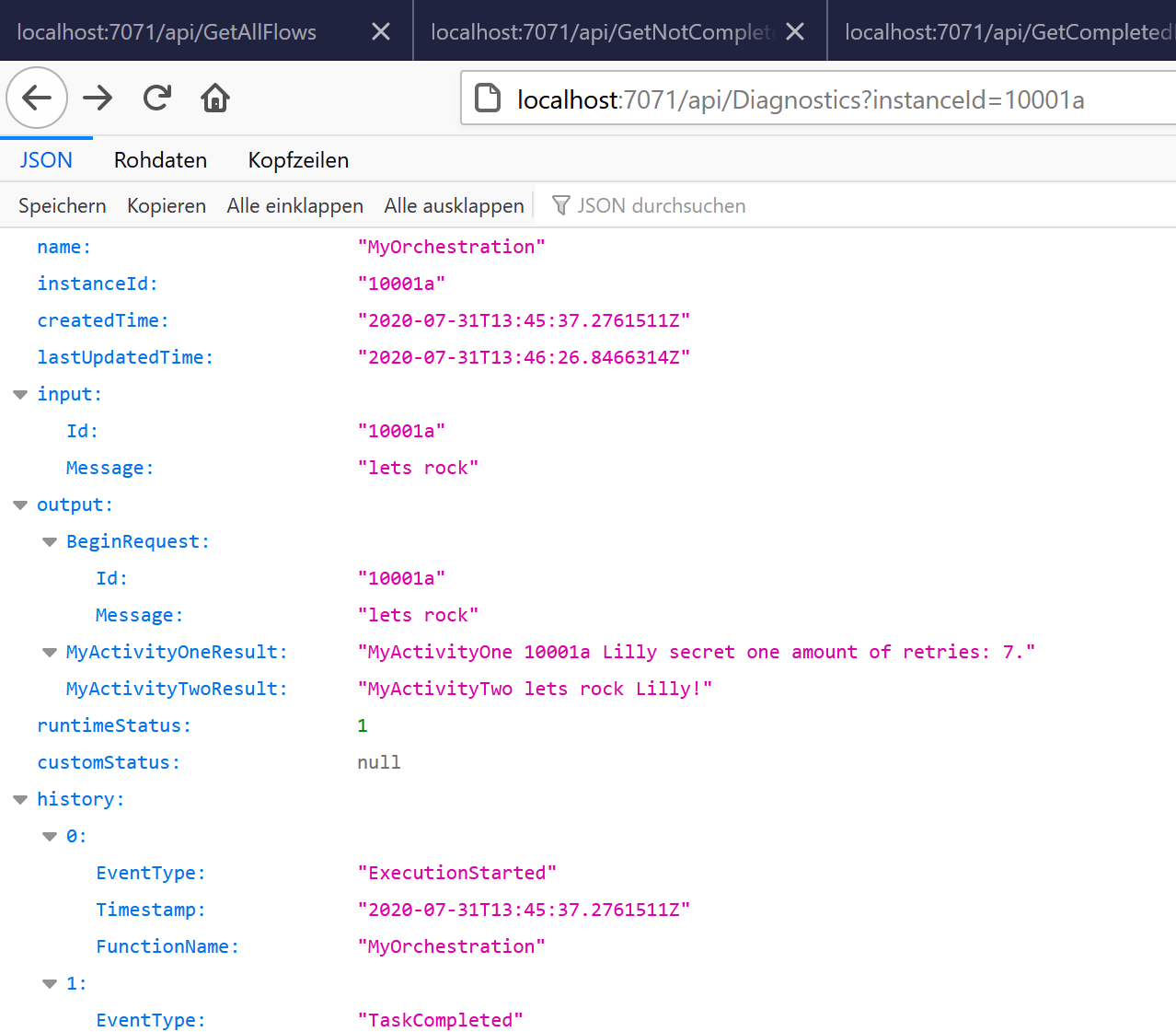
An Azure Function GetCompletedFlows can be implemented to return a list of orchestration as required. The following example returns all completed instances which ran in the last N days read from the query parameter days. If nothing is defined, the last day is returned.
[Function(Constants.GetCompletedFlows)]
public async Task<IActionResult> GetCompletedFlows(
[HttpTrigger(AuthorizationLevel.Anonymous, "get")] HttpRequest req,
[DurableClient] DurableTaskClient client)
{
  var runtimeStatus = new List<OrchestrationRuntimeStatus> {
	  OrchestrationRuntimeStatus.Completed
  };

  return await FindOrchestrations(req, client, runtimeStatus,
	  DateTime.UtcNow.AddDays(GetDays(req)),
	  DateTime.UtcNow, true);
}

private static int GetDays(HttpRequest req)
{
    string daysString = req.Query["days"];
    if (!string.IsNullOrEmpty(daysString))
    {
        var ok = int.TryParse(daysString, out int days);
        if (!ok)
        {
            return -1;
        }
        return -days;
    }

    return -1;
}
The FindOrchestrations method performs a search for orchestration instances by leveraging the GetAllInstancesAsync method from the DurableTaskClient interface in Azure Durable Functions. It constructs an OrchestrationQuery that specifies the time range, runtime statuses, and whether to include inputs and outputs. The OrchestrationRuntimeStatus parameter allows filtering by instance state, such as Running, Completed, or Failed, providing flexibility for targeted queries. The method then asynchronously iterates through all matching instances and returns the results as an OkObjectResult.
 private async Task<IActionResult> FindOrchestrations(
     HttpRequest req,
     DurableTaskClient client,
     IEnumerable<OrchestrationRuntimeStatus> runtimeStatus,
     DateTime from,
     DateTime to,
     bool showInput = false)
 {
     var query = new OrchestrationQuery(
         CreatedFrom: from,
         CreatedTo: to,
         Statuses: runtimeStatus,
         FetchInputsAndOutputs: showInput
     );

     var instances = new List<OrchestrationMetadata>();
     await foreach (var page in client.GetAllInstancesAsync(query))
     {
         instances.Add(page);
     }

     return new OkObjectResult(instances);
 }
When the functions are running, the data can be viewed directly in the browser using a simple GET request. If processing senstive data, these APIs would have to be secured.

Durable Functions Monitor
DurableFunctionsMonitor provides another way of monitoring your Azure Durable Functions. This is an excellent OSS project which can be added to Visual Studio Code as an extension or used directly.
https://github.com/microsoft/DurableFunctionsMonitor
For local development, the Azure functions core tools are required.
npm install -g azure-functions-core-tools@4 --unsafe-perm true
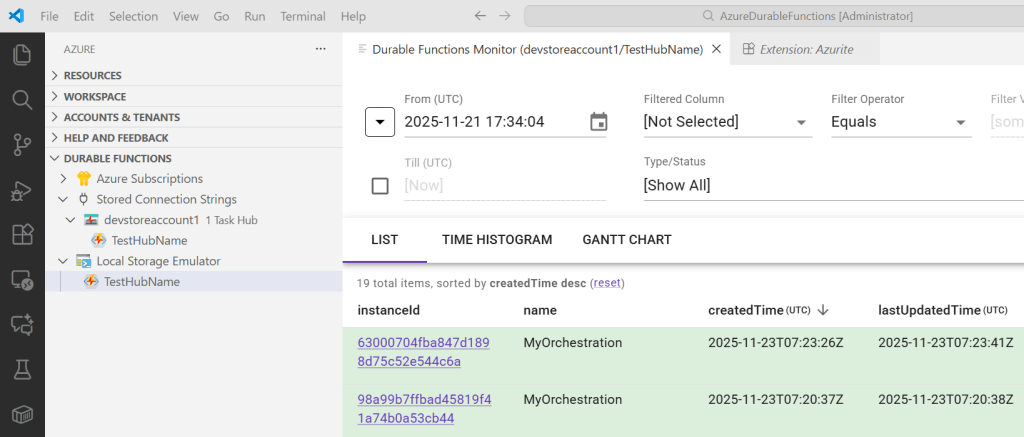
I added this to Visual Studio Code as an extension. Once installed, you need to configure this. In the Visual Studio Code explorer, you should have a Durable Function menu. Click the plug and add your connection string to your storage. This can be found using the Azure Storage Explorer/Azurite and when you click the Storage Account, which you want to view, the properties will display your connection string.
Microsoft Azurite
https://learn.microsoft.com/en-us/azure/storage/common/storage-install-azurite
https://learn.microsoft.com/en-us/azure/storage/common/storage-use-azurite
https://github.com/Azure/Azurite
Then you need to select the Durable Function Hub. This can be found in the Storage Explorer in the Tables. You will have one for the History and one for the Instances. Use the name before this.
Now the Functions can be viewed and active requests can be used like purge, terminate and so on.
Azure Durable Functions are built using Azure Functions which is an Azure App Service. This also provides further monitoring and diagnostic APIs for further standard monitoring.
Links:
https://github.com/microsoft/DurableFunctionsMonitor
https://www.npmjs.com/package/azure-functions-core-tools
https://docs.microsoft.com/en-us/azure/azure-functions/durable/
https://github.com/Azure/azure-functions-durable-extension
Running Local Azure Functions in Visual Studio with HTTPS
Microsoft Azure Storage Explorer
Microsoft Azure Storage Emulator

 Software Engineering
[…] Azure Durable Functions Monitoring and Diagnostics – Damien Bowden […]
[…] Azure Durable Functions Monitoring and Diagnostics (Damien Bowden) […]