This post shows how to implement an Azure Durable function flow with an external HTTP API input. The flow is started using a HTTP request, runs an activity, waits for the external input from a HTTP API which could be any Azure function input and then runs a second activity. The application is implemented using C# and uses Version 4 Azure functions.
Code: https://github.com/damienbod/AzureDurableFunctions
History
- 2025-11-23 Updated to .NET 10, Azure functions V4, Azurite
Posts in this series
- Using External Inputs in Azure Durable functions
- Azure Functions Configuration and Secrets Management
- Using Key Vault and Managed Identities with Azure Functions
- Waiting for Azure Durable Functions to complete
- Azure Durable Functions Monitoring and Diagnostics
- Retry Error Handling for Activities and Orchestrations in Azure Durable Functions
Azure Durable Functions
Azure Durable functions provides a simple way of implementing workflows in a serverless architecture. Durable functions are built on top of Azure functions and supports chaining, Fan-out/fan-in, external inputs, stateful flows, eternal flows with excellent diagnostic and monitoring APIs.
Durable function Orchestration
Orchestrations connect the activities of workflows or sub orchestrations together. The flows can be stateful and are slightly uncharacteristic to normal application code execution. The code in the orchestration can be re-run many times, but the activities are only run once. The results of the activities are always returned. The orchestration function code must be deterministic. The orchestrations are durable and reliable. When the code is run the first time, it is not replaying and after this, the part of the code is replaying. This can be checked with the IsReplaying property of the IDurableOrchestrationContext context. Every time the orchestration is started, it uses an instance ID to connect to the future steps , past steps. You can provide your own instance ID or auto generate this.
Further docs can be found here.
using Microsoft.Azure.Functions.Worker;
using Microsoft.DurableTask;
using Microsoft.Extensions.Logging;
using MyAzureFunctions.Model;

namespace MyAzureFunctions.Orchestrations;

public class MyOrchestration
{
    private readonly ILogger<MyOrchestration> _logger;

    public MyOrchestration(ILogger<MyOrchestration> logger)
    {
        _logger = logger;
    }

    [Function(Constants.MyOrchestration)]
    public async Task<MyOrchestrationDto> RunOrchestrator(
        [OrchestrationTrigger] TaskOrchestrationContext context)
    {
        var myOrchestrationDto = new MyOrchestrationDto
        {
            InputStartData = context.GetInput<string>()
        };

        if (!context.IsReplaying)
        {
            _logger.LogWarning("begin MyOrchestration with input {input}", context.GetInput<string>());
        }

        var myActivityOne = await context.CallActivityAsync<string>(
            Constants.MyActivityOne, context.GetInput<string>());

        myOrchestrationDto.MyActivityOneResult = myActivityOne;

        if (!context.IsReplaying)
        {
            _logger.LogWarning("myActivityOne completed {myActivityOne}", myActivityOne);
        }

        var myActivityTwoInputEvent = await context.WaitForExternalEvent<string>(
            Constants.MyExternalInputEvent);
        mrn myOrchestrationDto;
    }
}
Durable function Activities
Activities are normally only executed once for each run of a flow. The activity can use the IDurableActivityContext as an input parameter, or some typed parameter. You can only pass a single param to an activity. This is where you can implement the business of the flow. The orchestration glues this together. The result of the activity can be used many times, but the activity itself is only run once, unless using the ContinueAsNew method.
using Microsoft.Azure.Functions.Worker;
using Microsoft.Extensions.Logging;
using Microsoft.Extensions.Options;

namespace MyAzureFunctions.Activities;

public class MyActivities
{
    private readonly MyConfiguration _myConfiguration;
    private readonly MyConfigurationSecrets _myConfigurationSecrets;
    private readonly ILogger<MyActivities> _logger;

    public MyActivities(ILogger<MyActivities> logger, IOptions<MyConfiguration> myConfiguration,
        IOptions<MyConfigurationSecrets> myConfigurationSecrets)
    {
        _myConfiguration = myConfiguration.Value;
        _myConfigurationSecrets = myConfigurationSecrets.Value;
        _logger = logger;
    }

    [Function(Constants.MyActivityOne)]
    public string MyActivityOne([ActivityTrigger] string name)
    {
        _logger.LogInformation("Activity {myActivityOne} {name} {myConfigurationName} {myConfigurationSecretsMySecretOne} amount of retries: {myConfigurationAmountOfRetries}.",
            Constants.MyActivityOne, name, _myConfiguration.Name, _myConfigurationSecrets.MySecretOne, _myConfiguration.AmountOfRetries);

        return $"{Constants.MyActivityOne} {name} {_myConfiguration.Name} {_myConfigurationSecrets.MySecretOne} amount of retries: {_myConfiguration.AmountOfRetries}.";
    }

    [Function(Constants.MyActivityTwo)]
    public string MyActivityTwo([ActivityTrigger] string name)
    {
        _logger.LogInformation("Activity {myActivityTwo}  {name} {_myConfiguration.Name}.",
            Constants.MyActivityTwo, name, _myConfiguration.Name);

        return $"{Constants.MyActivityTwo} {name} {_myConfiguration.Name}!";
    }
}
External Input
External inputs in a workflow are extremely useful when waiting for an HTTP call, any UI user event, or any external events. A timer can be set to execute a separate flow result if the event is not called or completed within a certain time limit. This can be very useful. The example below is waiting for an API call with the instance ID and raises the event with the data intended for the flow. The orchestration would then continue with the next part of the flow using the data from this event code.
using Microsoft.AspNetCore.Http;
using Microsoft.AspNetCore.Mvc;
using Microsoft.Azure.Functions.Worker;
using Microsoft.DurableTask.Client;
using Microsoft.Extensions.Logging;

namespace MyAzureFunctions.Apis;

public class ExternalHttpPostInput
{
    private readonly ILogger<ExternalHttpPostInput> _logger;

    public ExternalHttpPostInput(ILogger<ExternalHttpPostInput> logger)
    {
        _logger = logger;
    }

    [Function(Constants.ExternalHttpPostInput)]
    public async Task<IActionResult> Run(
        [HttpTrigger(AuthorizationLevel.Anonymous, "get", "post", Route = null)] HttpRequest req,
        [DurableClient] DurableTaskClient client)
    {
        string instanceId = req.Query["instanceId"];
        var status = await client.GetInstanceAsync(instanceId);
        await client.RaiseEventAsync(instanceId, Constants.MyExternalInputEvent, "inputDataTwo");

        _logger.LogInformation("C# HTTP trigger function processed a request.");

        string responseMessage = string.IsNullOrEmpty(instanceId)
            ? "This HTTP triggered function executed successfully. Pass an instanceId in the query string"
            : $"Received, processing, {instanceId}";

        return new OkObjectResult(responseMessage);
    }
}
Start the flow with an HTTP API call
The orchestration is started using the StartNewAsync method. The example starts this with a null for the instance ID so that a new ID is auto generated.
using Microsoft.AspNetCore.Http;
using Microsoft.AspNetCore.Mvc;
using Microsoft.Azure.Functions.Worker;
using Microsoft.DurableTask.Client;
using Microsoft.Extensions.Logging;

namespace MyAzureFunctions.Apis;

public class BeginFlowWithHttpPost
{
    private readonly ILogger<BeginFlowWithHttpPost> _logger;

    public BeginFlowWithHttpPost(ILogger<BeginFlowWithHttpPost> logger)
    {
        _logger = logger;
    }

    [Function(Constants.BeginFlowWithHttpPost)]
    public async Task<IActionResult> HttpStart(
      [HttpTrigger(AuthorizationLevel.Anonymous, "get", "post")] HttpRequest req,
      [DurableClient] DurableTaskClient starter)
    {
        string instanceId = await starter.ScheduleNewOrchestrationInstanceAsync(Constants.MyOrchestration, "input data to start flow");
        _logger.LogInformation("Started orchestration with ID = '{instanceId}'.", instanceId);

        return new OkObjectResult(new { instanceId });
    }
}
When the API is requested, the flow starts and the durable function details are returned. This would need to be changed in a production app, security would be required, only a post request should be supported and properly logging, diagnostics would need to be supported.

The state of the flow can be viewed using the statusQueryGetUri link.
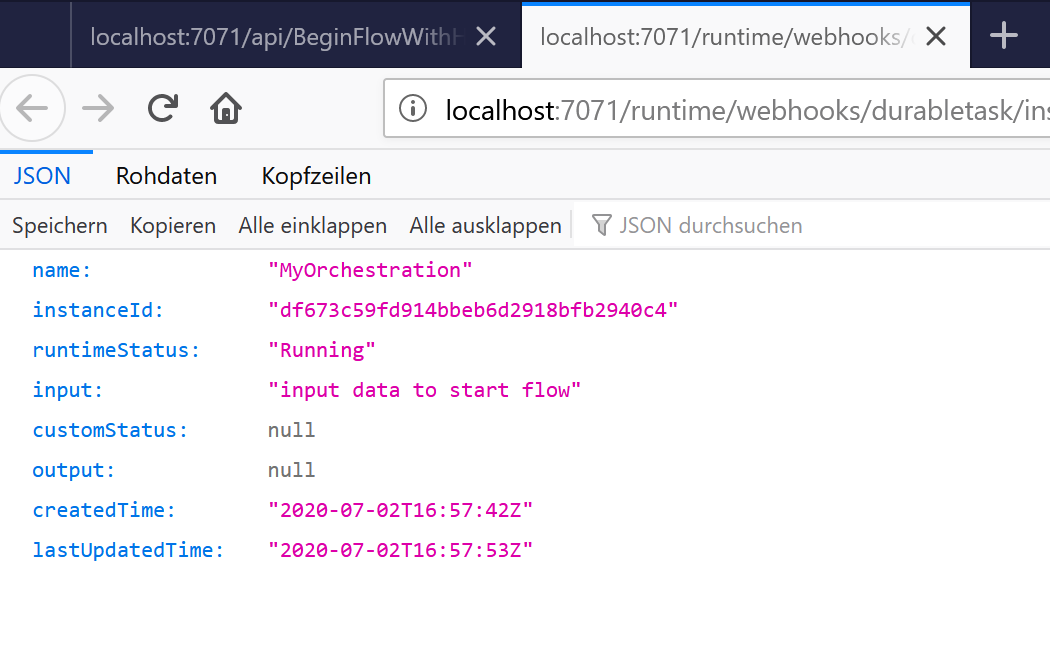
After the external HTTP is called, the flow continues. The state is then updated, and the end result can be viewed, used in any way.
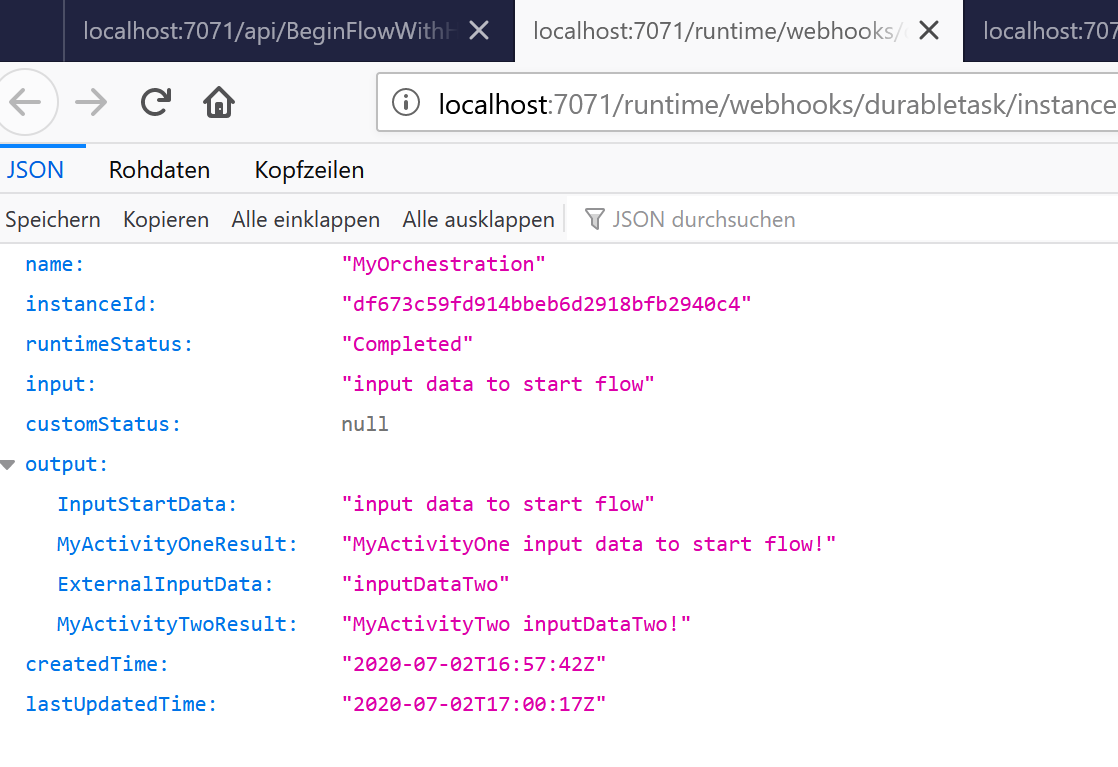
Links:
https://docs.microsoft.com/en-us/azure/azure-functions/durable/
https://github.com/Azure/azure-functions-durable-extension
Running Local Azure Functions in Visual Studio with HTTPS
Microsoft Azure Storage Explorer
Microsoft Azure Storage Emulator

 Software Engineering
[…] Using External Inputs in Azure Durable functions (Damien Bowden) […]
[…] Using External Inputs in Azure Durable functions — Software Engineering […]
[…] Using External Inputs in Azure Durable functions […]
[…] Using External Inputs in Azure Durable functions […]