Category .NET
Restricting access to an Azure AD protected API using Azure AD Groups
This post shows how to restrict access to an ASP.NET Core API to only allow users from a defined Azure AD group to use a protected API. The API uses an Azure App registration for authorization. The user signs in with an ASP.NET Core Razor page application or an Angular App and can access the […]
Angular SPA with an ASP.NET Core API using Azure AD Auth and user access tokens
This post shows how to authenticate an Angular SPA application using Azure AD and consume secure data from an ASP.NET Core API which is protected by Azure AD. Azure AD App registrations are used to configure and setup the authentication and authorization. The Angular application uses the OpenID Connect Code flow with PKCE and the […]
Login and use an ASP.NET Core API with Azure AD Auth and user access tokens
In this blog post, Azure AD will be setup and used to authenticate and authorize an ASP.NET core Razor Page application which uses an API from a separate ASP.NET Core MVC project. User access tokens are used to access to API, so that an email can be used in the API. The API is not […]
Configure a domain for an Azure App Service using Cloudflare
This blog shows how to create an Azure App Service with a custom domain using Cloudflare to configure the domain name servers. The post used the following blog from Matteo for the original setup: Serving your Azure App Service under your custom domain To create a custom domain for an Azure App Service, you require […]
Add git tags and versioning to mark Deployments in Azure DevOps Pipelines
This post shows how to tag to a git repository after a successful deployment or release. The tag is created using the version number of the build. The version number can be changed or set using Nerdbank.GitVersioning. The DevOps extension Tag\Branch Git on Release by Michael Barry was used to implement the tagging. This extension […]
Create, Build, Deploy and Configure an Azure App Service with Azure DevOps and Azure CLI
This post shows how to create, build, deploy and configure an Azure App Service using Azure DevOps, Azure CLI and Powershell. An Azure Service is created in Azure using Azure DevOps with Azure CLI and Powershell. The Azure App Service is created and built using ASP.NET Core and Visual Studio. This solution is deployed to […]
Using Certificates from Azure Key Vault in ASP.NET Core
This post shows how you can create and use X509 certificates in Azure Key Vault. The certificates are created using Azure CLI and are used inside an ASP.NET Core application. Code: StsServerIdentity/Services/Certificate Setup using Azure CLI Azure CLI can be used to setup the Azure Key Vault and also create certificates for an existing Key […]
Create, Build, Deploy and Configure an Azure Function with Azure DevOps and Azure CLI
This post shows how to create, build, deploy and configure an Azure Function using Azure DevOps, Azure CLI and Powershell. An Azure Function is created in Azure using Azure DevOps with Azure CLI and Powershell. The Azure Function (V3) project is created and built using Visual Studio and C#. This project is deployed to the […]
Publish Nuget packages in Azure DevOps Pipelines
In Azure DevOps, Pipelines can be used to build your solution, create a Nuget package and publish the Nuget package to the Nuget feed for further usage. This post shows how you can implement this and use the new Nuget package in Visual Studio. Setup Azure DevOps project and git Repository Open the required Azure […]
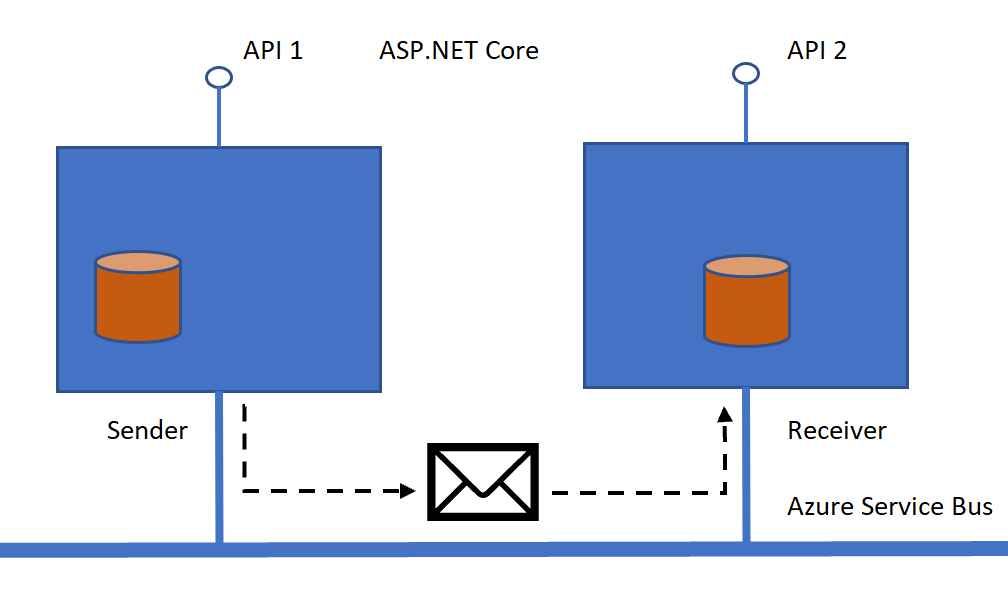
Using Azure Service Bus with restricted access
Azure Service Bus provides many ways to setup different access levels for all types of things like the bus itself, queues, topics or subscriptions. In this post some of the ways to configure the different access levels for a queue sender will be shown. In this demo we want to allow only send access rights […]


