The article shows how to implement a secure model context protocol (MCP) server using OAuth and Entra ID. The MCP server is implemented using ASP.NET Core and uses Microsoft Entra ID to secure the API. An ASP.NET Core application using Azure OpenAI and semantic kernel is used to implement the MCP client for the agent access.
Code: https://github.com/damienbod/McpSecurity
Setup
The solution is implemented in two separate ASP.NET Core services and uses Azure OpenAI to implement the agent and the LLM processing. The MCP Server is implemented using the ModelContextProtocol.AspNetCore Nuget package together with Microsoft.Identity.Web to secure the API (MCP server). The MCP client can be implemented and used in the ASP.NET Core web application. This client authenticates using Microsoft Entra ID and the Microsoft.Identity.Web Nuget package. The client uses Azure OpenAI to process the prompts.

Looking at a more detailed view of this setup and how this could be implemented using Entra ID, Azure OpenAI, it can be implemented with two App registrations. The web application needs to ability to use a secret (or client assertion) and can use a confidential flow for authentication. The scope is validated to ensure delegated access tokens are used which are intended for the MCP server.

Implement a secure MCP server
Setting up a MCP server is fairly straight forward in .NET when using the ModelContextProtocol.AspNetCore Nuget package. This provides the extension methods and you only need to define the MCP tools which the MCP server provides. The MCP server is an API and can be secured using a delegated access token from Microsoft Entra ID. As we intend that the users of the MCP server are identities created for users with a client application, the server MUST only accept delegated access tokens. We can force this by validating the scp claim as well as all the recommended JWT OAuth required validations. This can be implemented using the Microsoft.Identity.Web Nuget packages using the AddMicrosoftIdentityWebApiAuthentication method.
builder.Services.AddMicrosoftIdentityWebApiAuthentication(builder.Configuration);
var httpMcpServerUrl = builder.Configuration["HttpMcpServerUrl"];

builder.Services.AddAuthentication()
.AddMcp(options =>
{
    options.ResourceMetadata = new()
    {
        Resource = new Uri(httpMcpServerUrl),
        ResourceDocumentation = new Uri("https://mcpoauthsecurity-hag0drckepathyb6.westeurope-01.azurewebsites.net/health"),
        //AuthorizationServers = { new Uri(inMemoryOAuthServerUrl) },
        ScopesSupported = ["mcp:tools"],
    };
});

builder.Services.AddAuthorization();

builder.Services
       .AddMcpServer()
       .WithHttpTransport()
       .WithTools<RandomNumberTools>()
       .WithTools<DateTools>()
       .WithTools<WeatherTools>();

// Add CORS for HTTP transport support in browsers
builder.Services.AddCors(options =>
{
    options.AddDefaultPolicy(policy =>
    {
        policy.AllowAnyOrigin()
              .AllowAnyHeader()
              .AllowAnyMethod();
    });
});

builder.Services.AddHttpClient();

// change to scp or scope if not using magic namespaces from MS
// The scope must be validated as we want to force only delegated access tokens
// The scope is requires to only allow access tokens intended for this API
builder.Services.AddAuthorizationBuilder()
  .AddPolicy("mcp_tools", policy =>
        policy.RequireClaim("http://schemas.microsoft.com/identity/claims/scope", "mcp:tools"));
The authentication and authorization middleware can be added the the MCP endpoint and requires a valid Microsoft Entra ID token with the required scp claim and value to use this service. The “mcp_tools” policy is used to force this.
// Configure the HTTP request pipeline.
app.UseHttpsRedirection();

// Enable CORS
app.UseCors();

app.MapGet("/health", () => $"Secure MCP server running deployed: UTC: {DateTime.UtcNow}, use /mcp path to use the tools");

app.UseAuthentication();
app.UseAuthorization();

app.MapMcp("/mcp").RequireAuthorization("mcp_tools");
Implement a MCP client in ASP.NET Core
Now that we have a secure MCP server, we can create a client to consume the API. I implemented my first client using ASP.NET Core and Azure OpenAI. The ASP.NET Core application is secured using OpenID Connect code flow with PKCE. This is implemented using Microsoft Entra ID as the OIDC server and the AddMicrosoftIdentityWebApp extension method from the Microsoft.Identity.Web Nuget package. The agent logic using Azure OpenAI is implemented in the ChatService service.
var builder = WebApplication.CreateBuilder(args);

builder.Services.AddAuthentication(OpenIdConnectDefaults.AuthenticationScheme)
    .AddMicrosoftIdentityWebApp(builder.Configuration.GetSection("AzureAd"))
    .EnableTokenAcquisitionToCallDownstreamApi(["api://96b0f495-3b65-4c8f-a0c6-c3767c3365ed/mcp:tools"])
    .AddInMemoryTokenCaches();

builder.Services.AddAuthorization(options =>
{
    // By default, all incoming requests will be authorized according to the default policy.
    options.FallbackPolicy = options.DefaultPolicy;
});

builder.Services.AddRazorPages()
    .AddMicrosoftIdentityUI();

builder.Services.AddScoped<ChatService>();

var app = builder.Build();

// Configure the HTTP request pipeline.
if (!app.Environment.IsDevelopment())
{
    app.UseExceptionHandler("/Error");
    // The default HSTS value is 30 days. You may want to change this for production scenarios, see https://aka.ms/aspnetcore-hsts.
    app.UseHsts();
}

app.UseHttpsRedirection();

app.UseRouting();

app.UseAuthorization();

app.MapStaticAssets();
app.MapRazorPages()
   .WithStaticAssets();
app.MapControllers();

app.Run();
When the user is authenticated, an id_token is returned for the user and the application. The identity can request a delegated access token for the MCP Server. This is implemented by requesting the scope required by the API. Our MCP server only accepts delegated access tokens.
ChatService
The Microsoft.SemanticKernel Nuget package is used to implement the agent logic using Azure OpenAI. A HttpClient is used for access to the MCP server. The delegated access token can be used as a Bearer token and the MCP server functions can be called in the agent logic.
public class ChatService
{
    private readonly IConfiguration _configuration;
    private readonly ElicitationCoordinator _elicitationCoordinator;
    private Kernel _kernel;
    private IMcpClient _mcpClient = null!;
    private bool _initialized;
    private ApprovalMode _mode = ApprovalMode.Manual;
    private readonly ITokenAcquisition _tokenAcquisition;

    private PromptingService? _promptingService;

    public ChatService(IConfiguration configuration, ElicitationCoordinator elicitationCoordinator, ITokenAcquisition tokenAcquisition)
    {
        _configuration = configuration;
        _elicitationCoordinator = elicitationCoordinator;
        var config = new ConfigurationBuilder()
            .AddUserSecrets<Program>()
            .Build();
        _kernel = SemanticKernelHelper.GetKernel(config);
        _tokenAcquisition = tokenAcquisition;
    }

    public void SetMode(ApprovalMode mode)
    {
        if (_mode != mode)
        {
            _initialized = false;
            _mode = mode;
        }
    }

    public async Task EnsureSetupAsync(IHttpClientFactory clientFactory)
    {
        if (_initialized) return;

        var accessToken = await _tokenAcquisition
            .GetAccessTokenForUserAsync([_configuration["McpScope"]!]);

        _mcpClient = await McpClientFactory.CreateAsync(CreateMcpTransport(clientFactory, accessToken), GetMcpOptions());
        await _kernel.ImportMcpClientToolsAsync(_mcpClient);

        _promptingService = new PromptingService(_kernel, autoInvoke: _mode == ApprovalMode.Elicitation);
        _initialized = true;
    }

    private McpClientOptions? GetMcpOptions()
    {
        return _mode == ApprovalMode.Elicitation ? new McpClientOptions
        {
            ClientInfo = new() { Name = "WebElicitationClient", Version = "1.0.0" },
            Capabilities = new() { Elicitation = new() { ElicitationHandler = HandleElicitationAsync } }
        } : null;
    }

    // Inlined former WebElicitationHandler logic
    private ValueTask<ElicitResult> HandleElicitationAsync(ElicitRequestParams? requestParams, CancellationToken token)
    {
        return _elicitationCoordinator.HandleAsync(requestParams, token);
    }

    private IClientTransport CreateMcpTransport(IHttpClientFactory clientFactory, string accessToken)
    {
        var httpClient = clientFactory.CreateClient();
        httpClient.DefaultRequestHeaders.Authorization = new AuthenticationHeaderValue("Bearer", accessToken);
        var httpMcpServerUrl = _configuration["HttpMcpServerUrl"] ?? throw new ArgumentNullException("Configuration missing for HttpMcpServerUrl");
        return new SseClientTransport(new() { Endpoint = new Uri(httpMcpServerUrl), Name = "Secure Client" }, httpClient);
    }

    private PromptingService Handler => _promptingService ?? throw new InvalidOperationException("Service not initialized");

    public Task<ChatResponse> BeginChatAsync(string userKey, string prompt) => Handler.BeginAsync(userKey, prompt);
    public Task<ChatResponse> ApproveFunctionAsync(string userKey, string functionId) => Handler.ApproveAsync(userKey, functionId);
    public Task<ChatResponse> DeclineFunctionAsync(string userKey, string functionId) => Handler.DeclineAsync(userKey, functionId);
}
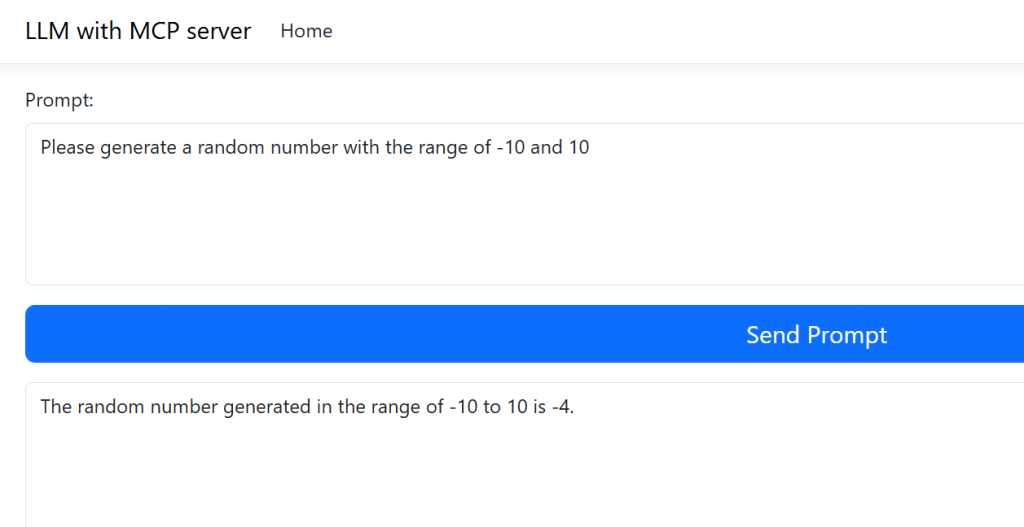
Prompts can be sent from the UI and the MCP server can be used. I used a simple Razor page application for the UI logic.
 public async Task<IActionResult> OnPostAsync()
 {
        if (!ModelState.IsValid)
        {
            return OnGet();
        }

        _chatService.SetMode(SelectedMode);
        await _chatService.EnsureSetupAsync(_clientFactory);

        // Begin a fresh chat with the prompt
        var response = await _chatService.BeginChatAsync(GetUserKey(), Prompt);
        PromptResults = response.FinalAnswer;
        PendingFunctions = response.PendingFunctions;
        return Page();
 }
When the Web application is started, the authenticated user can send prompt requests which can use the MCP server through the OpenAI.
Notes
This works solid and the scope of the MCP server is restricted to a user identity, i.e. a delegated access token. Entra ID works great for enterprise type solutions which don’t have cloud restrictions. Azure OpenAI is easy to implement using the provided Nuget packages. OAuth DCR is not used. It is important to validate the scope in the MCP server to prevent clients using application identities.
Links
https://github.com/microsoft/azure-devops-mcp
https://auth0.com/blog/an-introduction-to-mcp-and-authorization/
https://learning.postman.com/docs/postman-ai-agent-builder/mcp-server-flows/mcp-server-flows/
https://stytch.com/blog/MCP-authentication-and-authorization-guide/
.NET MCP server
https://learn.microsoft.com/en-us/dotnet/ai/quickstarts/build-mcp-server
Standards, draft Standards
OAuth 2.0 Dynamic Client Registration Protocol
OAuth 2.0 Authorization Server Metadata
https://modelcontextprotocol.io/specification/2025-06-18/basic/authorization
https://modelcontextprotocol.io/specification/2025-06-18/basic/security_best_practices
https://github.com/modelcontextprotocol/modelcontextprotocol/issues/1299
https://den.dev/blog/mcp-authorization-resource/
SPIFFE
https://spiffe.io/docs/latest/spiffe-about/overview/

 Software Engineering
[…] Implement a secure MCP server using OAuth and Entra ID (Damien Bowden) […]
[…] MCP server from the previous post; Implement a secure MCP server using OAuth and Entra ID is used by the new client. It only accepts delegated access tokens from Microsoft Entra ID for a […]