The post shows how features toggles or feature switches can be implemented in an ASP.NET Core application using Blazor. The Microsoft.FeatureManagement Nuget package is used to add the feature toggles.
Code: https://github.com/damienbod/AspNetCoreFeatures.Toggles

Setup
The Blazor application is a simple ASP.NET core hosted application using Azure AD for the identity provider. Both the Server and the Client applications need to implement the feature toggle.
The Blazor Server project is an ASP.NET Core application. This uses the Microsoft.FeatureManagement.AspNetCore Nuget package. The Client application is a Blazor WASM project and uses the Microsoft.FeatureManagement package.
Blazor Server
The AddFeatureManagement can be used to added the services to add or remove features. I added a feature specific service which is only added is the feature is activated. This is read from teh server app settings.
services.AddFeatureManagement();

var featureXEnabled = configuration.GetValue<bool>("FeatureManagement:FeatureX");

if(featureXEnabled)
{
    services.AddScoped<FeatureXService>();
}
The FeatureXApiController is used to make the feature business available for the Blazor UI. In this example, the IFeatureManager is used to check if the feature is enabled. If enabled, the business is called, otherwise a 404 is returned.
private IFeatureManager _featureManager;
private readonly FeatureXService _featureXService;

public FeatureXApiController(IFeatureManager featureManager,

	FeatureXService featureXService)
{
	_featureManager = featureManager;
	_featureXService = featureXService;
}

[HttpGet]
public async Task<IActionResult> GetAsync()
{
	var featureX = await _featureManager
		.IsEnabledAsync(Features.FEATUREX);

	if(featureX)
	{
		return Ok(new List<string> {
			"some data",
			"more data",
			_featureXService.GetFeatureString()
		});
	}

	return NotFound();
}
The ASP.NET Core Server application uses the default FeatureManagement app settings. Only one feature was added to this application.
{
  "FeatureManagement": {
    "FeatureX": true
  }
}
Blazor WASM Client
The AddFeatureManagement is used to add the feature management to the Blazor WASM UI.
builder.Services.AddFeatureManagement();
The feature check can be used by injecting the IFeatureManager interface. The IsEnabledAsync can be used to check if the feature is enabled.
@page "/featurexapi"
@inject IAntiforgeryHttpClientFactory httpClientFactory
@inject IJSRuntime JSRuntime
@using Microsoft.FeatureManagement
@using AspNetCoreFeatures.Toggles.Shared;
@inject IFeatureManager _featureManager

<h1>Data from Feature X API</h1>

@if (apiData == null)
{
    <p><em>Loading...</em></p>
}
else
{
    <table class="table">
        <thead>
            <tr>
                <th>Data</th>
            </tr>
        </thead>
        <tbody>
            @foreach (var data in apiData)
            {
                <tr>
                    <td>@data</td>
                </tr>
            }
        </tbody>
    </table>
}

@code {
    private string[]? apiData;

    public bool FeatureXEnabled { get; set; }

    protected override async Task OnInitializedAsync()
    {
        var featureX = await _featureManager.IsEnabledAsync(Features.FEATUREX);

        if (featureX)
        {
            var client = await httpClientFactory.CreateClientAsync();
            apiData = await client.GetFromJsonAsync<string[]>("api/FeatureXApi");
        }
    }
}
The Blazor WASM requires app settings with the feature definitions. This is deployed to the wwwroot folder in an ASP.NET Core hosted application.
{
  "FeatureManagement": {
    "FeatureX": true
  }
}
The feature switch can also be used in the Razor UI components. The component can used the OnInitializedAsync to check if a feaure is enabled and set a bool value which can be used in the UI.
@using Microsoft.FeatureManagement
@using AspNetCoreFeatures.Toggles.Shared
@inject IFeatureManager _featureManager

<div class="top-row pl-4 navbar navbar-dark">
    <a class="navbar-brand" href="">Blazor AAD BFF Cookies</a>
    <button class="navbar-toggler" @onclick="ToggleNavMenu">
        <span class="navbar-toggler-icon"></span>
    </button>
</div>

<div class="@NavMenuCssClass" @onclick="ToggleNavMenu">
    <ul class="nav flex-column">
        <AuthorizeView>
            <Authorized>

                <li class="nav-item px-3">
                    <NavLink class="nav-link" href="" Match="NavLinkMatch.All">
                        <span class="oi oi-home" aria-hidden="true"></span> Home
                    </NavLink>
                </li>

                @if (FeatureXEnabled)
                {
                    <li class="nav-item px-3">
                        <NavLink class="nav-link" href="featurexapi">
                            <span class="oi oi-list-rich" aria-hidden="true"></span> Feature X API call
                        </NavLink>
                    </li>
                }


            </Authorized>
            <NotAuthorized>
                <li class="nav-item px-3">
                    <p class="whiteColor">no access</p>
                </li>
            </NotAuthorized>
        </AuthorizeView>

    </ul>
</div>

@code {
    private bool collapseNavMenu = true;

    public bool FeatureXEnabled { get; set; }

    protected override async Task OnInitializedAsync()
    {
        FeatureXEnabled = await _featureManager.IsEnabledAsync(Features.FEATUREX);
    }

    private string? NavMenuCssClass => collapseNavMenu ? "collapse" : null;

    private void ToggleNavMenu()
    {
        collapseNavMenu = !collapseNavMenu;
    }
}
The feature can now be turned on or off per configuration.
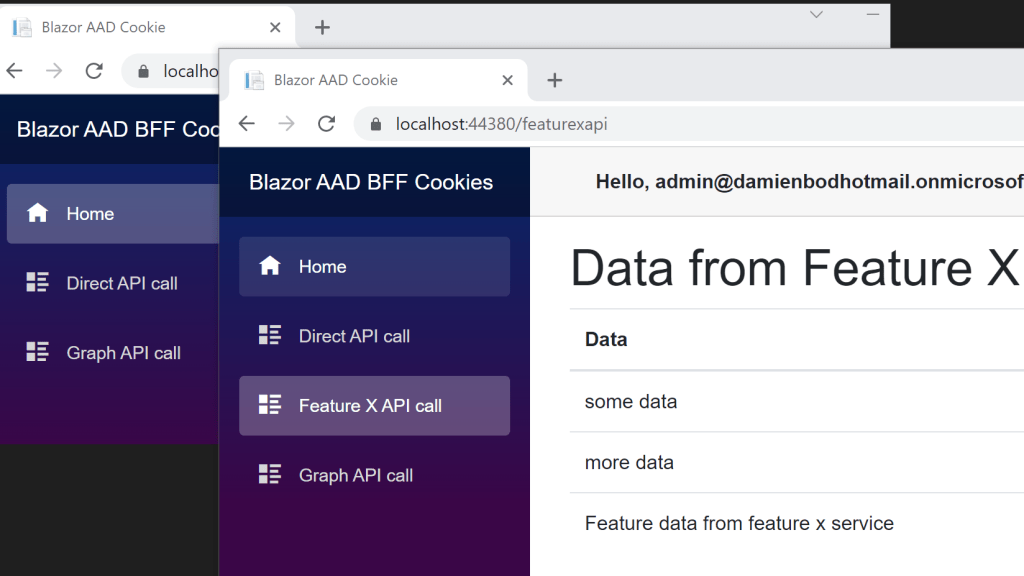
The Microsoft.FeatureManagement Nuget package provides many more feature management helpers and is really helpful when you need to support feature toggles or feature switches in a software solution or product.
Links
https://dev.to/karthikchintala/the-comprehensive-guide-to-feature-management-in-aspnet-core-23d1
https://learn.microsoft.com/en-us/dotnet/api/microsoft.featuremanagement?view=azure-dotnet-preview

 Software Engineering
[…] Implement Feature Management in Blazor ASP.NET Core (Damien Bowden) […]
[…] Implement Feature Management in Blazor ASP.NET Core – Damien Bowden […]
Here’s my challenge. We’ve got an ASP.Net Core API back end and Blazor WASM front end. We want to store feature flags in Azure app settings so that features can be toggled from Azure Portal without needing to redeploy any code. Blazor WASM apparently cannot directly access Azure app settings, so it seems my only two options are to put the flags in the wwwroot/AppSettings.json file, in which case we lose the ability to easily toggle them from a central location, or I add a controller to the API, something like FeatureFlagController, which serves feature flags from the server’s app settings, and have the Blazor app place calls to that API. The latter is what I’ve settled on for now but I feel like it’s not really a standardized approach. Anyone else have a good solution for this use case? Thanks.
i think the latter option with controller is fine and i dont see any issue with that approach. i am also thinking to implement same, but instead of app configuration i am planning to have a db instead where i can define roles too which can have access to different features based on there respective roles. hope this helped.
Just reading through this blog post a second time, I now see it’s doing basically what I mentioned doing in my first comment. My only question now about the above code is, if we are serving the feature’s value from the FeatureX controller on the server side, why do we also need to define the feature on the client side in wwwroot?
well we can create full end to end feature and then based on appropriate roles we can turn them on or off. also think a scenario where you wanted to work in a feature and not sure if that should go to production then you can turn it off for production.