UPDATED 2014.04.12: latest version of SignalR used and all other packages.
The idea of this example is to create a simple SignalR service, so that all Log messages can be sent to a client browser in real time.
In the example, EventSource classes are used to send the logs to the ETW. Semantic Logging OUT-OF-PROCESS is then used to log to the database. The SignalR framework will be added to the application and the EventSource class will be extended.
Code https://github.com/damienbod/MvcTestSignalR
The example continues on from the code found here:
Part 3 Enterprise Library 6, Unity 3 and MVC 4, Registration by Convention Part 3
Or direct from github https://github.com/damienbod/MvcUnityBootstrapperTestPart3
Step 1: Add SignalR using nuget:
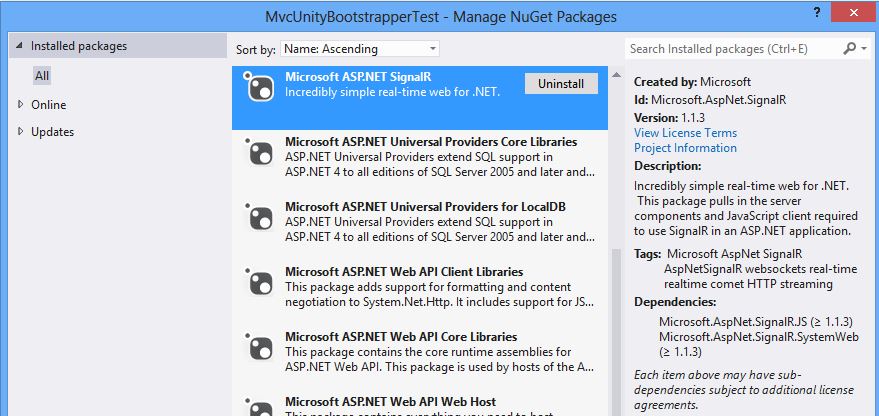
Step 2: In the Global.asax add RouteTable.Routes.MapHubs(); to the Application_Start method
protected void Application_Start()
{
  AreaRegistration.RegisterAllAreas();
  WebApiConfig.Register(GlobalConfiguration.Configuration);
  FilterConfig.RegisterGlobalFilters(GlobalFilters.Filters);
  RouteConfig.RegisterRoutes(RouteTable.Routes);
  BundleConfig.RegisterBundles(BundleTable.Bundles);
}
Step 3: Create a new Startup class for the OWIN config, SignalR start method:
using System;
using System.Threading.Tasks;
using Microsoft.Owin;
using Owin;

[assembly: OwinStartup(typeof(MvcUnityBootstrapperTest.Startup))]

namespace MvcUnityBootstrapperTest
{
    public class Startup
    {
        public void Configuration(IAppBuilder app)
        {
            app.MapSignalR();
        }
    }
}
Step 4: Create a SignalR Hub class. This class requires no methods as the log only pushes to the clients, no clients push to the server.
using System;
using System.Collections.Generic;
using System.Linq;
using System.Web;
using Microsoft.AspNet.SignalR;

namespace MvcUnityBootstrapperTest.Logging
{
    public class DiagnosisEventSourceService : Hub
    {
    }
}
Step 5: Extend the EventSource class. Add a IHubContext
private IHubContext hubContext = GlobalHost.ConnectionManager.GetHubContext<DiagnosisEventSourceService>();
And in each event add a hubContext.Clients.All.addDiagnosisMessage method. The addDiagnosisMessage now needs to be defined in javascript on the client.
  hubContext.Clients.All.addDiagnosisMessage("UnityLogger",
                createUnityMessageEventId,
                DateTime.Now.ToString(CultureInfo.InvariantCulture),
                "CreateUnityMessage: " + message + " EventLevel.Informational");
Step 6: Create a Diagnosis view. Add the following:
@{
    ViewBag.Title = "SignalR Diagnosis Example";
}

<h2>SignalR Diagnosis Example</h2>

<div class="container">
    <ol id="discussion">
    </ol>
</div>

@section scripts {
    <!--Script references. -->
    <!--The jQuery library is required and is referenced by default in _Layout.cshtml. -->
    <!--Reference the SignalR library. -->
    <script src="~/Scripts/jquery.signalR-2.0.3.js"></script>
    <!--Reference the autogenerated SignalR hub script. -->
    <script src="~/signalr/hubs"></script>
    <!--SignalR script to update the chat page and send messages.-->
    <script>
        $(function () {
            // Reference the auto-generated proxy for the hub.
            var signalRService = $.connection.diagnosisEventSourceService;

            // Create a function that the hub can call back to display messages.
            signalRService.client.addDiagnosisMessage = function (providerName, timestamp, eventId, message) {
                // Add the message to the page.
                $('#discussion').append('<li><strong>' + htmlEncode(providerName) + '</strong>: '
                    + htmlEncode(timestamp) + ', ' + htmlEncode(eventId) + ', ' + htmlEncode(message) + '</li>');
            };

            // Start the connection.
            $.connection.hub.start();
        });
        // This optional function html-encodes messages for display in the page.

        function htmlEncode(value) {
            var encodedValue = $('<div />').text(value).html();
            return encodedValue;
        }
    </script>
}
Now all Events will be sent to the diagnosis view in real time when the view is opened.

Links:
http://signalr.net/
https://github.com/SignalR/SignalR
http://www.asp.net/signalr/overview/getting-started/tutorial-getting-started-with-signalr-and-mvc-4
http://en.wikipedia.org/wiki/SignalR
http://www.west-wind.com/weblog/posts/2013/Sep/04/SelfHosting-SignalR-in-a-Windows-Service
http://www.asp.net/signalr/overview/getting-started/tutorial-signalr-self-host


Maybe using DIAGNOSIS USING SIGNALR, with Serilog in NET 6 minimal API and Blazor Server App ?