Tag Archives: aad
Implement OAUTH Device Code Flow with Azure AD and ASP.NET Core
The post shows how the Device Code flow (RFC 8628) could be implemented in an ASP.NET Core web application which uses Azure AD as an identity provider. An Azure App registration is used to setup the client. This solution would be useful for input constrained devices which have a browser and need to authenticate identities. […]
Protecting legacy APIs with an ASP.NET Core Yarp reverse proxy and Azure AD OAuth
This article shows how a legacy API could be protected using an ASP.NET Core Yarp reverse proxy and Azure AD OAuth. The security is implemented using Azure AD and Microsoft.Identity.Web. Sometimes it is not possible to update an existing or old API within a reasonable price and the financially best way to use it in […]
Azure AD Access Token Lifetime Policy Management in ASP.NET Core
This article shows how the lifespan of access tokens can be set and managed in Azure AD using ASP.NET Core Razor pages with Microsoft Graph API and token lifetime policies. A TokenLifetimePolicy can be created for the whole tenant or used for specific Azure App Registrations. Code: Azure AD Token Management Posts in this series […]
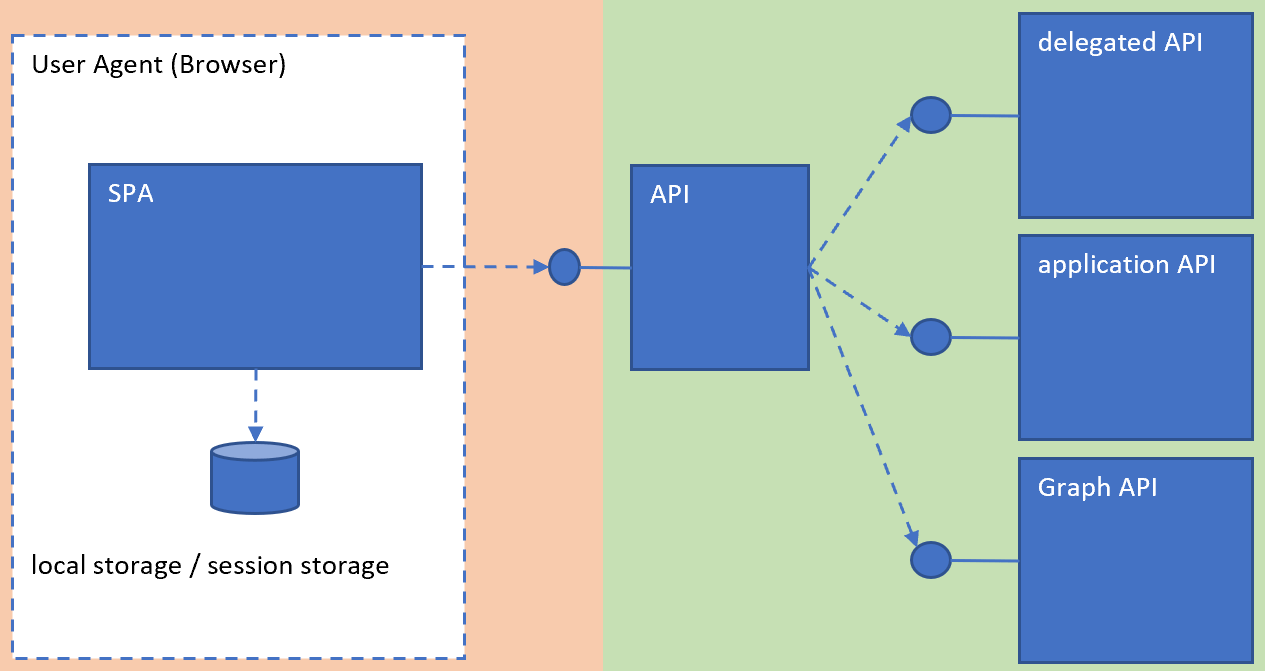
Using multiple APIs in Angular and ASP.NET Core with Microsoft Entra ID authentication
This article shows how an Angular application could be used to access many APIs in a secure way. An API is created specifically for the Angular UI and the further APIs can only be access from the trusted backend which is under our control. Code: https://github.com/damienbod/MicrosoftEntraIDAuthMicrosoftIdentityWeb Posts in this series History Setup The applications are […]
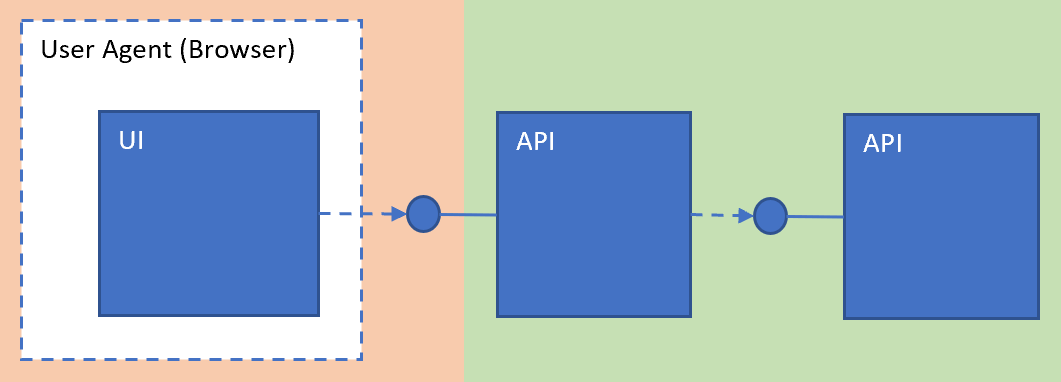
Implement a Web APP and an ASP.NET Core Secure API using Microsoft Entra ID which delegates to a second API
This article shows how an ASP.NET Core Web application can authenticate and access a downstream API using user access tokens and delegate to another API in Microsoft Entra ID also using user access tokens. Microsoft.Identity.Web is used in all three applications to acquire the tokens afor the Web API and the access tokens for the […]

Securing Azure Functions using ME-ID JWT Bearer token authentication for user access tokens
This post shows how to implement OAuth security for an Azure Function using user-access JWT Bearer tokens created using Microsoft Entra ID and App registrations. A client web application implemented in ASP.NET Core is used to authenticate and the access token created for the identity is used to access the API implemented using Azure Functions. […]
Restricting access to an Azure AD protected API using Azure AD Groups
This post shows how to restrict access to an ASP.NET Core API to only allow users from a defined Azure AD group to use a protected API. The API uses an Azure App registration for authorization. The user signs in with an ASP.NET Core Razor page application or an Angular App and can access the […]
Angular SPA with an ASP.NET Core API using Azure AD Auth and user access tokens
This post shows how to authenticate an Angular SPA application using Azure AD and consume secure data from an ASP.NET Core API which is protected by Azure AD. Azure AD App registrations are used to configure and setup the authentication and authorization. The Angular application uses the OpenID Connect Code flow with PKCE and the […]
Implementing a multi-tenant OIDC Azure AD external login for IdentityServer4
This article shows how to setup a multi-tenant Azure AD external login for IdentityServer4 which uses ASP.NET Core Identity. Code: IdentityServer4 app with Identity Setting up the Azure AD Application registration for multiple tenants An Azure AD Application registration needs to be setup for the Active Directory tenant. Login to the Azure portal and switch […]

 Software Engineering