Sometimes it is required that some properties in a MVC model should not be validated, but the rest are required and should be validated in the client view. Mostly I cannot turn off client validation for all properties in the model.
Here is an example of a Model class. I need to validate 2 properties and the other 2 should not be validated. (client side).
using System;
namespace Mvc4DateTimeClientValidationTest.Models
{
    public class TestModel
    {
        public DateTime Date1 { get; set; }
        public DateTime? Date2 { get; set; }

        public DateTime NoValidationDate1 { get; set; }
        public DateTime? NoValidationDate2 { get; set; }
    }
}
To achieve this, the HtmlHelper class is extended.
using System;
using System.Collections.Generic;
using System.Linq.Expressions;
using System.Web.Routing;
using System.Web.Mvc;

namespace Mvc4DateTimeClientValidationTest
{
    public static class HtmlHelperExtensions
    {
        public static MvcHtmlString HiddenForWithoutClientValidation<TModel, TProperty>(this HtmlHelper<TModel> htmlHelper, Expression<Func<TModel, TProperty>> expression)
        {
            return HiddenForWithoutClientValidation(htmlHelper, expression, null);
        }

        public static MvcHtmlString HiddenForWithoutClientValidation<TModel, TProperty>(this HtmlHelper<TModel> htmlHelper, Expression<Func<TModel, TProperty>> expression, object htmlAttributes)
        {
            var name = htmlHelper.ViewContext.ViewData.TemplateInfo.GetFullHtmlFieldName(ExpressionHelper.GetExpressionText(expression));
            var id = htmlHelper.ViewContext.ViewData.TemplateInfo.GetFullHtmlFieldId(ExpressionHelper.GetExpressionText(expression));

            var value = ModelMetadata.FromLambdaExpression(expression, htmlHelper.ViewData).Model;
            var routeValueDictionary = htmlAttributes != null ? new RouteValueDictionary(htmlAttributes) : new RouteValueDictionary();

            return HiddenForWithoutClientValidation(name, id, value, routeValueDictionary);
        }

        private static MvcHtmlString HiddenForWithoutClientValidation(string name, string id, object value, IEnumerable<KeyValuePair<string, object>> routeValueDict)
        {
            var input = new TagBuilder("input");
            if (!string.IsNullOrEmpty(id))
            {
                input.Attributes.Add("id", id);
            }
            input.Attributes.Add("name", name);
            input.Attributes.Add("type", "hidden");
            foreach (var routeValue in routeValueDict)
            {
                input.MergeAttribute(routeValue.Key, routeValue.Value.ToString(), true);
            }

            if (value != null)
            {
                input.Attributes.Add("value", value.ToString());
            }

            return new MvcHtmlString(input.ToString(TagRenderMode.SelfClosing));
        }
    }
}
No changes are required for the controller class, unless I validate the model server side
 public class HomeController : Controller
    {
        public ActionResult Index()
        {
            var t = new TestModel
                {
                    Date1 = DateTime.Now,
                    Date2 = DateTime.Now,
                    NoValidationDate1 = DateTime.Now,
                    NoValidationDate2 = DateTime.Now
                };
            return View(t);
        }
    }
And here’s how the new extension is used in the Razor view: (@Html.HiddenForWithoutClientValidation(m => m.NoValidationDate1))
@using System.Web.Optimization
@using Mvc4DateTimeClientValidationTest

@model Mvc4DateTimeClientValidationTest.Models.TestModel
<!DOCTYPE html PUBLIC "-//W3C//DTD XHTML 1.0 Transitional//EN"
"http://www.w3.org/TR/xhtml1/DTD/xhtml1-transitional.dtd">
<html xmlns="http://www.w3.org/1999/xhtml" lang="de-DE">
    <head>
        <title>title</title>
        @Scripts.Render("~/bundles/jquery")
        @Scripts.Render("~/bundles/jqueryui")
        @Scripts.Render("~/bundles/jqueryval")
        @Styles.Render("~/Content/css")
        @Styles.Render("~/Content/themes/base/css")
    </head>
    <body>
        <div>
            @Html.HiddenFor(m => m.Date1)
            @Html.HiddenFor(m => m.Date2)

            @Html.HiddenForWithoutClientValidation(m => m.NoValidationDate1)
            @Html.HiddenForWithoutClientValidation(m => m.NoValidationDate2)

        </div>
    </body>
</html>
Using Firebug, the result can be viewed. You can see the difference in the html input controls. 2 input controls will be validated client side and 2 will not be validated.
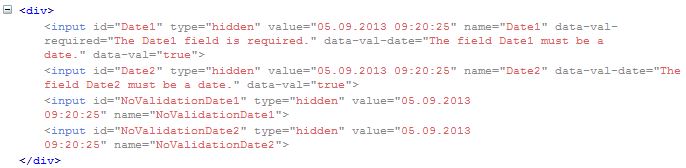
This could also be achieved in the view using javascript.
Code: https://github.com/damienbod/Mvc4DateTimeClientValidationTest

 Software Engineering