Software Engineering
Home | About | Archives
Enterprise Library 6, Semantic Logging, Part 4 advantages, customising
June 10, 2013 20:05
This post continues on from part 3:
Enterprise Library 6, Semantic Logging, Part 3, Getting into the details
In-process / out of process logging
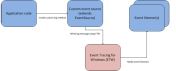
Again, here’s the diagrams showing the difference between in-process and out-of-process logging. (Taken from the EL6 documentation)
In-Process
OUT-OF-PROCESS
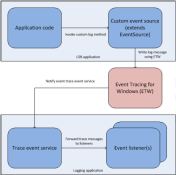
As soon as performance in your logging is required, out-of-process should be used. If you use out-of-process though, deployment of your application is more complicated, 2 separate applications are then required for each target host. (SLAB OUT-OF-PROCESS service must run on the same host as the event sources)
Advantages compared to Enterprise Library Logging Block
- live configuration, trace tuning without restarting web apps in the IIS (by OUT-OF-PROCESS)
- high performance logging
- OUT-OF-PROCESS and distributed software systems support
- easy to configure in OUT-OF-PROCESS
- no unity dependency
- Complicated Logging configuration is no longer required and the web.config, app.config is almost free from EL configurations
- Application is free from listeners (OUT-OF-PROCESS)
- Active logging/IT planning when implementing the tracing, logging systems, instead of log analysis in the log Db after the application has been deployed
- Easy to plan for logging, tracing, run-time diagnosis
- Easy to extend source code
- Easy to use KISS
- Semantic logging and strongly typed events ensure that the structure of your log messages is known.
Disadvantages compared to Enterprise Library Logging Block
- string categories filters are missing, replaced by keywords (int)
- mapping required for keywords, tasks and opcodes
- when using OUT-OF-PROCESS, it must be deployed to every client PC
- Keywords are defined as a nested class inside the EventSource classes
- No Windows EventLog support
- No MSMQ support (Out of the box)
Customizing the Semantic Logging Application Block
(Taken from the EL docs)
The Semantic Logging Application Block provides a number of extension points that enable you to further customize its behavior. These extension points include:
- Creating custom formatters for use both in-process and out-of-process.
- Creating custom event listeners for use both in-process and out-of-process.
- Creating a custom application to collect trace messages from your LOB applications.
Enterprise Library 6, Semantic Logging, Part 1, database listener
Enterprise Library 6, Semantic Logging, Part 2, OUT-OF-PROCESS
Enterprise Library 6, Semantic Logging, Part 3, Getting into the details
Links:
http://blogs.msdn.com/b/vancem/archive/2012/08/13/windows-high-speed-logging-etw-in-c-net-using-system-diagnostics-tracing-eventsource.aspx
http://msdn.microsoft.com/en-us/library/dn170426%28v=pandp.60%29.aspx
http://blogs.msdn.com/b/dotnet/archive/2013/08/09/announcing-the-eventsource-nuget-package-write-to-the-windows-event-log.aspx
Troubleshooting:
Microsoft-SemanticLogging-Etw’ already exists How do I delete the session?
http://entlib.codeplex.com/discussions/447091
http://entlib.codeplex.com/discussions/455508
http://weblogs.asp.net/hernandl/archive/2013/05/02/your-best-friend-for-authoring-etw-strongly-typed-events.aspx
Posted by damienbod
Categories: .NET, Enterprise Library, Logging, MVC, Semantic Logging, SLAB, Web
Tags: Enterprise Library, EventSource, Keywords, Opcode, Semantic Logging, SLAB, Task
« Older Newer »
Leave a Reply
Mobile Site | Full Site
Get a free blog at WordPress.com Theme: WordPress Mobile Edition by Alex King.


Reblogged this on Happy DotNetting.
By Vasista Bhargav on February 16, 2016 at 04:09